Voice emotion control
The tags, emotion settings, and pacing controls that direct how a generated voice performs a line.
Voice emotion control on Morphic lets you shape how generated speech sounds, from emotional tone to reactions, pacing, and delivery style. Write your prompt with the right cues, and the voice performs the way you direct it.
How to use Voice emotion control
Here's a quick tutorial on how to use voice emotion control on Morphic:
- Open Morphic and go to your project.
- Create a new file or open an existing one.
- In the prompt bar at the bottom, switch the mode to 'Audio' and select 'Speech'.
- Choose your speech model from the model picker, for example 'ElevenLabs', 'Gemini' or 'Fish Audio Drama 3'.
- Select a voice and language from the voice picker.
- Write your prompt using the emotion control format for your selected model (see below).
- Click the blue button in the prompt bar.
Each speech model uses its own way of directing delivery. Select your model, then follow its section below.
ElevenLabs
ElevenLabs uses bracket tags written directly in your prompt. Wrap any emotion, reaction, or direction in square brackets, and the model interprets it as a performance cue, not spoken text.
How it works
[tag] Your dialogue text here.Tags affect everything after them until a new tag appears. You can place tags anywhere in your text and combine multiple tags in sequence.
| Without tags | With tags |
|---|---|
I got the part. I actually got the part. | [excited] I got the part. I actually got the part. |
We need to leave. Now. | [whispers][tense] We need to leave. Now. |
I don't think this is going to work out. | [sad][hesitant] I don't think this is going to work out. |
The treasure is buried beneath the old chapel. | [pirate voice] The treasure is buried beneath the old chapel. |
ElevenLabs is open-ended. There is no fixed list. Write any emotion or direction inside brackets, and the model will try to interpret it. Tags like [jealous], [romantic], [awkward], [suspicious tone], or [continues after a beat] all work.
The tags below are commonly used and reliably effective, but you are not limited to them.
Tags
Emotions
| Tag | What it does |
|---|---|
[excited] | High energy, enthusiastic delivery |
[happy] | Warm, upbeat tone |
[cheerfully] | Light, bright delivery |
[sad] | Downcast, subdued tone |
[sorrowful] | Deep sadness, grief |
[angry] | Sharp, forceful delivery |
[nervous] | Uncertain, slightly shaky |
[frustrated] | Tense, impatient tone |
[calm] | Steady, relaxed delivery |
[tired] | Low energy, worn out |
[curious] | Inquisitive, wondering tone |
[sarcastic] | Dry, ironic delivery |
[playful] | Light, teasing energy |
[deadpan] | Flat, emotionless delivery |
Try it:
[excited] We just got funded. I can't believe it. [nervous] But now we actually have to deliver. [calm] One step at a time. We'll figure this out.Emotional nuance
For subtler shifts in tone. These add depth to a line without overriding the entire delivery.
| Tag | What it does |
|---|---|
[hesitant] | Unsure, holding back |
[relieved] | Weight lifted, tension released |
[tense] | On edge, bracing for something |
[warm] | Gentle, caring tone |
[resigned tone] | Giving in, accepting defeat |
[stammers] | Tripping over words, flustered |
[regretful] | Wishing something were different |
[sympathetic] | Compassionate, understanding |
[reassuring] | Comforting, steady |
[awe] | Struck by wonder or amazement |
Try it:
[tense] Something's not right. I can feel it. [relieved] Oh, it's just you. Thank god. [warm] Come here. I was worried about you.Reactions
Non-verbal sounds that add realism between or within lines.
| Tag | What it does |
|---|---|
[laughs] | Full laugh |
[giggles] | Soft, light laugh |
[light chuckle] | Brief, subdued laugh |
[sigh] | Exhale of fatigue, relief, or frustration |
[gasps] | Sharp intake of breath, surprise or shock |
[gulps] | Nervous swallow |
[crying] | Tearful, breaking voice |
[clears throat] | Quick vocal reset |
Try it:
[laughs] You're kidding me. [gasps] Wait, you're serious? [clears throat] Okay. Let's talk about this properly.Delivery
Control how the voice physically performs the line, independent of emotion.
| Tag | What it does |
|---|---|
[whispers] | Soft, breathy, close delivery |
[shouts] | Loud, projected voice |
[quietly] | Low volume, restrained |
[loudly] | Raised volume, forceful |
[rushed] | Fast-paced, urgent rhythm |
[drawn out] | Slow, stretched delivery |
[dramatic tone] | Theatrical, heightened intensity |
Try it:
[whispers] They're right outside the door. [rushed] We need to move now, there's no time. [shouts] Run!Accents and characters
Switch the accent without changing the voice, or give the voice a character persona.
| Tag | What it does |
|---|---|
[American accent] | Standard American English |
[British accent] | Standard British English |
[French accent] | French-inflected English |
[Southern US accent] | Southern American drawl |
[Australian accent] | Australian English |
[strong Russian accent] | Heavy Russian inflection |
[strong X accent] | Replace X with any nationality |
[pirate voice] | Gruff, seafaring character |
[old man voice] | Aged, weathered delivery |
[robot voice] | Mechanical, synthetic tone |
[fantasy narrator] | Epic, storybook narration |
[film noir narrator] | Dark, moody, cynical narration |
[sarcastically] | Dry, ironic character read |
Try it:
[pirate voice] The treasure lies beneath the old chapel, buried three fathoms deep. [old man voice] I remember when this town had nothing but dirt roads and honest people. [robot voice] Warning. Structural integrity compromised. Evacuate immediately.Multi-character dialogue
When writing scenes with two or more characters in one prompt, use these to shape how lines interact.
| Tag | What it does |
|---|---|
[interrupting] | Cuts in before the other line finishes |
[overlapping] | Starts speaking while another voice trails |
Try it:
So what I was trying to say was [interrupting] No, stop. You don't get to explain this away. [overlapping] But if you'd just listen for a second...Pauses and pacing
ElevenLabs does not support explicit pause durations. Pause length is inferred from context, tags, and punctuation.
| Write this | What it does |
|---|---|
[pause] | Dramatic silence (model decides length) |
... | Hesitant, trailing pause |
| ALL CAPS | Emphasis on the word |
| New paragraph | Clear pause and intonation reset |
Try it:
"I... yeah, I guess so."

[pause] And then it happened.

"I said NOW!"
Tips for better results
| Tip | Why it works |
|---|---|
| Match tags to the text | [crying] Don't leave me. sounds natural. Adding [crying] to a casual sentence does not. The model reads the full line for context. |
| Combine tags | [whispers][tense] or [hesitant][nervous] gives the model two cues to blend for more nuanced output. |
| Pick the right voice | A calm voice will not shout convincingly. A high-energy voice will not whisper well. Match the voice to the role. |
| Use Creative or Natural stability | These settings give the model more room to express tags. Robust is more consistent but less expressive. |
| Use punctuation as rhythm cues | Commas slow the pace. Periods create hard stops. Ellipses trail off. The model reads and responds to punctuation. |
Gemini
Gemini gives you expressive, multilingual narration with fine control over tone, pace, and accent across a wide range of languages. You direct it two ways: with plain-language instructions and with inline cues written into your script.
How it works
Gemini reads the direction you write in natural language and shapes the delivery to match. Put the instruction first, then your line.
| Without direction | With direction |
|---|---|
| The storm has passed. You're safe now. | Say this warmly and slowly, like comforting a child: The storm has passed. You're safe now. |
You can also drop inline cues in square brackets to add reactions and shift delivery mid-line. Gemini performs the cue instead of reading it aloud.
Try it: I can't believe you did that [laughs]. Best surprise all year.
Tags
Place a cue in square brackets directly where you want it in the line. Gemini performs the cue instead of reading it aloud, and you can use more than one in a single script.
Reactions and sounds:
| Tag | What it does |
|---|---|
| [laughs] | Adds a natural laugh |
| [laughs nervously] | Adds a nervous laugh |
| [sighs] | Adds a sigh |
| [gasps] | Adds a sharp intake of breath |
| [exhales] | Adds an audible breath out |
| [scoffs] | Adds a dismissive scoff |
| [clears throat] | Adds a throat-clear before the line |
| [crying] | Delivers the line through tears |
Delivery and tone:
| Tag | What it does |
|---|---|
| [whispering] | Drops the voice to a whisper |
| [normal voice] | Returns to a normal speaking voice |
| [softly] | Softens the delivery |
| [shouting] | Raises the voice to a shout |
| [slowly] | Slows the pace |
| [excited] | Adds energy and excitement |
| [nervously] | Adds a nervous, hesitant tone |
Try it: [whispering] Don't make a sound. [normal voice] Okay, we're clear.
For tone, energy, or accent, describe what you want in plain language before the line. Gemini supports accent control across its languages.
Try it: Read this in a British accent: Lovely weather we're having, isn't it?
Multi-speaker dialogue
Gemini can voice a back-and-forth between two speakers in a single generation, giving each speaker a distinct voice. Label every line with the speaker's name, then assign a voice to each speaker before you generate. Gemini supports up to two speakers per dialogue.
Try it:
Maya: Did you hear back about the job?
Tom: I did. I start Monday.
Maya: That's amazing, congratulations.| Element | What to do |
|---|---|
| Speaker label | Start each line with the speaker's name followed by a colon |
| Voice per speaker | Assign each named speaker its own voice before generating |
| Speaker limit | Up to two distinct speakers in one dialogue |
Pauses and pacing
Use ellipses to add a beat of silence, and ask for the pace you want in your direction.
| Method | Example |
|---|---|
| Ellipses for a pause | Wait... ... ... did you hear that? |
| Pace in the direction | Read this slowly and deliberately: Every. Word. Matters. |
Tips for better results
| Tip | Why it helps |
|---|---|
| Put direction before the line | Gemini applies the instruction to the text that follows it |
| Set the scene | Context like Narrating a nature documentary, calm and hushed: shapes tone and delivery |
| Combine methods | Pair a plain-language direction with inline bracket cues in the same script |
| Match the language to the voice | Pick a voice and language that suit your script before generating |
Fish Audio Drama 3
Fish Audio Drama 3 is built for acted reads. You direct it inline, in the script itself, and the directions work the same in any language.
How it works
Write a direction in square brackets where you want it, in plain words. Drama 3 performs it instead of reading it aloud.
| Without direction | With direction |
|---|---|
I told you not to come back here. | [quietly, holding back anger] I told you not to come back here. |
Fine. Do it your way. | [sigh] Fine. Do it your way. |
Sounds and pauses
Put a sound or a pause in brackets exactly where it happens in the line:
| Tag | What it does |
|---|---|
[sigh] | A sigh at that point |
[laugh] | A laugh at that point |
[breath] | An audible breath |
[pause] | A pause before the next words |
Try it: I waited all night. [pause] [sigh] And you never called.
Direct chosen words
Wrap a few words in a paired tag to change only those words:
| Tag | What it does |
|---|---|
<whisper>...</whisper> | Whispers the words inside |
<soft>...</soft> | Softens them |
<emphasis>...</emphasis> or <stress>...</stress> | Leans on them |
<forceful>...</forceful> | Delivers them with force |
<fast>...</fast> | Speeds them up |
<slow>...</slow> | Slows them down |
Try it: Keep your voice down. <whisper>They can hear us.</whisper> <forceful>Now move.</forceful>
Voices and languages
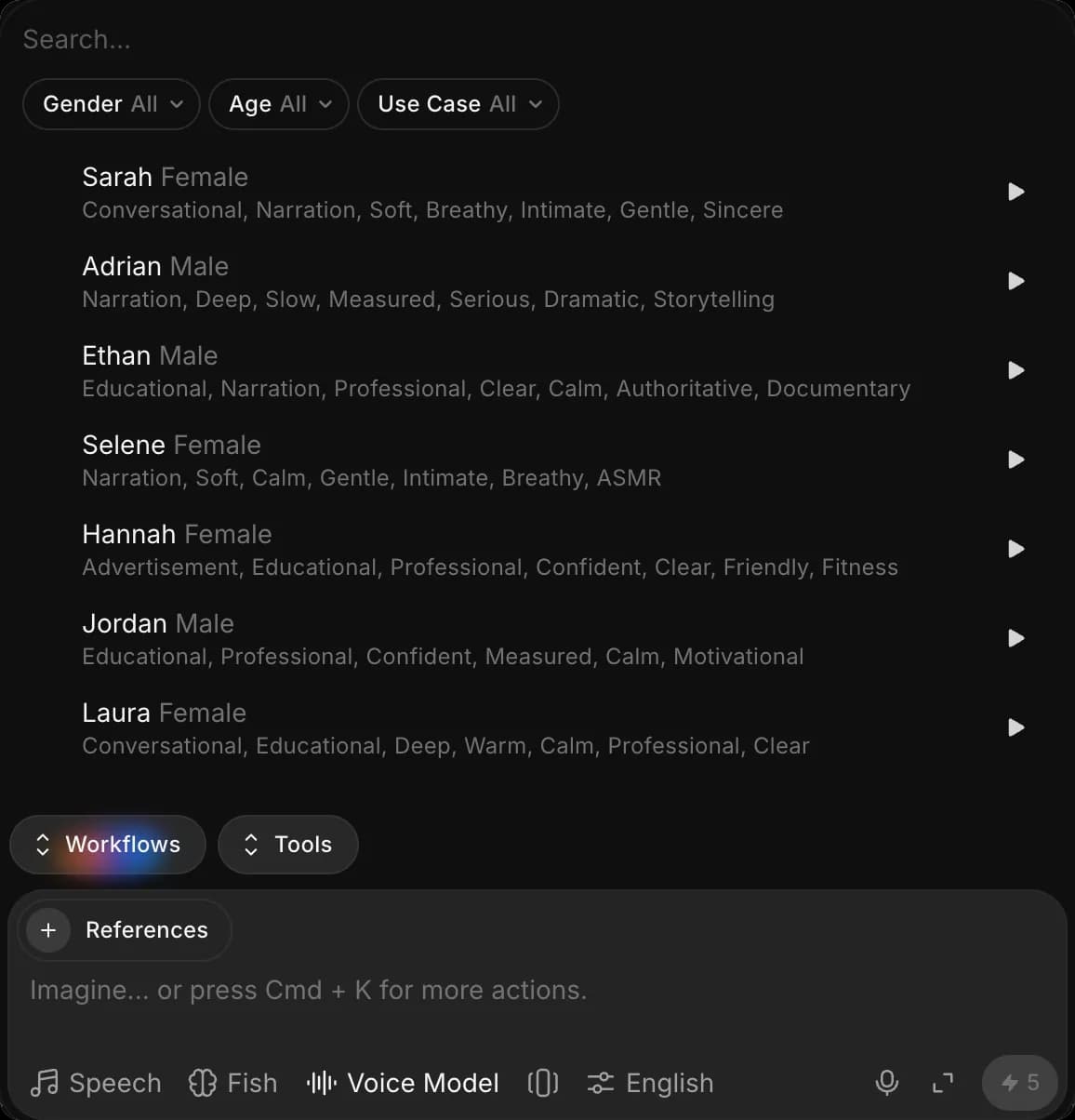
Pick a voice from the voice picker, where you can filter by gender, age and use case and press play to hear one. Any Drama 3 voice can speak any language, with its own accent. Set the language under Preferences in the prompt bar.
Dialogue
In 'Dialogue' mode, Drama 3 voices a scene with several speakers in one generation. A dialogue needs at least two lines and can use up to nine different voices.
Limits
A script can be up to 10,000 characters, in speech and in dialogue alike.
Tips for better results
| Tip | Why it helps |
|---|---|
| Direct the line, not the word | A short direction before a line shapes the whole read. Save paired tags for the few words that need to stand out |
| Use pauses for rhythm | [pause] gives a beat where punctuation alone runs the words together |
If you have any trouble or have any questions, feel free to reach out. We're happy to help. Write to us at support@morphic.com.