MorphicでのHappy Horse 1.0の使い方
1.
Morphicでファイルを開く
任意のプロジェクト内で新しいファイルを開始するか、既存のファイルを開きます。Happy Horse 1.0の生成は他の作業と同じキャンバス上で行われるため、ツールを切り替えることなくリファレンスに対して反復できます。
2.
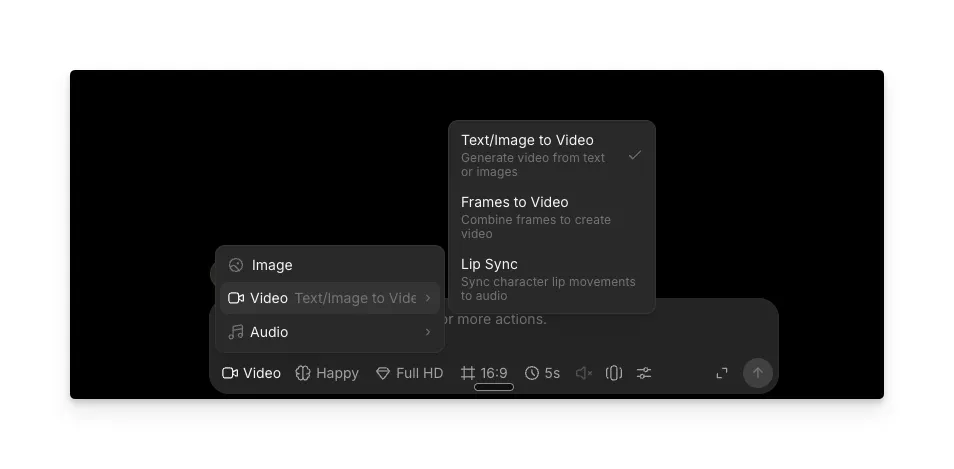
動画モードに切り替える
プロンプトバーをVideoに切り替え、Text/Image to Video、Frames to Video、またはLip Syncを選びます。
3.
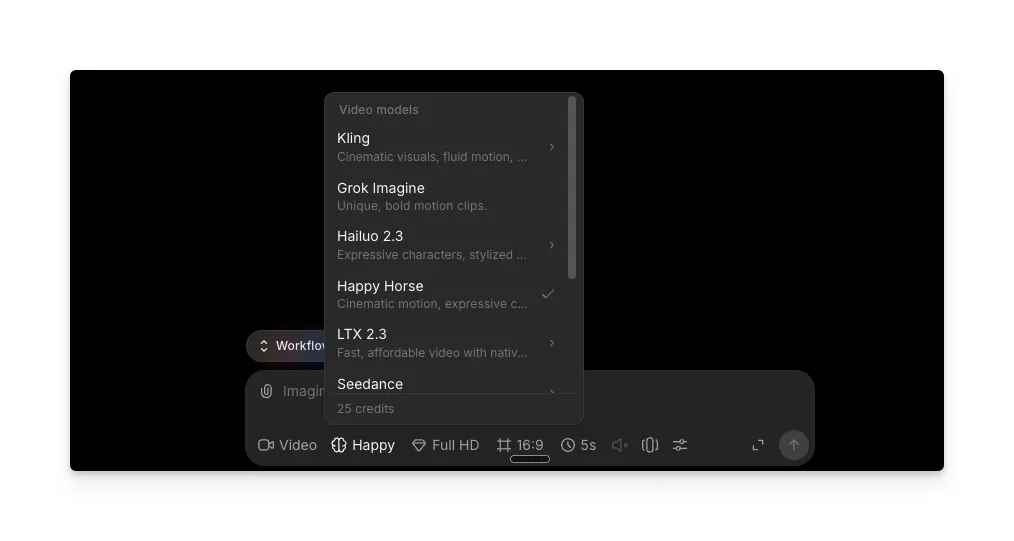
モデルピッカーからHappy Horseを選択する
モデルセレクターをクリックして「Happy Horse」を選びます。MorphicはHappy Horse 1.0を他の動画モデルと並べて提供しているため、ファイルを離れずに切り替えて比較できます。
4.
プロンプトを書いて生成する
プロンプトを書き、必要に応じてキャラクターやスタイルの一貫性のためにビジュアルリファレンスを追加し、「Generate」をクリックします。Happy Horse 1.0は約30秒で同期音声付きの高解像度動画を生成します。Morphicからプレビューしてダウンロードするか、同じファイルで編集を続けられます。
Happy Horse 1.0にできること
Happy Horse 1.0は、Alibabaが構築した150億パラメータの統合Transformerモデルです。1つのプロンプトから動画と音声を同時に生成し、映像と音に別々のパイプラインを必要とするモデルとは一線を画します。
Happy Horse 1.0の音声と動画の同時生成
Happy Horseは、動画と音声(セリフ、環境音、Foley効果)を1回の順方向処理で生成します。別途のダビングやサウンドデザインの工程は不要です。7つの言語でネイティブのリップシンクに対応しています。
- 英語
- 標準中国語
- 広東語
- 日本語
- 韓国語
- ドイツ語
- フランス語
Happy Horse 1.0のカメラ制御
このモデルはカメラ言語に対して非常に反応がよく、具体的な用語が明確で信頼できる結果を生み出します。
| カメラ指示 | 生成される内容 | 最適な用途 |
|---|---|---|
| Steadicam push | 滑らかな前進移動 | 歩行シーン、リビール |
| Slow dolly-in | ミディアムからクローズへの段階的なズーム | 感情的な場面、製品フォーカス |
| Lateral orbit | パララックスを伴う左右の回転 | 製品紹介、建築 |
| Helicopter aerial | 俯瞰のスイープショット | 風景、エスタブリッシングショット |
| Locked-off framing | 固定カメラ、被写体が動く | 対話、インタビュー |
| Tracking shot | カメラが被写体の動きを追う | アクション、歩行シーケンス |
カメラ指示はプロンプトの最後に置いてください。そこでHappy Horse 1.0が最も重みを与えます。
Happy Horse 1.0の動きの一貫性
被写体はクリップ全体を通して安定しています。
- 顔がショットの途中でずれたり変形したりしません
- 製品が形状と比率を保ちます
- 歩き方や体の動きが全編を通して自然なままです
これにより、Happy Horse 1.0は製品デモからキャラクター主導のシーンまで、被写体の忠実度が求められるあらゆるものに特に信頼できます。
Happy Horse 1.0のマルチショットストーリーテリング
Happy Horse 1.0は、ネイティブのマルチショット対応を備えた唯一のAI動画モデルです。1つのプロンプトから、次のことができます。
- 複数のビートを持つ一貫したシーンシーケンスを生成する
- ショット間で持続的なキャラクターの同一性を維持する
- シーケンス全体で音声を同期する
- タイムコード付きのショットリストに従う(例:Shot 1 wide 0-1s、Shot 2 mid tracking 1-4s)
Happy Horse 1.0のモードと出力仕様
| モード | 機能 | 最適な用途 |
|---|---|---|
| Text-to-video | 書かれた説明から動画を生成する | ゼロから始める、クリエイティブなコンセプト |
| Image-to-video | 静止画に動きを付けてアニメ化する | 製品写真、既存のアートワーク、ポートレート |
| Lip sync | リップシンクしたセリフを動画に生成または適用する | 多言語ナレーション、トーキングヘッドコンテンツ |
| ビジュアルリファレンス | スタイルとキャラクターの一貫性のためにリファレンス画像を使う | クリップ全体で同一の見た目を維持する |
| 仕様 | 詳細 |
|---|---|
| 解像度 | 最大1080p |
| クリップの長さ | 5〜8秒 |
| アスペクト比 | 16:9、9:16、4:3、21:9、1:1 |
| 音声 | ネイティブの同時生成(セリフ、Foley、環境音) |
| 生成速度 | 1080pで約30秒 |
Happy Horse 1.0のプロンプトのコツ
| 推奨 | 非推奨 |
|---|---|
| 被写体、アクション、設定から始め、カメラまたはライティングの指示を1つ加えます。プロンプトが短いほど、特に単一キャラクターのシーンではクリーンな結果が得られます。 | 1つのプロンプトに5つの撮影指示を詰め込む。互いに打ち消し合います。 |
| 具体的なライティング用語を使います(「暖かいアンバーの逆光」「曇りの日中光」「ナトリウム灯の街灯」)。 | 「良いライティング」や「美しい雰囲気」のような曖昧な修飾語を使う。 |
| カメラの方向をプロンプトの最後に置きます。そこで最も重みを持ちます。 | 中身のない言葉を使う:stunning、epic、breathtaking、masterpiece、hyperrealistic、ultra detailed。 |
| 複数ビートのシーンにはタイムコード付きのショットリストを使います(例:Shot 1 wide 0-1s、Shot 2 mid tracking 1-4s)。 | 複数ステップのアクションを単なる文章で書く(「まずX、次にY、それからZ」)。1つの動きに圧縮されます。 |
| ビジュアルスタイルを技術用語で記述します(「逆光のシルエット、柔らかな自然のもや、冷たく彩度を抑えたパレット」)。 | 監督や撮影監督の名前だけを置いて(「Roger Deakinsの撮影」)それで見た目が決まると期待する。 |
Happy Horse 1.0は、シンプルな英語の文章に最もよく反応します。テストでは、booruタグ、JSON、重み付き括弧などの構造化された形式は、同じ内容を文章で書いた場合に比べて性能が劣りました。長いプロンプトには、タイムコード付きのショットリストやmarkdownのセクション(Subject、Action、Setting、Camera、Lighting、Mood)が、モデルが各要素をきれいに解析するのを助けます。
Happy Horse 1.0のプロンプト例
Shot 1 (0-2s): コーヒーショップ店内のワイドショット、窓から差し込む朝の光、ざわめく話し声。 Shot 2 (2-5s): ラテを淹れるバリスタを追うミッドのトラッキングショット、ミルクをスチームする音。 Shot 3 (5-8s): カウンターに置かれた完成したラテのクローズアップ、背景に柔らかなピアノ。
プロンプトについてさらに詳しくは、Happy Horse 1.0完全ガイドをご覧ください。
よくある質問
Happy Horse 1.0は、他の主要な動画モデルと並んでMorphicで利用できます。任意のプロジェクトでファイルを開き、プロンプトバーを「Video」に切り替えて、モデルメニューから「Happy Horse」を選びます。
いいえ。Morphicはブラウザで動作します。ダウンロードするソフトウェアはなく、技術的なセットアップも不要です。
7言語:英語、標準中国語、広東語、日本語、韓国語、ドイツ語、フランス語です。セリフの言語はプロンプトに直接指定してください。
Happy Horse 1.0は5〜8秒のクリップを生成します。より長いシーケンスには、Morphicの編集ツールで複数のクリップを組み合わせるか、マルチショットのプロンプト形式を使ってカット間でキャラクターと音声を一貫させてください。
Text-to-videoは、書かれた説明だけからクリップを生成します。Image-to-videoは静止画をビジュアルの出発点として、プロンプトに基づいてアニメ化します。image-to-videoでは、画像にすでにあるものを説明するより、求める動きにプロンプトを集中させてください。
はい。Happy Horse 1.0はビジュアルリファレンスに対応しており、リファレンス画像を渡すことで、モデルが複数の生成にわたって一貫したキャラクターやスタイルを維持できます。