Cam ofise yeşil perde geçişi
Kameraya konuşan bir sunucu, şehir manzaralı ve güneşli bir cam ofise taşınır. YouTube içeriği ya da kurumsal tanıtım için uygun; masanın yanından yavaş bir kaydırma.
Prompt'u düzenleyin
Arka planı tarayıcınızda Morphic'in yapay zeka yeşil perde video oluşturucusuyla değiştirin. Bir sunucuyu şehir silüetine ya da yağmur ormanına saniyeler içinde taşıyın, her kesiti Speech ile Türkçe seslendirin, sonra sahneleri değiştirip Canvas'ta yayınlayın.
Kameraya konuşan bir sunucu, şehir manzaralı ve güneşli bir cam ofise taşınır. YouTube içeriği ya da kurumsal tanıtım için uygun; masanın yanından yavaş bir kaydırma.
Prompt'u düzenleyinYürüyüşçü sunucu konuşurken orijinal arka plan, altın saatte geniş bir alp sırtıyla değiştirilir. Alçak bulutlar süzülür, hafif bir elde kamera sallanması eşlik eder.
Prompt'u düzenleyin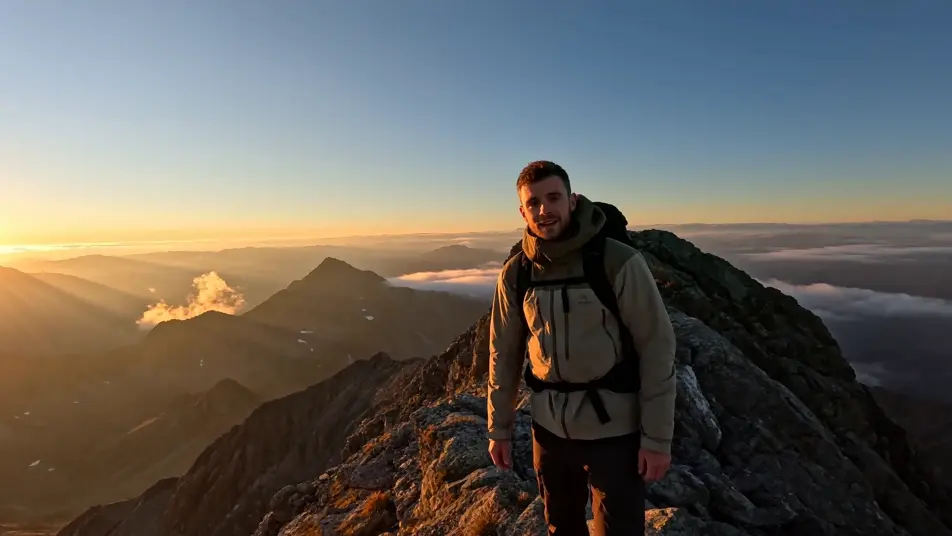
Sade bir odadan alınan özne, dolu bir arena konserinin merkez sahnesine yerleştirilir. Sahne ışıkları süpürür, ışık demetlerinde sis asılıdır; kalabalıktan yavaş bir yakınlaşma.
Prompt'u düzenleyin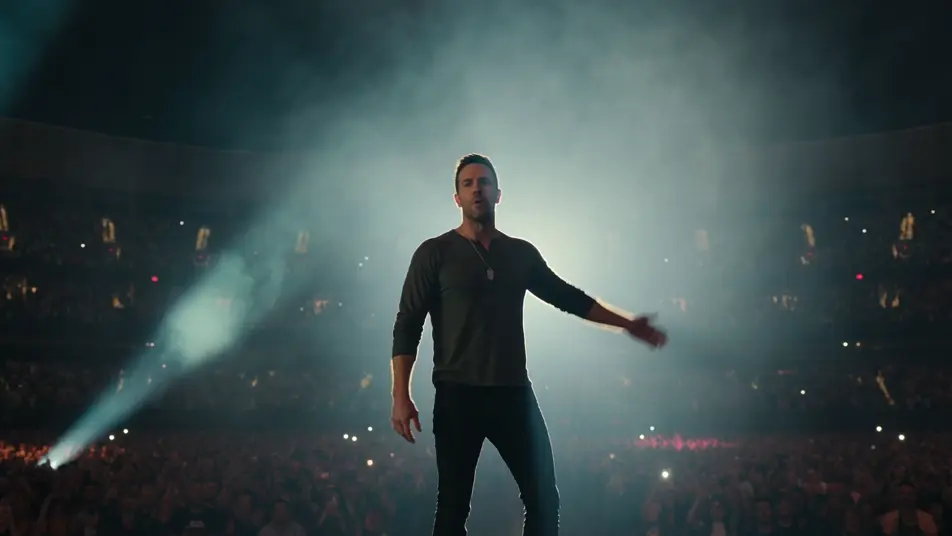
Mürettebat üyesi sunucu, parıldayan konsollar ve yıldız tarlası penceresi olan bir bilim kurgu gemi köprüsüne taşınır. Soğuk mavi bir ışık, oyun içeriği için sabit bir çekim.
Prompt'u düzenleyin
İstediğiniz yeşil perde sahnesini sade sözcüklerle yazın.
Morphic, tuvalinizde saniyeler içinde sinematik, kareye hazır bir klip oluşturur.
Prompt'ta ince ayar yapın, varyasyonları yeniden oluşturun, ardından çekimi indirin veya paylaşın.

Dramatize any text conversation into a cinematic multi-shot video.
Cinematic time-freeze short film for any scene

Generate a professional film title card from scratch, with optional cinematic animation.
Photo of any real-estate becomes a cinematic renovation timelapse video with construction SFX and music.
One image to a 9-scene cinematic video.
Drop in a photo of yourself. Get a 12-second cinematic movie with animation and a matched soundtrack.
Yapay zeka VFX videoları
Morphic ile VFX videoları üretin. Patlamalar, enerji efektleri, yıkım sahneleri ve yaratık dönüşümleri saniyeler içinde hazır.
Yapay zeka POV videoları
Morphic ile yapay zeka POV videoları yapın. Sürükleyici birinci şahıs yürüyüşler, aksiyon anları ve günlük hayat anları. Örnek sahneler, deneyim gerekmez.
Yapay zeka kısa filmler
Morphic ile yapay zeka kısa filmler yapın. Kurguyu tasarlayın, karakterleri tutarlı tutun, sahneleri yönetin, müzikle bitirin. Deneyim gerekmez.
Yapay zeka morph videoları
Morphic ile yapay zeka morph videoları üretin. Akıcı morph geçişleri, biçim değiştiren ifşalar, yüz yaşlandıran morphlar ve doğrudan çalışan ritme oturmuş morph-cut promptları.
Bugün ücretsiz başlayın, istediğiniz zaman yükseltme veya iptal etme seçeneğiyle.
Basic
2400 aylık kredi
1 yalnızca kullanıcı
Tüm modeller
Workflows
Standard
3625 aylık kredi
1 yalnızca kullanıcı
Tüm modeller
Workflows
Pro
6350 paylaşılan aylık kredi
1 kullanıcı
Tüm modeller
Workflows
Max
24650 paylaşılan aylık kredi
1 kullanıcı
Tüm modeller
Workflows
Enterprise
Daha yüksek limitler için
Özel
fiyatlandırma ve faturalandırma koşulları

Free
Denemek için
$0
kalıcı olarak ücretsiz