AI Ink Bleed Transition videos

Direct ink bleed transitions in your browser with Morphic's ink bleed AI video generator. Generate ink spreading across wet paper to reveal the next shot, a black bloom between portraits, or a color spill opening a scene. Time the spread with Music, then stitch one sequence on the Canvas.

Ink bleed variations you can direct

Ink bleed sequences you can stage

A black bloom between two portraits

A soft close-up of a face on a pale ground where a black ink drop lands and spreads in feathered tendrils across the frame to reveal a second portrait inside the bloom. Even soft light, slow organic spread.

Prompt'u düzenleyin

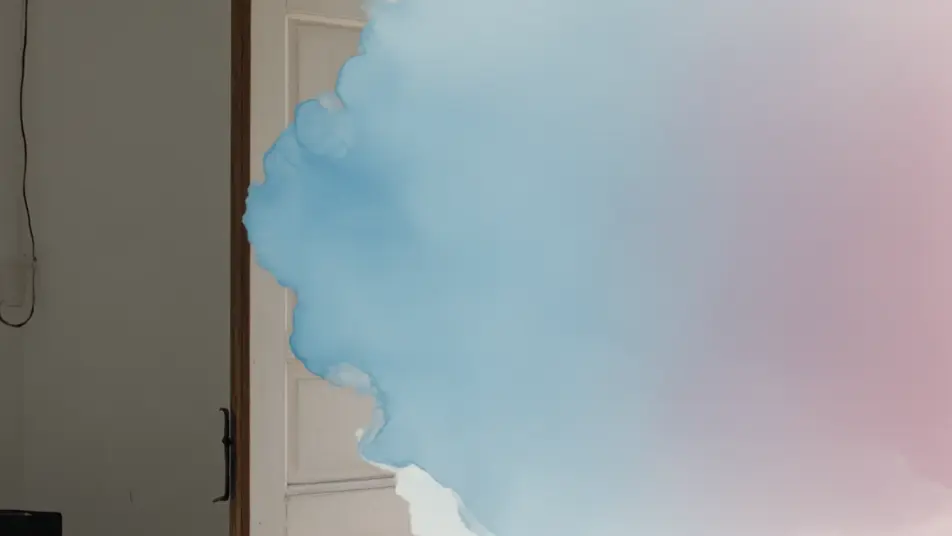
A watercolor spill into a garden

A muted interior shot where soft blue and pink watercolor washes bleed across the frame with wet feathered edges, opening onto a sunlit garden. Static framing, gentle painterly transition.

Prompt'u düzenleyin

A marbled swirl between worlds

A dark still shot where ink caught in swirling water twists into marbled ribbons that turn and open onto a bright surreal landscape. Locked camera, mesmerizing fluid motion bridging the two shots.

Prompt'u düzenleyin

A calligraphy stroke reveal

A pale frame where a single wet brushstroke sweeps left to right, ink feathering at its edges, revealing a serene ink-wash mountain scene in its wake. Warm soft light, elegant directional bleed.

Prompt'u düzenleyin

ink bleed transition videolarını üç adımda oluşturun

  1. 01

    ink bleed transition sahnenizi açıklayın

    İstediğiniz ink bleed transition sahnesini sade sözcüklerle yazın.

  2. 02

    Videoyu oluşturun

    Morphic, tuvalinizde saniyeler içinde sinematik, kareye hazır bir klip oluşturur.

  3. 03

    ink bleed transition videonuzu iyileştirin

    Prompt'ta ince ayar yapın, varyasyonları yeniden oluşturun, ardından çekimi indirin veya paylaşın.

İlgili Workflow'lar

Şunları da beğenebilirsiniz

Basit fiyatlandırma

Bugün ücretsiz başlayın, istediğiniz zaman yükseltme veya iptal etme seçeneğiyle.

Basic

$9/ ay
şu şekilde faturalandırılır $0 yıl başına

900 aylık kredi

1 yalnızca kullanıcı

Tüm modeller

Workflows

Standard

$24/ ay
şu şekilde faturalandırılır $0 yıl başına

3200 aylık kredi

1 yalnızca kullanıcı

Tüm modeller

Workflows

Pro

$45/ ay
şu şekilde faturalandırılır $0 yıl başına

6200 paylaşılan aylık kredi

1 kullanıcı

+ en fazla 4 ek ücret karşılığında daha fazlası

Tüm modeller

Workflows

Pro Max

$170/ ay
şu şekilde faturalandırılır $0 yıl başına

24000 paylaşılan aylık kredi

1 kullanıcı

+ en fazla 9 ek ücret karşılığında daha fazlası

Tüm modeller

Workflows

Enterprise

Daha yüksek limitler için

Özel

fiyatlandırma ve faturalandırma koşulları

High-volume credits
Özel koltuk limitleri
Tüm modeller
Workflows
Pricing Gradient

Free

Denemek için

$0

kalıcı olarak ücretsiz

En fazla 20 kredi
Yalnızca 1 kullanıcı
Sınırlı modeller
Workflows

SSS

Where can I make ink bleed transition videos with AI?
You can create ink bleed transitions directly in your browser on Morphic. Open the Text to Video tool, describe the ink color, its spread, and the shot it reveals, and Morphic produces the bleeding transition. Chain the clips on the Canvas, with no template packs and no installs.
What kinds of ink bleed transitions work best with AI video?
A black ink bloom, a soft watercolor spill, and a marbled swirl in water all read strongly. The most convincing ink bleeds name a clear color and spread behavior and a shot to reveal inside the bloom, so the ink has something to open onto as it fills the frame.
How do I write a good prompt for an ink bleed transition?
State the ink color, how it moves (feathering, swirling, sweeping as a stroke), where it starts, and the shot it reveals. Add the texture, smooth wash or fibrous creep. The clearer the spread, the more organic the ink bleed Morphic returns.
How do I keep the ink bleed smooth between scenes?
Reuse the same ink color and spread style across your transitions and name it in each prompt. On the Canvas you can align the moment the ink fills the frame with the start of the next clip so the blooms hand off with a consistent hand-crafted rhythm.
Can I add music and narration to my ink bleed videos?
Yes. The Music tool produces a score, and an ink bleed lands best when a rising note tracks the spread and resolves as the new shot clears. The Speech tool generates narration in your chosen voice, suiting a poetic or reflective voiceover over the bloom.
Do I need video editing experience to make an ink bleed transition?
No. Morphic runs in your browser and you direct it in plain language. If you can describe ink spreading across paper into the next shot, you can produce an ink bleed transition. Every prompt on this page is ready to paste and run.