الالتهام عند القبر
غول مقبرة يجثم فوق تراب مكسور في مقبرة مضاءة بالقمر، رأسه ينتفض نحو الكاميرا، ضوء أزرق بارد، ضباب بين شواهد القبور، اقتراب بطيء يتوقف حين يلتفت.
تعديل الأمر النصي
أخرج الغول من متصفحك مع مولّد فيديوهات الغول بالذكاء الاصطناعي من Morphic. ولّد غولًا محدودبًا يلتهم فوق قبر حديث أو قطيعًا يعدو عبر كثبان مضاءة بالقمر، ثبّت تصميمًا واحدًا بأداة Character Lineup، ألحّنه بأداة Music، واقطع النبضات في الـ Canvas.
غول مقبرة يجثم فوق تراب مكسور في مقبرة مضاءة بالقمر، رأسه ينتفض نحو الكاميرا، ضوء أزرق بارد، ضباب بين شواهد القبور، اقتراب بطيء يتوقف حين يلتفت.
تعديل الأمر النصيصياد صحراء يعدو على أطرافه الأربعة عبر كثبان مضاءة بالقمر، الرمل يهسّ عن خطوته، اللعاب ينجرف في الريح، لقطة تتبّع منخفضة تجري موازية عبر الرمل المتموج.
تعديل الأمر النصي
قاطن نفق أعمى يتحسّس نحو مشعل سقط على حجر مبلل، عيناه الحليبيتان لا تلتقطان ضوءًا، ماء يقطر، لقطة منخفضة ثابتة بينما تومض الشعلة عبر البشرة الشاحبة.
تعديل الأمر النصي
متربّص سرداب يجثم بلا حراك بين توابيت حجرية، مخلب واحد يطرق غطاءً، شعاع رمادي رقيق يجد عينيه فقط، غبار معلّق ساكن، زحف بطيء عبر باب القبو.
تعديل الأمر النصي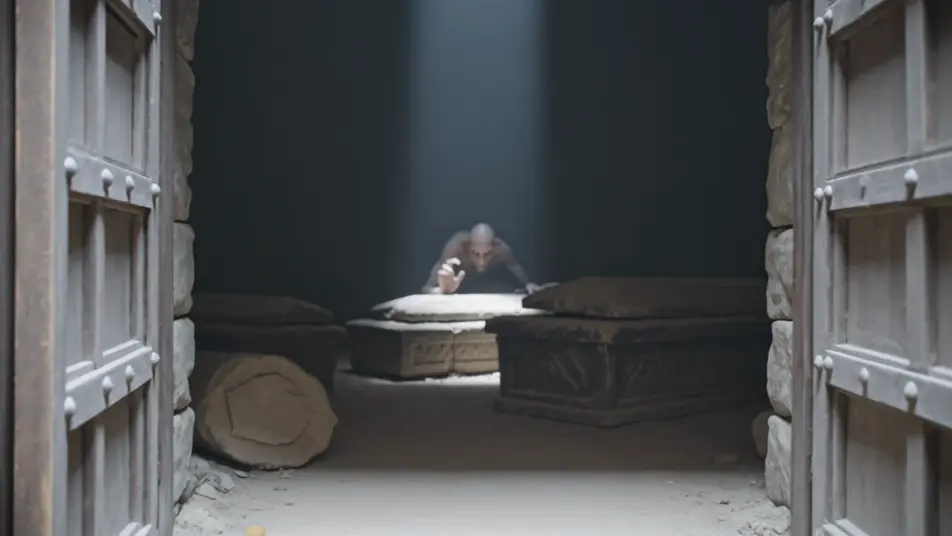
اكتب مشهد ghoul الذي تريده، بكلمات بسيطة.
ينشئ Morphic مقطعا سينمائيا جاهزا للإطارات على لوحتك خلال ثوانٍ.
عدّل الأمر النصي، وأعد إنشاء التنويعات، ثم نزّل اللقطة أو شاركها.
Cinematic time-freeze short film for any scene

Dramatize any text conversation into a cinematic multi-shot video.
One image to a 9-scene cinematic video.
Drop in a photo of yourself. Get a 12-second cinematic movie with animation and a matched soundtrack.

Share a scene description with character references. Get a full storyboard with shot angles and mood.

Feed in a single image. Get 9 cinematic beats laid out as a 3x3 storyboard grid.
فيديوهات الميت العائد بالذكاء الاصطناعي
أنشئ فيديوهات الميت العائد بالذكاء الاصطناعي مع Morphic. الجثة الناهضة، الساعي للانتقام، وزاحف القبر بمشاهد مقبرة متجمدة وطريق مغطى بالثلج.
فيديوهات الطيف بالذكاء الاصطناعي
أنشئ فيديوهات الطيف بالذكاء الاصطناعي مع Morphic. أنماط الحاصد المقنّع، وظل المعركة، والطيف الغريق، بمشاهد ضباب ومقابر جاهزة.
مقاطع الوحوش بالذكاء الاصطناعي
أنشئ مقاطع وحوش على Morphic. مخلوقات أصلية، وحوش في الضباب، كائنات المياه السوداء، ومشاهد التهديد الخفي من وصف بلغة بسيطة.
فيديوهات أفلام الوحوش بالذكاء الاصطناعي
ولّد فيديوهات أفلام الوحوش بالذكاء الاصطناعي مع Morphic. وحوش متربّصة وكشوف وحش بطيئة وموجّهات مشاهد في أماكن محصورة توجّهها في المتصفح.
ابدأ مجاناً اليوم، مع إمكانية الترقية أو الإلغاء في أي وقت.
Basic
2400 شهرياً أرصدة
1 مستخدم فقط
جميع النماذج
Workflows
Standard
3625 شهرياً أرصدة
1 مستخدم فقط
جميع النماذج
Workflows
Pro
6350 مشترك شهرياً أرصدة
1 مستخدم
جميع النماذج
Workflows
Max
24650 مشترك شهرياً أرصدة
1 مستخدم
جميع النماذج
Workflows
Enterprise
لحدود أعلى
مخصص
شروط الأسعار والفوترة

Free
للتجربة والاستكشاف
$0
مجاني إلى الأبد