Impressionist portrait AI Images

Create impressionist portraits in your browser with Morphic's AI image generator. Generate a woman in a sun-dappled garden, a child caught in soft afternoon light, or a man rendered in loose luminous brushstrokes. Drop the finished art into the Canvas to add a title or caption.

Impressionist portrait subjects you can create

Impressionist portraits you can compose

Sun-dappled garden portrait

A seated sitter in a garden built from broken visible brushstrokes, dappled light flickering across the face and dress, a luminous pastel palette, soft edges and a band reserved at the base for a title.

Prompt'u düzenleyin
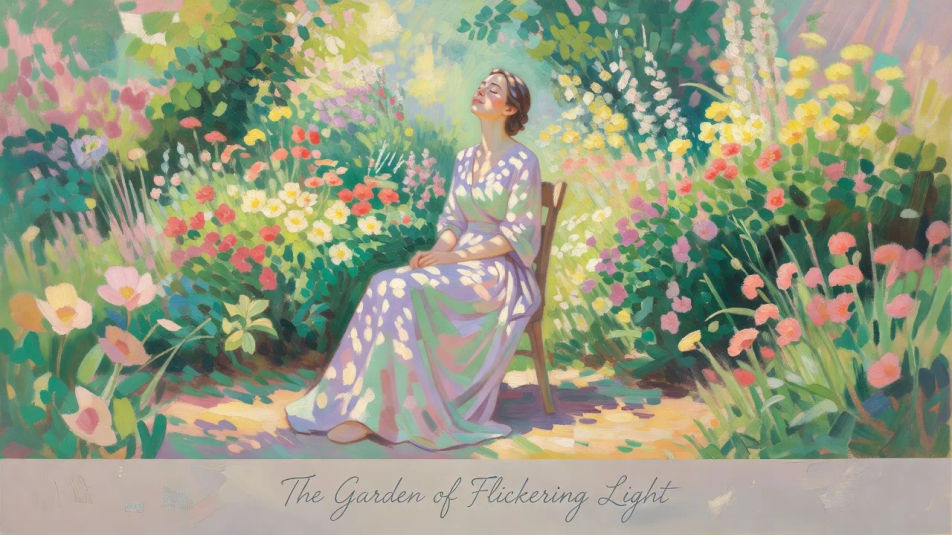
Sun-dappled garden portrait

Soft interior portrait

A figure by a window in a soft interior, warm and cool light mingling in loose strokes, features suggested rather than outlined and a gentle plein-air glow across the scene.

Prompt'u düzenleyin
Soft interior portrait

Parasol stroll portrait

A figure under a parasol seen slightly from behind, the outdoor light dissolving the form into shimmering flecks, a bright pastel palette and an open, breezy plein-air composition.

Prompt'u düzenleyin
Parasol stroll portrait

Portrait poster layout

A full poster composition with the sitter in loose luminous brushwork and dappled light, headline space reserved at the top and a caption strip at the base for a name.

Prompt'u düzenleyin
Portrait poster layout

Impressionist portrait üç adımda oluşturun

  1. 01

    Impressionist portrait açıklayın

    İstediğiniz Impressionist portrait öğesini sade sözcüklerle açıklayın.

  2. 02

    Görseli oluşturun

    Morphic, tuvalinizde saniyeler içinde temiz, yayına hazır bir görsel oluşturur.

  3. 03

    Impressionist portrait iyileştirin

    Prompt'ta ince ayar yapın, varyasyonları yeniden oluşturun, ardından kareyi indirin veya paylaşın.

İlgili Workflow'lar

Şunları da beğenebilirsiniz

Basit fiyatlandırma

Bugün ücretsiz başlayın, istediğiniz zaman yükseltme veya iptal etme seçeneğiyle.

Basic

$9/ ay
şu şekilde faturalandırılır $0 yıl başına

900 aylık kredi

1 yalnızca kullanıcı

Tüm modeller

Workflows

Standard

$24/ ay
şu şekilde faturalandırılır $0 yıl başına

3200 aylık kredi

1 yalnızca kullanıcı

Tüm modeller

Workflows

Pro

$45/ ay
şu şekilde faturalandırılır $0 yıl başına

6200 paylaşılan aylık kredi

1 kullanıcı

+ en fazla 4 ek ücret karşılığında daha fazlası

Tüm modeller

Workflows

Pro Max

$170/ ay
şu şekilde faturalandırılır $0 yıl başına

24000 paylaşılan aylık kredi

1 kullanıcı

+ en fazla 9 ek ücret karşılığında daha fazlası

Tüm modeller

Workflows

Enterprise

Daha yüksek limitler için

Özel

fiyatlandırma ve faturalandırma koşulları

High-volume credits
Özel koltuk limitleri
Tüm modeller
Workflows
Pricing Gradient

Free

Denemek için

$0

kalıcı olarak ücretsiz

En fazla 20 kredi
Yalnızca 1 kullanıcı
Sınırlı modeller
Workflows

SSS

What defines the impressionist portrait look?
An impressionist portrait is defined by three signature traits: broken visible brushstrokes, dappled natural light, and a luminous pastel palette. Keep the edges soft and the light scattered and the face reads instantly as an impressionist portrait.
Where can I make impressionist portraits with AI?
You can create impressionist portraits with AI on Morphic, right in your browser. Open the Image tool, describe the sitter, the broken brushstrokes, and the dappled light, and Morphic generates the portrait. No installs and no painting software are needed.
How do I get the broken brushwork and dappled light?
Name the cues directly in your prompt: "broken visible brushstrokes, dappled natural light, soft edges, luminous pastel palette, plein-air atmosphere." Calling out the loose strokes and the scattered daylight is what gives the portrait its impressionist character.
How do I keep a set of impressionist portraits consistent?
Use Morphic's Style Transfer workflow to lock the pastel palette and the broken-brushwork style from your first portrait, then reference that style card across the set. Each portrait carries a different sitter while the whole set keeps one palette and one loose style.
Can I add a title or caption to an impressionist portrait on Morphic?
Yes. Generate the portrait with a band reserved at the base or top, then open the Canvas to place a title or caption. Keeping the type as a layer lets you adjust the wording without regenerating the artwork.
Do I need painting skill to make impressionist portraits?
No. Morphic runs in your browser and takes plain-language prompts, so anyone who can describe a sitter, broken brushstrokes, and dappled light can produce a finished impressionist portrait. No brush or easel is required.

