Design photorealism art in your browser with Morphic's Photorealism AI image generator. Paint glossy 1970s Americana, chrome bumpers, neon, and storefront reflections in neutral deadpan with uniform sharp focus, lock the look with Style Transfer, then animate any still with Image to Video.

Photorealism subjects you can compose

Photorealism compositions you can design

Main Street storefronts

A row of 1970s Main Street storefronts painted from a photograph, plate-glass windows layering reflections of parked cars over the goods inside, neon signs dead in flat daylight, uniform sharp focus down the block, neutral deadpan framing, glossy Americana, the ordinary street transcribed as fact.

Editar prompt
Main Street storefronts

Diner exterior at midday

A chrome-trimmed roadside diner at flat midday, polished metal mirroring the parking lot and a pale sky, a neon sign cold in daylight, a single parked car, uniform sharp focus across the whole facade, neutral deadpan light, glossy 1970s Americana, no shadows for drama.

Editar prompt
Diner exterior at midday

Used-car lot

A used-car lot painted from a snapshot, rows of chrome bumpers and grilles each mirroring a slightly different slice of the lot, plastic pennant strings overhead, flat grey asphalt, uniform sharp focus to the back fence, neutral deadpan framing, glossy banal Americana throughout.

Editar prompt
Used-car lot

Phone booth and reflections

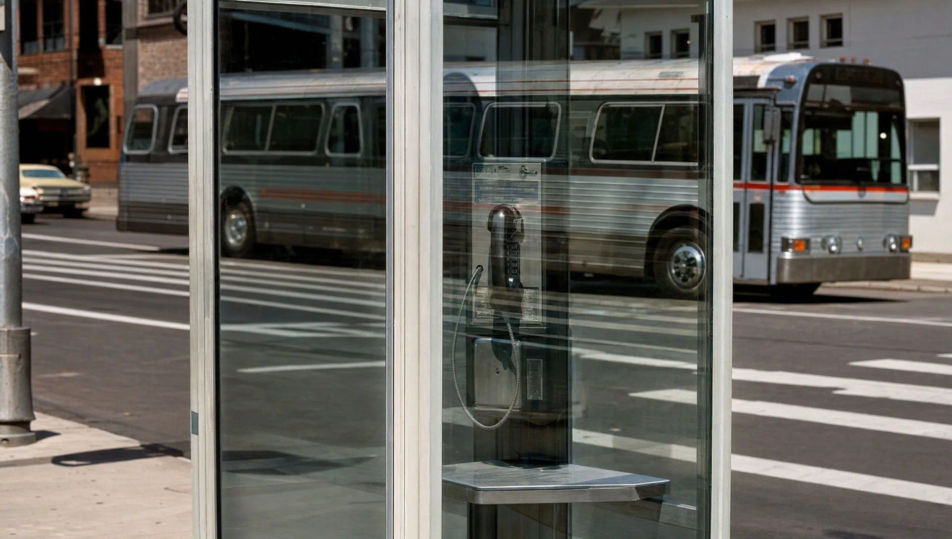
A glass phone booth on a city corner painted from a photo, the panes layering a reflection of the crosswalk and a bus over the interior, all planes in uniform sharp focus, neutral framing dead-on, glossy 1970s surface, the doubled reflection rendered as deadpan everyday fact.

Editar prompt
Phone booth and reflections

Crie Photorealism em três passos

  1. 01

    Descreva seu Photorealism

    Descreva o Photorealism que você quer, em poucas palavras.

  2. 02

    Gere a imagem

    A Morphic gera uma imagem limpa e pronta para publicar no seu Canvas em segundos.

  3. 03

    Refine seu Photorealism

    Ajuste o prompt, gere novas variações e depois baixe ou compartilhe o quadro.

Workflows relacionados

Você também pode gostar

Preços simples

Comece grátis hoje mesmo, com a opção de fazer upgrade ou cancelar quando quiser.

Basic

$9/ mês
cobrado como $0 por ano

900 mensal créditos

1 apenas usuário

Todos os modelos

Workflows

Standard

$24/ mês
cobrado como $0 por ano

3200 mensal créditos

1 apenas usuário

Todos os modelos

Workflows

Pro

$45/ mês
cobrado como $0 por ano

6200 compartilhado mensal créditos

1 usuário

+ até 4 mais com custo adicional

Todos os modelos

Workflows

Pro Max

$170/ mês
cobrado como $0 por ano

24000 compartilhado mensal créditos

1 usuário

+ até 9 mais com custo adicional

Todos os modelos

Workflows

Enterprise

Para limites maiores

Personalizado

termos de preços e cobrança

Créditos ilimitados
Limites de vagas personalizados
Todos os modelos
Workflows
Pricing Gradient

Free

Para experimentar

$0

grátis para sempre

Até 20 créditos
apenas 1 usuário
Modelos limitados
Workflows

Perguntas frequentes

Where can I make photorealism art with AI?
You can create photorealism images directly in your browser on Morphic. Open the Image tool, describe the glossy Americana subject, the neutral deadpan framing, and the uniform sharp focus, and Morphic produces the composition. No installs and no specialist software needed.
What defines photorealism for an AI prompt?
Four locked-in choices: a glossy Americana subject (chrome, neon, storefront reflections, diners), neutral deadpan framing, uniform sharp focus front to back, and a painted-from-a-photograph surface. Name all four for the 1970s look to land rather than a generic photo.
What is the difference between photorealism and hyperrealism?
Photorealism faithfully matches a photograph, keeping its focus and banality intact. Hyperrealism exaggerates past the photo with pores, droplets, and texture sharper than any lens. Name "uniform focus, faithful to the photo, no exaggeration" and the look reads as photorealism, not hyperrealism.
How do I keep a photorealism series feeling like one collection?
Use Morphic's Style Transfer workflow to lock the neutral deadpan light and the glossy Americana register before producing additional pieces, then reference that style card in every prompt. A storefront series or a chrome-and-neon set stays consistent in framing and surface across the run.
Can I turn photorealism compositions into animated video?
Yes. Morphic's Image to Video tool animates any still you generate, and a slow dolly past a chrome reflection or a steady push down a storefront row suits the deadpan register. Pair with the Music tool for a cool, neutral score.
Do I need any prior painting experience to make photorealism art?
No. Morphic runs in your browser and you direct it with plain-language prompts. Anyone who can describe a chrome bumper, a neon sign, and uniform sharp focus can produce a photorealism composition. Airbrush, masking film, and a gridded reference photo are not required.