Face in the tube glow
Close shot of a face lit only by a curved CRT screen, scanlines rippling across their skin and phosphor bloom washing the eyes, dark room, static frame so the flicker and glow carry the mood.
Editar prompt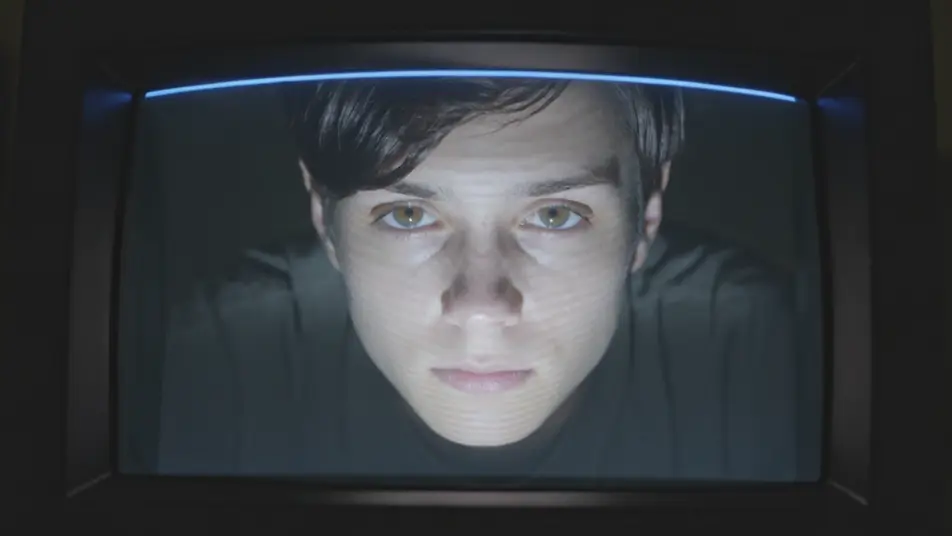
Direct the full CRT effect in your browser with Morphic's CRT AI video generator, from glowing scanlines to curved glass and phosphor bloom. Generate a face lit by a curved screen ribbed with scanlines, or a title card blooming in soft phosphor. Sync a synth pulse to the flicker with Music, then stitch the shots on the Canvas.
Close shot of a face lit only by a curved CRT screen, scanlines rippling across their skin and phosphor bloom washing the eyes, dark room, static frame so the flicker and glow carry the mood.
Editar promptLocked shot of a glowing title blooming in soft phosphor on a dark curved screen, a refresh bar rolling up the frame and fine scanlines throughout, deep black surround, no camera move so the tube reads clean.
Editar prompt
Medium shot of a figure hunched before a bank of old monitors whose curved glass and RGB phosphor grids glow in the dark, warm flicker on their face, slow push-in past the humming screens.
Editar prompt
Wide of a dim living room where a tube set flickers with signal noise and a rolling bar, its blue-white glow the only light, gentle drift toward the screen as the picture jitters and rolls.
Editar prompt
Escreva a cena de crt scanline effect que você quer, em poucas palavras.
A Morphic gera um clipe cinematográfico e pronto para uso no seu Canvas em segundos.
Ajuste o prompt, gere novas variações e depois baixe ou compartilhe a cena.
Cinematic time-freeze short film for any scene

Dramatize any text conversation into a cinematic multi-shot video.

Generate a professional film title card from scratch, with optional cinematic animation.
Photo of any real-estate becomes a cinematic renovation timelapse video with construction SFX and music.
One image to a 9-scene cinematic video.
Drop in a photo of yourself. Get a 12-second cinematic movie with animation and a matched soundtrack.
AI Glitch Effect videos
Generate AI glitch videos with Morphic. Block corruption, signal dropout, RGB tears, and paste-ready glitch prompts that run end to end in your browser.
AI chromatic aberration
Generate AI chromatic aberration videos with Morphic. RGB split, color fringing, edge ghosting, and paste-ready prompts that run end to end in your browser.
Vídeos de VFX com IA
Crie vídeos de VFX com IA no Morphic: explosões, energia, destruição e criaturas a partir de um prompt. Sem green screen, sem composição.
Vídeos morph com IA
Crie vídeos morph com IA no Morphic. Transições suaves, revelações com mudança de forma e cortes morph no ritmo, prontos para usar.
Comece grátis hoje mesmo, com a opção de fazer upgrade ou cancelar quando quiser.
Basic
2400 mensal créditos
1 apenas usuário
Todos os modelos
Workflows
Standard
3625 mensal créditos
1 apenas usuário
Todos os modelos
Workflows
Pro
6350 compartilhado mensal créditos
1 usuário
Todos os modelos
Workflows
Max
24650 compartilhado mensal créditos
1 usuário
Todos os modelos
Workflows
Enterprise
Para limites maiores
Personalizado
termos de preços e cobrança

Free
Para experimentar
$0
grátis para sempre