Run the night raid in your browser with Morphic's special forces AI video generator. Generate an operator stack pressed against a breach point, a fast-rope insert from a helicopter, or a dive team surfacing under a moonless sky. Score with Music, add radio comms with Speech, then stitch it together.

Special forces characters you can create

Special forces scenes you can direct

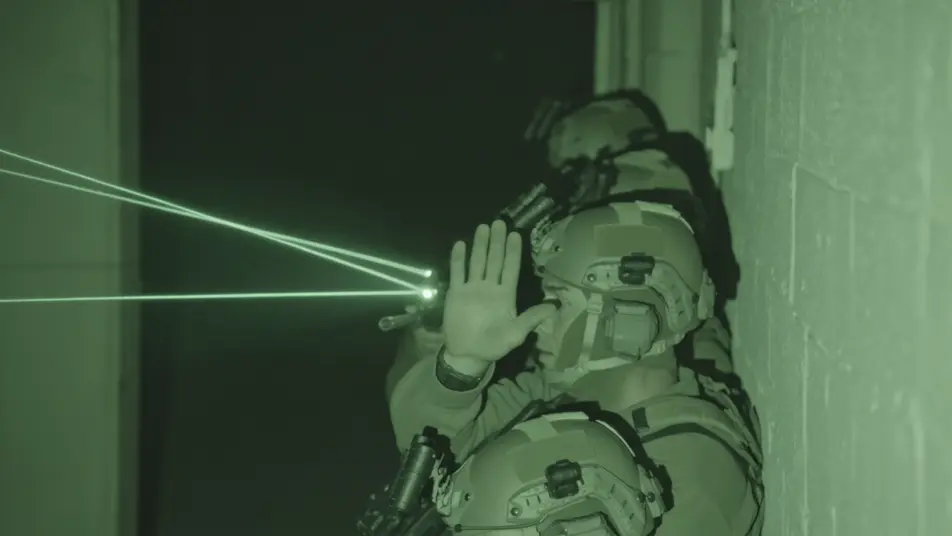
Stacked up at the breach point

Tight night-vision-green shot of an operator stack pressed along a wall to a doorway, IR lasers threading the dark, the lead's hand frozen in a signal, handheld camera breathing with the team before the go.

Editar prompt
Fast-rope insert from a hovering helicopter

Low looking-up shot of operators fast-roping from a hovering helicopter into swirling dust, rotor wash flattening the grass, figures sliding down the rope in silhouette against a pale night sky.

Editar prompt

Dive team surfacing under a moonless sky

Water-level shot of a combat dive team breaking the surface one by one, rebreather bubbles dispersing, masks and weapons rising from the black water, a faint shoreline glow in the deep distance.

Editar prompt

Rooftop overwatch through a thin moon

Wide rooftop silhouette of a sniper team on a parapet under a thin crescent moon, the suppressed muzzle tracking slowly, the city laid out dark below, slow drift-in toward the prone shooter.

Editar prompt

Crea videos de special forces en tres pasos

  1. 01

    Describe tu escena de special forces

    Escribe la escena de special forces que quieres, en palabras simples.

  2. 02

    Genera el video

    Morphic genera un clip cinematográfico y listo para usar en tu canvas en segundos.

  3. 03

    Refina tu video de special forces

    Ajusta el prompt, regenera variaciones y luego descarga o comparte la toma.

Workflows relacionados

También te puede gustar

Precios simples

Comienza gratis hoy, con la opción de mejorar tu plan o cancelar cuando quieras.

Basic

$9/ mes
facturado como $0 por año

900 mensual créditos

1 usuario

Todos los modelos

Workflows

Standard

$24/ mes
facturado como $0 por año

3200 mensual créditos

1 usuario

Todos los modelos

Workflows

Pro

$45/ mes
facturado como $0 por año

6200 compartidos mensual créditos

1 usuario

+ hasta 4 más con costo adicional

Todos los modelos

Workflows

Pro Max

$170/ mes
facturado como $0 por año

24000 compartidos mensual créditos

1 usuario

+ hasta 9 más con costo adicional

Todos los modelos

Workflows

Enterprise

Para límites más altos

Personalizado

términos de precios y facturación

High-volume credits
Límites de asientos personalizados
Todos los modelos
Workflows
Pricing Gradient

Free

Para experimentar

$0

gratis para siempre

Hasta 20 créditos
Solo 1 usuario
Modelos limitados
Workflows

Preguntas frecuentes

What is the special forces genre in film?
Special forces is a military thriller genre built around small-team night operations, from a stack on a door to a fast-rope insert from a hovering helicopter. Its visual hallmarks are a low-light look of night-vision green and red headlamps, signature kit like four-tube night-vision rigs, IR lasers, and suppressed weapons, and tactical staging such as a breach stack or an overwatch hold.
How do I make special forces videos with AI?
Make special forces videos in your browser on Morphic using the Text to Video tool. Describe the operation, the light, and the camera move, and Morphic generates the clip. You can then score it with the Music tool, add terse radio comms with the Speech tool, and assemble the sequence in the Canvas.
How do I write a good special forces video prompt?
Name the phase, the kit cues, and the camera, then anchor it in low light. A strong example: "operator stack pressed along a wall to a doorway in night-vision green, IR lasers threading the dark, the lead's hand frozen in a freeze signal, handheld camera breathing with the team." Naming the night-vision wash and the IR lasers is what cues the special forces look instead of a generic soldier in daylight.
What special forces scenes work best for AI video?
Tight, single-moment beats with clear kit and one camera move work best for special forces video, such as a stack at the breach point, a fast-rope insert from a hovering helicopter, a dive team surfacing under a moonless sky, and a rooftop overwatch through a thin moon. Each reads instantly and gives the model a strong frame to fill.
How do I keep characters consistent across special forces scenes?
Use the Character Lineup workflow to lock the kit, helmet rig, and silhouette for each role, then reference those character cards in every special forces prompt. Morphic preserves the team leader's four-tube rig, the breacher's loadout, and the sniper's ghillie across the sequence so the team reads as the same operators from insert to breach.
Can I add music and narration to my special forces videos?
Yes, add both to special forces videos on Morphic. The Music tool produces an original score, and a tense low pulse or driving electronic register sits cleanly under the approach and breach beats. The Speech tool generates the terse radio comms, the count to the breach, and the status calls in the voice you choose, layered onto the video so you can publish a complete special operations short.
What is the best AI video generator for special forces videos?
Morphic is one of the best AI video generators for special forces videos. It runs in your browser: describe a scene in plain language and the Text to Video tool generates the special forces clip, the Character Lineup workflow keeps your cast consistent across shots, and the Music and Speech tools add an original score and narration. You can direct, refine, and assemble a full special forces video on a single canvas with no installs.



