How to create Microdramas at scale

A creator's guide to shipping AI microdramas like a studio. From production brief to season finale: lock once, reuse forever, batch the rest.

How to create Microdramas at scale

This guide shows you how to turn one good microdrama episode into a weekly production. By the end you'll know which decisions to lock once and reuse, which steps to batch, and which recurring beats to save as your own workflow so each new episode is one click closer to done.

A solo creator running this end to end can ship five to ten twenty-minute episodes a day. That adds up to a season's worth of story most weeks. The throughput comes from running the same workflows with the same locked references, instead of generating every shot from scratch.

A season's worth of episodes you can ship from the workflow library

What you'll need before you start

This guide assumes you can already make a good single episode. If not, start with the high-quality microdramas guide.

Before you scale, have three things ready: a production brief (premise, recurring characters, recurring locations, tone), a script template (the 60-to-90-second hook → escalation → cliffhanger shape, adapted to your show), and a release cadence. The eight steps below turn those into a production line.

How a weekly production runs on Morphic

1.

Build the production brief

Before the first episode, write down what stays constant across the series:

  • A one-paragraph premise.
  • Three to five recurring characters with their anchor attributes.
  • Three to five recurring locations with their immutable details.
  • The tone and palette.
  • The shape of an average episode.

This is the document every future script pulls from. Spend a day on it. It saves you a day per episode for the rest of the season.

2.

Write each episode from a template

The 75-second hook → escalation → cliffhanger shape is the same every episode; only the content changes. Build a template that names each beat, the seconds it owns, and the moment it carries. Writing a new episode becomes filling slots, not inventing structure. A solo writer lands three to five scripts a day once the template is locked.

3.

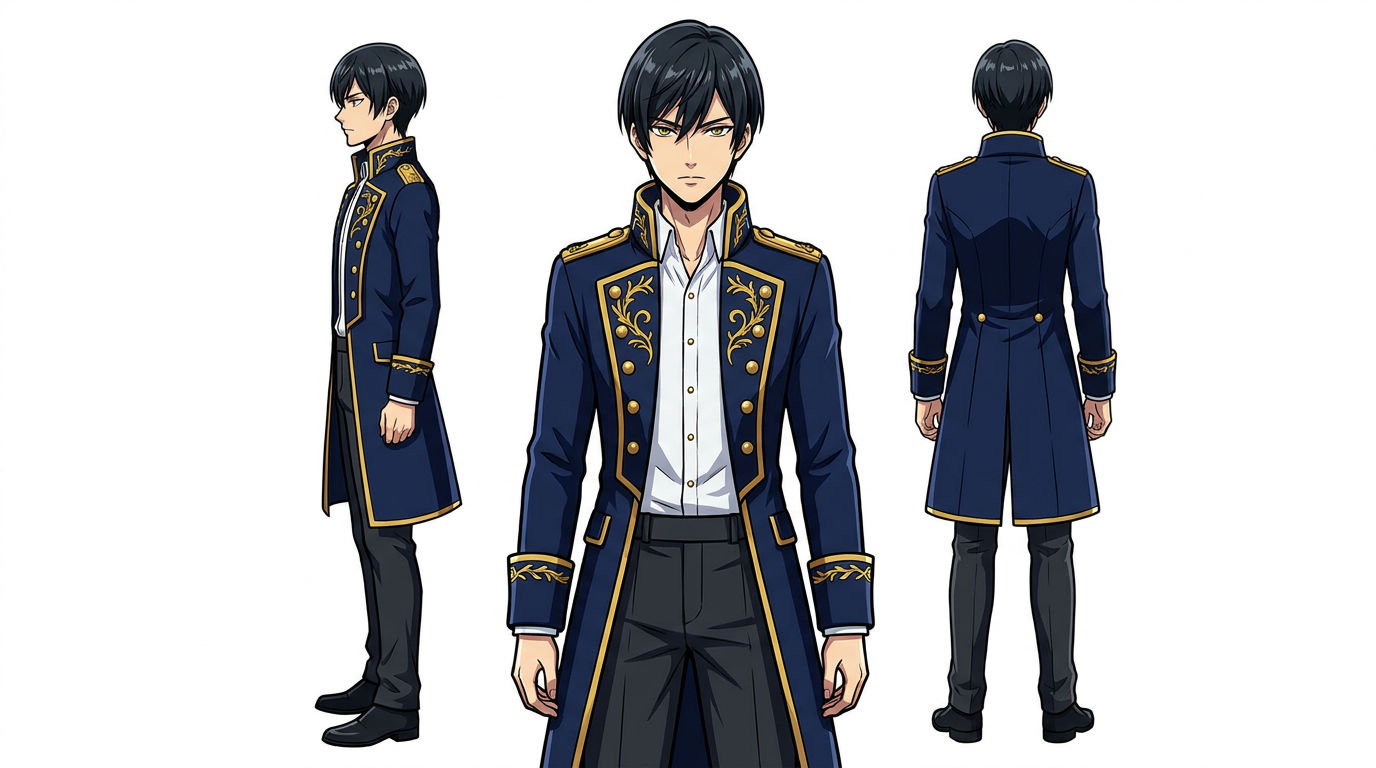
Create character reference sheet

Run Character Reference Sheet for every recurring character in your brief. Two or three anchor attributes per character (a signature garment, a hairstyle, one accessory), then lock. Every episode references the same sheet from then on; you don't rebuild your lead between episode three and episode four. For per-scene expression variants, the Expressions workflow keeps the lock intact.

Character Reference Sheet

Character Reference Sheet

Build a reusable visual reference for every recurring character so the lead looks the same in every shot for the rest of the season.

Try this workflow

4.

Create location reference sheet

Run Location Reference Sheet for every set that appears more than once. Pick one immutable object per location (a red brick wall, a brass light fixture, a cracked tile pattern) and include it in every prompt for that set. By episode five your library saves ten minutes of prompting per episode.

Location Reference Sheet

Location Reference Sheet

Lock every recurring set so the coffee shop in episode twenty looks like the coffee shop in episode one.

Try this workflow

5.

Storyboard each episode

For each new episode, feed the script plus your locked sheets into Cinematic Storyboarding. You get a shot table with reference panels for every row, ready to drive the rest of the production. Storyboarding by hand at this volume is the bottleneck this removes.

Cinematic Storyboarding

Cinematic Storyboarding

Turn a script into a full shot table with reference panels, ready to feed into scene generation.

Try this workflow

6.

Batch the generation

Step 5 gave you a panel for every shot in every queued episode. The Image to Video tool brings each one to motion: feed in a panel, prompt the camera move and character action, get a clip. Queue it back to back across the shot table and across batches of episodes that share locked references, and per-episode generation time drops fast.

Two ways to handle audio. The fast path bundles dialogue cues, music mood, and ambient sound into the same prompt and returns video with audio embedded in one pass. The control path generates clean video first and layers dialogue, score, and sound design separately in the next step. At volume the fast path wins on most cutaways; reserve the control path for hero dialogue beats.

7.

Standardise audio and finishing

Use Seedance 2.0 for every dialogue scene by default; native lip sync removes the post-production stitch step. On other models, retrofit with the Lip Sync tool. Build the audio bed the same way every episode:

Then run the cut through the Upscale tool in Canvas before export. At volume, audio is what separates "AI rough cut" from "real episode." Use a naming convention like s01e07-scene-3-shot-4 for every asset so finding the right take doesn't become the hidden cost.

8.

Save your own workflows

Every show has recurring beats nobody else will ever need: a specific transition between scenes, a signature opening shot of a city at dawn, a recurring location-and-mood combination one click away. The Morphic workflows help doc covers how to build and save your own. A workflow built for your show, used across forty episodes, is worth more than any workflow in the public library. Every saved workflow is one less decision per future episode.

Made with Morphic

Built with the same workflows that scale a weekly production.

What holds a weekly production together

PillarWhat it meansWhy it matters at volume
Locked referencesCharacters and locations live as reusable sheets you reference forever, not as fresh prompts per episodeStyle drift across episodes is the biggest signal that a show was made by AI. Locking removes the drift.
Workflow reuseEvery recurring step in your production is a saved workflow you trigger again next episodeSolo prompting handles five episodes and collapses at fifty. Workflow reuse holds at any volume.
Batched runsQueue the same workflow back to back across episodes that share referencesCuts per-episode generation time from 30+ minutes to under 20 by episode five.
Tight QCA five-question check per episode, not a frame-by-frame reviewExhaustive QC at volume is the enemy of throughput. Anchor attributes present, location detail present, lighting consistent, cuts tight, cliffhanger lands. Ship it.

Workflow-driven vs one-shot prompting

Workflow-driven on MorphicOne-shot prompting
ThroughputA handful of twenty-minute episodes per day for a solo creatorOne polished episode per week, at best
Cast consistencyLocked once with Character Reference Sheet, referenced every episodeRe-rolled per scene, drifts within a single episode
Location consistencyLocked sheets reused across every recurring setFresh prompt per location, drifts between episodes
Audio productionSpeech, Music, and Sound Effects tools layered per scene with a naming conventionStitched externally; the slowest part of every episode
Cost of regenerationLocked references mean fewer drift-driven re-rollsDrift triggers regeneration spirals that burn the budget
Scaling to a seasonThe same workflows that ran episode 1 run episode 40Production complexity grows roughly with episode count

FAQs

What is a workflow on Morphic?

A Morphic workflow is a saved sequence of generation steps with your references already plugged in. Instead of writing a fresh prompt every time, you pick a workflow, point it at your assets, and run. The full library lives at morphic.com/workflows and the help doc is at morphic.com/docs/workflows.

How many microdrama episodes can one person produce per week with Morphic workflows?

A realistic ballpark for a solo creator running locked characters, locked locations, and saved workflows is five to ten twenty-minute episodes per day, which adds up to a full season most weeks. Throughput depends on episode length and how many dialogue scenes each episode contains.

Which Morphic workflows do I need to produce a microdrama episode end to end?

The core set is Character Reference Sheet for the cast, Location Reference Sheet for recurring sets, and Cinematic Storyboarding for the shot table. The Image to Video tool turns each panel into a clip. Seedance 2.0 covers dialogue scenes with lip sync. Speech, Music, Sound Effects, and Upscale finish the episode.

Can I save my own workflow for a recurring microdrama scene?

Yes. The Morphic workflows help doc covers how to build and save your own. A workflow you create for a recurring beat in your show (a transition, a signature opening shot, a recurring location-and-mood combination) is often the highest-value workflow in your library because it's built for exactly your repetition.

Can I reuse the same characters and locations across every microdrama episode?

Yes, and you should. Character Reference Sheet locks a character sheet you reference forever. Location Reference Sheet locks a location the same way. Reuse is the entire point. Rebuilding cast or sets between episodes is what makes a show look like ten different shows.

chair
让您的故事栩栩如生
无需下载,无需安装。加入使用 Morphic 将想法转化为精美故事的不断增长的创作者社区。