Draw pencil sketch images in your browser with Morphic's pencil sketch AI image generator. Create a violinist mid-stroke or two friends over coffee, keep line weight and tonal range consistent with Style Transfer, then animate any still with Image to Video.

Pencil sketch subjects you can draw

Pencil sketch scenes you can compose

Architectural study of an old church facade

A careful pencil study of an old church facade, fine ruled lines on the masonry, soft graphite tonal modelling in the rose-window recess, paper white left for the morning sky behind the spire.

Editar prompt
Architectural study of an old church facade

Travel sketchbook page of a market

A travel sketchbook spread of a foreign market, awnings, stalls, and figures captured in fast confident lines, light tonal modelling on the baskets of fruit, hand-lettered notes in the margins.

Editar prompt
Travel sketchbook page of a market

Studio life drawing on a Sunday

A life-drawing studio session, a model seated in three-quarter pose, soft graphite tonal modelling across the back and shoulders, paper white left for the wall behind, easel just suggested.

Editar prompt
Studio life drawing on a Sunday

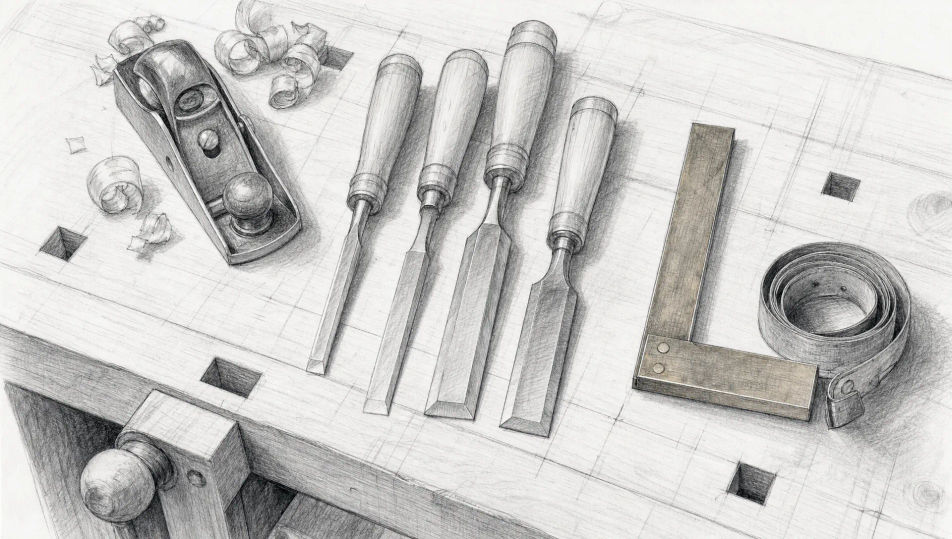
Workshop bench with hand tools

A workshop bench seen from above with chisels, a small block plane, a brass square and a coiled tape measure, careful pencil lines on each tool, soft graphite shadows pooling at the back.

Editar prompt
Workshop bench with hand tools

Crea Pencil sketch en tres pasos

  1. 01

    Describe tu Pencil sketch

    Describe el Pencil sketch que quieres, en palabras simples.

  2. 02

    Genera la imagen

    Morphic genera una imagen limpia y lista para publicar en tu canvas en segundos.

  3. 03

    Refina tu Pencil sketch

    Ajusta el prompt, regenera variaciones y luego descarga o comparte el fotograma.

Workflows relacionados

También te puede gustar

Precios simples

Comienza gratis hoy, con la opción de mejorar tu plan o cancelar cuando quieras.

Basic

$9/ mes
facturado como $0 por año

900 mensual créditos

1 usuario

Todos los modelos

Workflows

Standard

$24/ mes
facturado como $0 por año

3200 mensual créditos

1 usuario

Todos los modelos

Workflows

Pro

$45/ mes
facturado como $0 por año

6200 compartidos mensual créditos

1 usuario

+ hasta 4 más con costo adicional

Todos los modelos

Workflows

Pro Max

$170/ mes
facturado como $0 por año

24000 compartidos mensual créditos

1 usuario

+ hasta 9 más con costo adicional

Todos los modelos

Workflows

Enterprise

Para límites más altos

Personalizado

términos de precios y facturación

High-volume credits
Límites de asientos personalizados
Todos los modelos
Workflows
Pricing Gradient

Free

Para experimentar

$0

gratis para siempre

Hasta 20 créditos
Solo 1 usuario
Modelos limitados
Workflows

Preguntas frecuentes

Where can I make Pencil Sketch images with AI?
You can create Pencil Sketch images directly in your browser on Morphic. Open the Image tool, describe the subject and setting with the linework and contrast spelled out, and Morphic produces the artwork. No installs and no specialist software needed.
What Pencil Sketch styles can I generate?
Loose fast-contour travel-sketchbook scenes, careful tonal portrait studies, fine architectural pencil studies, and life-drawing figure work. Name the application upfront so Morphic picks the right line weight and tonal range.
How do I keep Pencil Sketch characters consistent across multiple pieces?
Use the Character Lineup workflow to lock in each figure's face, costume, and signature props before generating, then reference those character cards in every prompt. Morphic preserves the design across stage, cafe, and stairwell scenes so a series reads as one body of work.
How do I prompt for tonal modelling versus fast contour?
Name the linework directly. Use phrases like "soft graphite tonal modelling on the face", "fast confident contour lines on the figure", "fine ruled lines on the masonry", or "paper white left for the sky". The named linework tells Morphic which hand the page is drawn with.
Can I turn my Pencil Sketch into a video?
Yes. Open the Image to Video tool, upload the still, and describe the motion you want (the violinist drawing the bow across the string, steam rising from the cup, leaves drifting onto the park bench). Morphic animates from the source so the video preserves the linework.
Do I need art vocabulary to prompt Pencil Sketch images?
No. Plain words for subject, setting, linework, and contrast are enough. If you know terms like graphite, contour drawing, tonal modelling, or hatching, citing them sharpens the result; if not, describing what you see in your head still gets you a strong Pencil sketch.