Design post-graffiti art in your browser with Morphic's post-graffiti AI image generator. Build a spray-can figure on a gallery canvas, layer stencils and torn paste-up over a gritty wall, lock the urban palette with Style Transfer, then animate any still with Image to Video.

Post-graffiti subjects you can compose

Post-graffiti compositions you can design

Gallery wall of canvases

A white-cube gallery wall hung with three unstretched post-graffiti canvases, each a bold spray-can figure in flat primaries with drip outlines, raw canvas tooth and overspray fog at the edges, a wild-style tag scrawled across the bottom of each.

Edit prompt
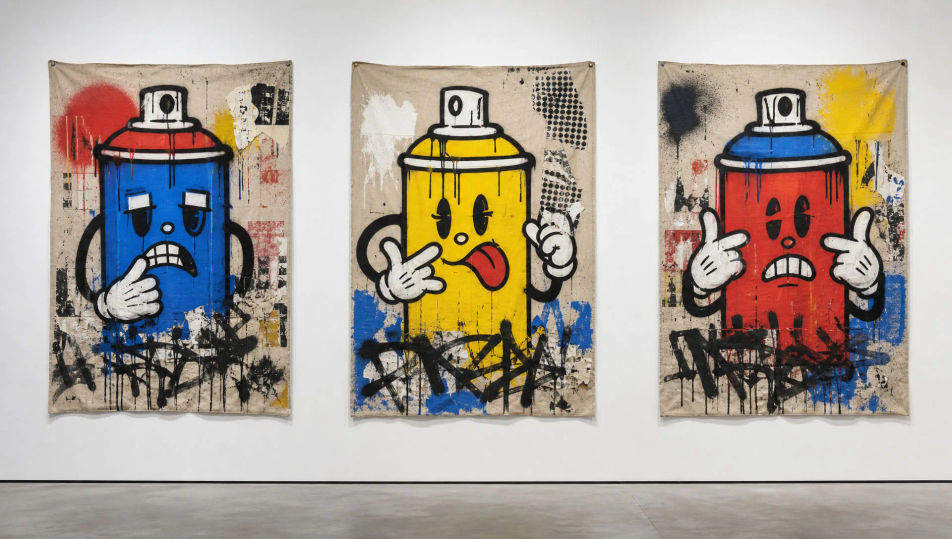
Gallery wall of canvases

Layered alley wall

A gritty brick alley wall stacked with overlapping work, hand-sprayed wild-style tags beneath a hard-edged stencil king and a curling wheat-paste poster, paint drips running over the mortar, a single radiant figure crowning the layers.

Edit prompt
Layered alley wall

Subway car panel

The flat side of a subway car covered end to end with a post-graffiti burner, fat bubble letters in flat primaries outlined thick black, a spray-can cartoon figure riding the lettering, drips and overspray haze, dull steel rivets showing through.

Edit prompt
Subway car panel

Exhibition poster

A tall post-graffiti exhibition poster for an invented downtown show, a bold spray-can crowned figure centred over torn paste-up scraps, hand-scrawled marker title across a black bar, garish flat colour and visible drips on a gritty ground.

Edit prompt
Exhibition poster

Buat Post-graffiti dalam tiga langkah

  1. 01

    Jelaskan Post-graffiti Anda

    Jelaskan Post-graffiti yang Anda inginkan, dengan kata-kata sederhana.

  2. 02

    Buat gambar

    Morphic membuat gambar bersih yang siap diterbitkan di canvas Anda dalam hitungan detik.

  3. 03

    Sempurnakan Post-graffiti Anda

    Ubah prompt, buat ulang variasi, lalu unduh atau bagikan frame-nya.

Workflow terkait

Anda mungkin juga suka

Harga sederhana

Mulai gratis hari ini, dengan opsi untuk upgrade atau membatalkan kapan saja.

Basic

$9/ bulan
ditagih sebagai $0 per tahun

900 bulanan kredit

1 pengguna saja

Semua model

Workflows

Standard

$24/ bulan
ditagih sebagai $0 per tahun

3200 bulanan kredit

1 pengguna saja

Semua model

Workflows

Pro

$45/ bulan
ditagih sebagai $0 per tahun

6200 bersama bulanan kredit

1 pengguna

+ hingga 4 lainnya dengan biaya tambahan

Semua model

Workflows

Pro Max

$170/ bulan
ditagih sebagai $0 per tahun

24000 bersama bulanan kredit

1 pengguna

+ hingga 9 lainnya dengan biaya tambahan

Semua model

Workflows

Enterprise

Untuk batas yang lebih tinggi

Khusus

ketentuan harga dan penagihan

High-volume credits
Batas kursi khusus
Semua model
Workflows
Pricing Gradient

Free

Untuk bereksperimen

$0

gratis selamanya

Hingga 20 kredit
Hanya 1 pengguna
Model terbatas
Workflows

FAQ

Where can I make post-graffiti art with AI?
You can create post-graffiti images directly in your browser on Morphic. Open the Image tool, describe the spray-can outline, the layered stencils and paste-up, and the gritty canvas surface, and Morphic produces the composition. No installs and no specialist software needed.
What defines post-graffiti for an AI prompt?
Four locked-in choices: thick spray-can outlines with visible drips and overspray fog, bold flat cartoon figuration, layered stencils, hand tags and torn paste-up stacked over one another, and a gritty surface that reads as raw canvas or weathered brick. Name all four so the look lands as gallery-canvas street art, not clean vector clip art.
What is the difference between post-graffiti and street graffiti in AI prompts?
Street graffiti lives on the wall as wild-style lettering and tags. Post-graffiti takes that spray-can language onto a canvas or gallery surface and adds bold cartoon figuration and fine-art framing. Name "unstretched canvas, bold figure, drip outline on a gallery wall" and the look reads as post-graffiti rather than a plain wall tag.
How do I keep a post-graffiti series feeling like one collection?
Use Morphic's Style Transfer workflow to lock the spray-can palette, the drip outline weight, and the gritty surface before producing additional pieces, then reference that style card in every prompt. A canvas series or a poster run stays consistent across the whole set.
Can I turn post-graffiti compositions into animated video?
Yes. Morphic's Image to Video tool animates any still you generate, and a slow drip running down a tag or a stencil layer fading up suits the register. Pair with the Music tool for a hip-hop or breakbeat score.
Do I need any prior art experience to make post-graffiti art?
No. Morphic runs in your browser and you direct it with plain-language prompts. Anyone who can describe a bold spray-can figure, dripping black outlines, and a gritty canvas can produce a post-graffiti composition. Spray cans and a wall are not required.



