화창한 피크닉 인스턴트 스냅
인스턴트 필름에 담긴 화창한 피크닉 장면, 씻겨 나간 따뜻한 하이라이트, 바랜 녹색, 소프트포커스, 두꺼운 흰 테두리, 은은한 비네팅, 담요 위에 흩어진 소품, 근심 없는 여름 스냅의 무드.
프롬프트 편집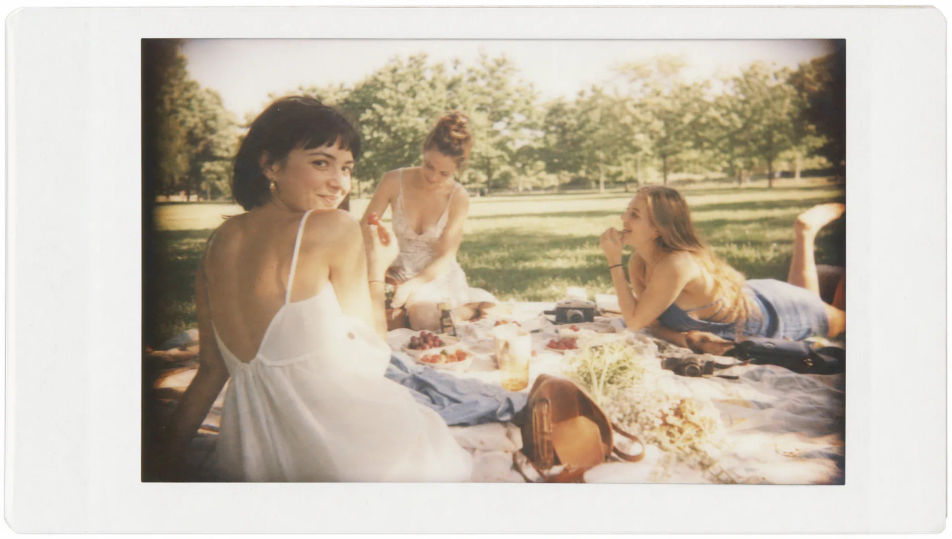
Morphic의 폴라로이드 AI 이미지 생성기로 브라우저에서 폴라로이드 프레임을 촬영하세요. 두꺼운 흰 테두리의 정사각 초상이나 햇빛에 바랜 야외 프레임을 생성하고, Style Transfer로 인스턴트 필름 룩을 고정한 뒤 Image to Video로 어떤 스냅이든 움직여 보세요.
인스턴트 필름에 담긴 화창한 피크닉 장면, 씻겨 나간 따뜻한 하이라이트, 바랜 녹색, 소프트포커스, 두꺼운 흰 테두리, 은은한 비네팅, 담요 위에 흩어진 소품, 근심 없는 여름 스냅의 무드.
프롬프트 편집강한 온카메라 플래시로 밝힌 실내 파티 장면, 밝은 전경이 어두운 모서리로 떨어지는, 소프트포커스, 우윳빛 하이라이트, 바랜 색, 두꺼운 흰 테두리, 캔디드하고 즉흥적인 인스턴트 필름의 느낌.
프롬프트 편집
핀과 테이프로 함께 붙인 여러 인스턴트 프레임의 벽 콜라주, 저마다 두꺼운 흰 테두리와 바랜 색, 소프트포커스, 따뜻하고 고른 데일라이트, 겹쳐진 격식 없는 추억 보드 배치.
프롬프트 편집
인스턴트 필름에 담긴 골든아워 해변 장면, 씻겨 나간 하늘, 바랜 터쿼이즈 물, 따뜻한 안개, 소프트포커스, 두꺼운 흰 테두리, 은은한 비네팅, 향수 어린 하루의 끝 스냅의 무드.
프롬프트 편집
원하는 폴라로이드의 모습을 쉬운 말로 설명하세요.
Morphic이 캔버스 위에 바로 게시할 이미지를 몇 초 만에 생성합니다.
프롬프트를 조정해 다시 생성한 뒤, 원하는 이미지를 저장하거나 공유하세요.
플라스틱처럼 보이는 AI 피부를 수정합니다. 사실감을 더하기 위해 자연스러운 질감, 모공, 결점을 추가합니다.
셀카 한 장으로 전문적인 프로필 사진 세트를 완성하세요. 스튜디오 품질, 다양한 스타일.
모든 이미지를 새 종횡비로 변환합니다. 스마트 자르기 또는 가장자리를 늘려 맞춥니다.
하나의 레퍼런스 이미지로 룩을 설정하세요. 모든 씬이나 배치에 해당 그레이드를 정확하게 적용하세요.
모든 이미지에 대한 정확한 원근감 전환과 전체 카메라 제어를 통해 시청 각도를 선택하세요.
손상되거나, 흐릿하거나, 저해상도 이미지를 복원하세요. 선명하고 디테일한 4K 버전으로 자연스러운 선명도를 복원하세요.
필름 아날로그 사진 AI 이미지
Morphic으로 AI 필름 아날로그 사진 이미지를 만드세요. 어떤 프로젝트든 몇 초 안에 필름 아날로그 사진 컷, 초상, 비주얼을 생성합니다.
로모그래피 AI 이미지
Morphic으로 AI 로모그래피 이미지를 만드세요. 어떤 프로젝트든 몇 초 안에 로모그래피 컷, 초상, 비주얼을 생성합니다.
사이아노타이프 AI 이미지
Morphic으로 AI 사이아노타이프 이미지를 만드세요. 어떤 프로젝트든 몇 초 안에 사이아노타이프 인화, 실루엣, 비주얼을 생성합니다.
라이프스타일 사진 AI 이미지
Morphic으로 AI 라이프스타일 사진 이미지를 만드세요. 어떤 프로젝트든 몇 초 안에 라이프스타일 컷, 초상, 비주얼을 생성합니다.
오늘 무료로 시작하고 언제든지 업그레이드하거나 취소할 수 있습니다.
Basic
2400 월간 크레딧
1 명 전용
모든 모델
워크플로
Standard
3625 월간 크레딧
1 명 전용
모든 모델
워크플로
Pro
6350 공유 월간 크레딧
1 사용자
모든 모델
워크플로
Max
24650 공유 월간 크레딧
1 사용자
모든 모델
워크플로
Enterprise
더 높은 제한
사용자 정의
가격 및 청구 조건

Free
가볍게 사용해보기
$0
영구 무료