Artificial intelligence film AI Videos

Direct the question of machine consciousness in your browser with Morphic's artificial intelligence film AI video generator. Generate an android studying its own reflection in a white clean room, a lab tech behind one-way glass watching a mind wake up, or a lonely apartment where a soft voice answers from the walls. Pair the scene with the Speech tool for an unsettlingly calm synthetic voice and the Music tool for an ambient score, then stitch the sequence in the Canvas.

Artificial intelligence film characters you can create

Artificial intelligence film scenes you can direct

Android studying its reflection in a clean room

Bright white examination room with soft even light, an android slowly raising a hand to a mirrored panel and studying its own face, the seam at the jaw catching the light, slow push-in on the reflection.

Prompt bearbeiten

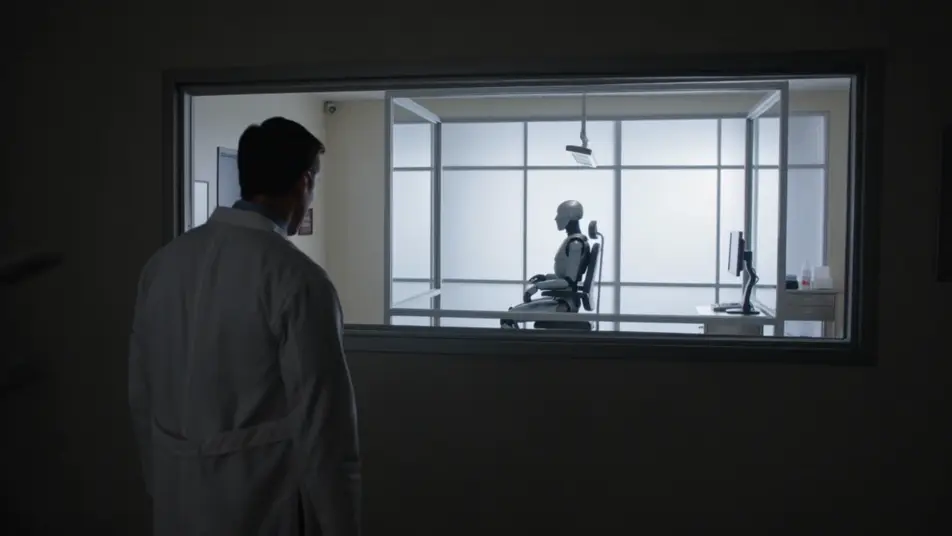
Researcher watching through one-way glass

Dim observation booth behind a wall of one-way glass, a researcher silhouetted against the bright lab beyond, the android visible upright in the chair, slow dolly that frames creator and creation in one shot.

Prompt bearbeiten

A voice answers in a quiet apartment

Tidy apartment at dusk in soft warm light, a single glowing pinhole sensor on the wall, a person turning toward it as a calm voice replies, camera holding still on the small point of light.

Prompt bearbeiten

Shutdown panel and a quiet question

Sterile maintenance bay under cool even light, a technician with a hand resting on an open access panel, the android turning its head with an even gaze, slow push-in as the hand hesitates.

Prompt bearbeiten

artificial intelligence film-Videos in drei Schritten erstellen

  1. 01

    Beschreiben Sie Ihre artificial intelligence film-Szene

    Beschreiben Sie die artificial intelligence film-Szene, die Sie möchten, in einfachen Worten.

  2. 02

    Video generieren

    Morphic generiert in Sekunden einen filmreifen Clip auf Ihrer Canvas.

  3. 03

    artificial intelligence film-Video verfeinern

    Passen Sie den Prompt an, generieren Sie Varianten und laden Sie die Aufnahme herunter oder teilen Sie sie.

Verwandte Workflows

Das könnte Ihnen auch gefallen

Einfache Preise

Starten Sie noch heute kostenlos, mit der Option, jederzeit zu upgraden oder zu kündigen.

Basic

$0/ Monat
abgerechnet als $0 pro Jahr

900 monatliche Credits

1 Nutzer

Alle Modelle

Workflows

Standard

$0/ Monat
abgerechnet als $0 pro Jahr

3200 monatliche Credits

1 Nutzer

Alle Modelle

Workflows

Pro

$0/ Monat
abgerechnet als $0 pro Jahr

6200 gemeinsame monatliche Credits

1 Nutzer

+ bis zu 4 weitere gegen Aufpreis

Alle Modelle

Workflows

Pro Max

$0/ Monat
abgerechnet als $0 pro Jahr

24000 gemeinsame monatliche Credits

1 Nutzer

+ bis zu 9 weitere gegen Aufpreis

Alle Modelle

Workflows

Enterprise

Für höhere Limits

Individuell

Preis- und Abrechnungsbedingungen

Unbegrenzte Credits
Individuelle Platzlimits
Alle Modelle
Workflows
Pricing Gradient

Free

Zum Ausprobieren

$0

dauerhaft kostenlos

Bis zu 20 Credits
Nur 1 Nutzer
Eingeschränkte Modelle
Workflows

Häufig gestellte Fragen

What is an artificial intelligence film?
An artificial intelligence film is a science-fiction genre about machine consciousness and what it means to think, told through restraint rather than spectacle. Its visual hallmarks are clinical settings like a white clean room or a one-way-glass observation booth, soft even lighting that makes the space feel watched, and a quiet consciousness beat such as an android catching its own reflection.
How do I make artificial intelligence film videos with AI?
Make artificial intelligence film videos with the Text to Video tool in your browser on Morphic. Describe the clean room, the soft light, and the consciousness beat, and Morphic generates the clip. Add more shots for each beat, then assemble the sequence in the Canvas. No installs or specialist software are needed.
How do I write a good artificial intelligence film video prompt?
Name the clinical setting, the soft diffuse light, and the camera move, then add the quiet consciousness beat that carries the unease. For example: "an android in a grey shift raises a hand to a mirrored panel in a bright white clean room, slow push-in on the reflection." Naming the soft even light and the stillness lands the contemplative AI film register instead of an action-robot scene.
What artificial intelligence film scenes work best for AI video?
The strongest artificial intelligence film scenes are still, clinical, and quietly unsettling, such as an android studying its reflection in a clean room, a researcher watching through one-way glass, a calm voice answering in a quiet apartment, and a shutdown panel met with a quiet question. Each gives Morphic a clear setting, light source, and consciousness beat to anchor the shot.
How do I keep characters consistent across artificial intelligence film scenes?
Use the Character Lineup workflow to lock the wardrobe and android face details for each figure, then reference those character cards in every prompt. Morphic preserves the android jaw seam and grey shift, the researcher lab coat, and the ethicist tailored coat across the sequence so the continuity holds from shot to shot.
Can I add music and narration to my artificial intelligence film videos?
Yes, you can score and voice artificial intelligence film videos on Morphic. The Music tool produces an original soundtrack, and a slow ambient pad sits cleanly under the clean-room beats. The Speech tool generates an unsettlingly calm synthetic voice and human dialogue in the voices you choose, layered onto the generated video.
What is the best AI video generator for artificial intelligence film videos?
Morphic is one of the best AI video generators for artificial intelligence film videos. It runs in your browser: describe a scene in plain language and the Text to Video tool generates the artificial intelligence film clip, the Character Lineup workflow keeps your cast consistent across shots, and the Music and Speech tools add an original score and narration. You can direct, refine, and assemble a full artificial intelligence film video on a single canvas with no installs.