Der Volley am langen Pfosten, der die Gruppe erschütterte
Eine Flanke überfliegt alle und der Volley am langen Pfosten schlägt pfeilschnell ein, die Bank leert sich, während eine tiefe Kamera vom Schuss zum Tumult schwenkt.
Prompt bearbeiten
Erleben Sie den Lauf in Ihrem Browser neu mit dem KI-Videogenerator für die Cape Verde WM von Morphic. Erschaffen Sie den Volley am langen Pfosten, die morgendliche Verabschiedung am Flughafen oder den offenen Doppeldeckerbus durch Praia neu. Fügen Sie mit Speech Radiokommentar hinzu und schneiden Sie dann in Compose einen Highlight-Film.
Eine Flanke überfliegt alle und der Volley am langen Pfosten schlägt pfeilschnell ein, die Bank leert sich, während eine tiefe Kamera vom Schuss zum Tumult schwenkt.
Prompt bearbeitenDer Mannschaftsbus kriecht im ersten Licht durch ein Meer aus Fahnen und Bengalos, die Gesichter der Spieler an die Scheiben gedrückt, die Kamera fährt tief mit.
Prompt bearbeiten
Beim Abpfiff der Verlängerung geben die Beine nach, und die Gegner heben die Inselspieler vom Rasen auf, während der Gästeblock singt, die Kamera fährt heran.
Prompt bearbeiten
Eine Heimkehrparade unter einem Konfetti-Schneesturm, der Bus schiebt sich durch Straßen, die von den Dächern bis zum Bordstein vollgepackt sind, die Helden winken unter einer Luftaufnahme mit dem Kran.
Prompt bearbeiten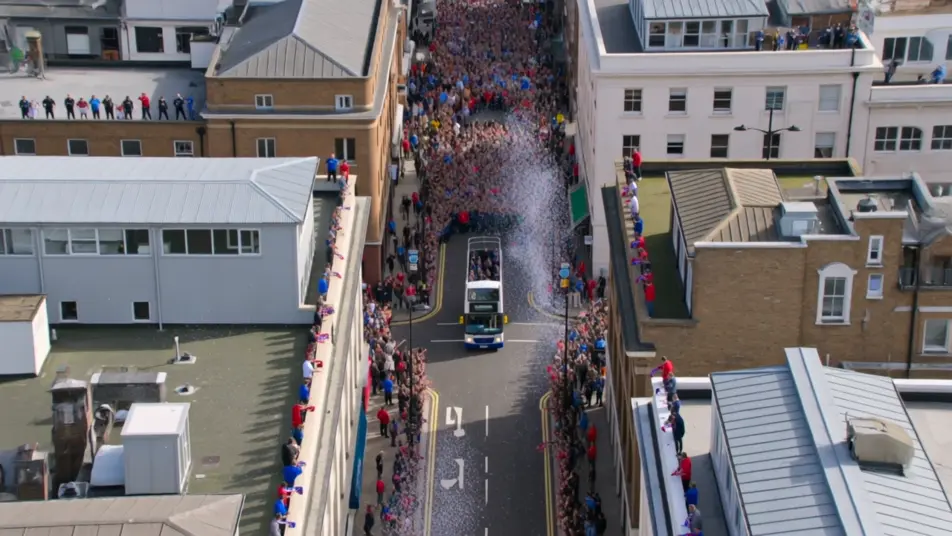
Beschreiben Sie die Cape Verde WM-Szene, die Sie möchten, in einfachen Worten.
Morphic generiert in Sekunden einen filmreifen Clip auf Ihrer Canvas.
Passen Sie den Prompt an, generieren Sie Varianten und laden Sie die Aufnahme herunter oder teilen Sie sie.
Cinematic time-freeze short film for any scene

Dramatize any text conversation into a cinematic multi-shot video.
One image to a 9-scene cinematic video.
Drop in a photo of yourself. Get a 12-second cinematic movie with animation and a matched soundtrack.

Share a scene description with character references. Get a full storyboard with shot angles and mood.

Feed in a single image. Get 9 cinematic beats laid out as a 3x3 storyboard grid.
Cape Verde Torwart KI-Video-Maker
Erstellen Sie Cape Verde Torwart-Videos mit KI: inszenieren Sie die Fingerspitzenparade, den Doppelstopp und den Jubel nach dem Zu-null-Spiel, fügen Sie Kommentar und eine Inselhymne hinzu.
Cape Verde Fußball KI-Video-Maker
Erstellen Sie Cape Verde Fußball-Videos mit KI: Plätze auf der Hafenmauer, Watch-Partys auf der Straße, Diaspora-Bars, Insel-Fanstolz. Fügen Sie Musik und Kommentar hinzu.
Cape Verde Anime Video-Maker
Erstellen Sie einen Cape Verde Anime Edit mit KI: inszenieren Sie die Sieben-Paraden-Nacht, den Ausgleich und die Watch-Party am Hafen, fügen Sie Kommentar und Musik hinzu. ausprobieren.
Cape Verde KI-Videos
Erstellen Sie Cape-Verde-Videos (Cabo Verde) mit KI: Inselfußballstolz, Fogo-Vulkanwanderungen, Morna-Nächte in Mindelo, Hafenfeiern. loslegen.
Starten Sie noch heute kostenlos, mit der Option, jederzeit zu upgraden oder zu kündigen.
Basic
2400 monatliche Credits
1 Nutzer
Alle Modelle
Workflows
Standard
3625 monatliche Credits
1 Nutzer
Alle Modelle
Workflows
Pro
6350 gemeinsame monatliche Credits
1 Nutzer
Alle Modelle
Workflows
Max
24650 gemeinsame monatliche Credits
1 Nutzer
Alle Modelle
Workflows
Enterprise
Für höhere Limits
Individuell
Preis- und Abrechnungsbedingungen

Free
Zum Ausprobieren
$0
dauerhaft kostenlos