Direct the ghoul in your browser with Morphic's ghoul AI video generator. Generate a hunched feeder crouched over a fresh grave or a pack loping across moonlit dunes, hold one design with Character Lineup, score it with Music, and cut the beats in the Canvas.

Ghoul forms you can create

Ghoul scenes you can direct

Feeding at the grave

A graveyard feeder crouched over broken earth in a moonlit cemetery, head snapping up toward the camera, cold blue light, mist between the headstones, a slow push-in that halts as it turns.

Prompt bearbeiten

The desert lope

A desert hunter loping on all fours across moonlit dunes, sand hissing off its stride, drool trailing in the wind, a low tracking shot running parallel across the rippling sand.

Prompt bearbeiten

In the flooded tunnel

A blind tunnel-dweller groping toward a dropped torch on wet stone, milky eyes catching no light, water dripping, a static low shot as the flame flickers across the pallid skin.

Prompt bearbeiten

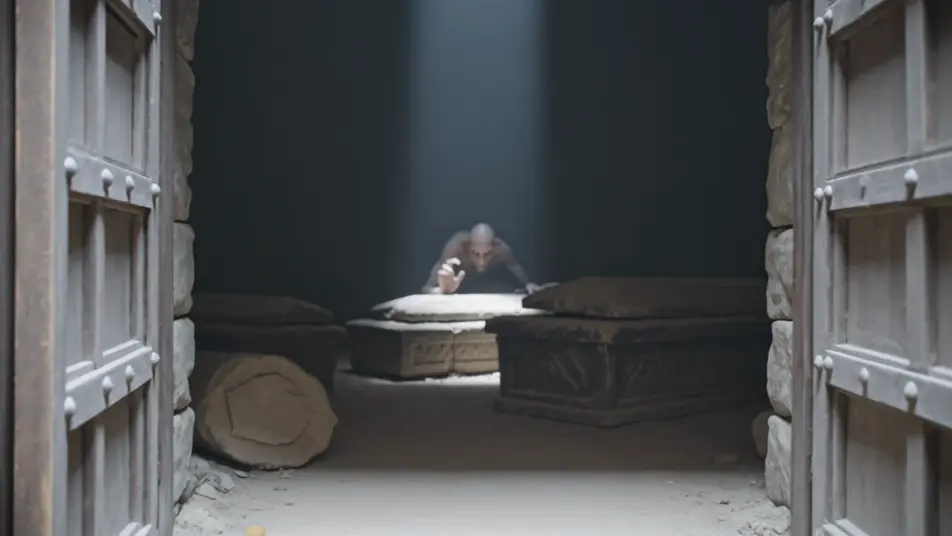
The wait in the crypt

A crypt-lurker crouched motionless among stone sarcophagi, one claw tapping a lid, a thin shaft of grey light finding only its eyes, dust hanging still, a slow creep-in through the vault door.

Prompt bearbeiten

ghoul-Videos in drei Schritten erstellen

  1. 01

    Beschreiben Sie Ihre ghoul-Szene

    Beschreiben Sie die ghoul-Szene, die Sie möchten, in einfachen Worten.

  2. 02

    Video generieren

    Morphic generiert in Sekunden einen filmreifen Clip auf Ihrer Canvas.

  3. 03

    ghoul-Video verfeinern

    Passen Sie den Prompt an, generieren Sie Varianten und laden Sie die Aufnahme herunter oder teilen Sie sie.

Verwandte Workflows

Das könnte Ihnen auch gefallen

Einfache Preise

Starten Sie noch heute kostenlos, mit der Option, jederzeit zu upgraden oder zu kündigen.

Basic

$9/ Monat
abgerechnet als $0 pro Jahr

900 monatliche Credits

1 Nutzer

Alle Modelle

Workflows

Standard

$24/ Monat
abgerechnet als $0 pro Jahr

3200 monatliche Credits

1 Nutzer

Alle Modelle

Workflows

Pro

$45/ Monat
abgerechnet als $0 pro Jahr

6200 gemeinsame monatliche Credits

1 Nutzer

+ bis zu 4 weitere gegen Aufpreis

Alle Modelle

Workflows

Pro Max

$170/ Monat
abgerechnet als $0 pro Jahr

24000 gemeinsame monatliche Credits

1 Nutzer

+ bis zu 9 weitere gegen Aufpreis

Alle Modelle

Workflows

Enterprise

Für höhere Limits

Individuell

Preis- und Abrechnungsbedingungen

Unbegrenzte Credits
Individuelle Platzlimits
Alle Modelle
Workflows
Pricing Gradient

Free

Zum Ausprobieren

$0

dauerhaft kostenlos

Bis zu 20 Credits
Nur 1 Nutzer
Eingeschränkte Modelle
Workflows

Häufig gestellte Fragen

Where can I make ghoul videos with AI?
You can create ghoul scenes directly in your browser on Morphic. Open the Text to Video tool, describe the register, the body, and the lighting, and Morphic produces the clip. No installs and no specialist software needed.
What kinds of ghoul scenes work best with AI video?
Low, hunched, feeding-and-hunting moments read best: a feeder crouched over a grave, a hunter loping across dunes, a blind dweller in a tunnel. Cemeteries, catacombs, and deserts under cold moonlight or a single flame sell the ghoul far better than a bright open scene.
How do I keep the ghoul consistent across scenes?
Use the Character Lineup workflow to lock the skin tone, the claw and tooth shape, the eyes, and the build, then reference that character card in every shot prompt. Morphic preserves the same ghoul across the graveyard, the tunnel, and the crypt so a pack or a single hunter stays recognisable.
How do I write a good prompt for a ghoul scene?
Name the register, then the body and the sickly light together: "hunched grey ghoul feeding over a broken grave, dirt-caked claws, distended mouth, cold moonlight sinking the eyes to black, slow push-in that halts as it turns." Anchoring the crouch and the single cold or flickering source is what makes the shot read as a ghoul rather than a shambling corpse.
Can I add narration and music to my ghoul videos?
Yes. The Music tool produces an original score, and low wet percussion with skittering high textures sits cleanly under a feeding scene while a driving low pulse suits the pack lope. The Speech tool can add guttural snarls or a horrified narration in the voice you choose to publish a complete short.
What visual style works best for a ghoul video?
Sickly, desaturated palettes with cold moonlight or a single guttering flame and heavy underlighting read most convincingly. Keep the ghoul low and hunched, shoot from ground level where you can, and let mist, dust, and darkness hide as much as they reveal.