Stage the lotus-born boy god in your browser with Morphic's Nezha AI video generator. Generate Nezha scenes like the Third Lotus Prince riding his Wind-Fire Wheels, the duel with Ao Bing beneath the East Sea, and his rebirth from a lotus flower, and pair them with the Speech and Music tools to voice his fearless taunts and score the fight with surging strings and drums. Stitch the moments into a Chinese mythology episode on the Canvas.

Nezha characters you can direct

Nezha scenes you can stage

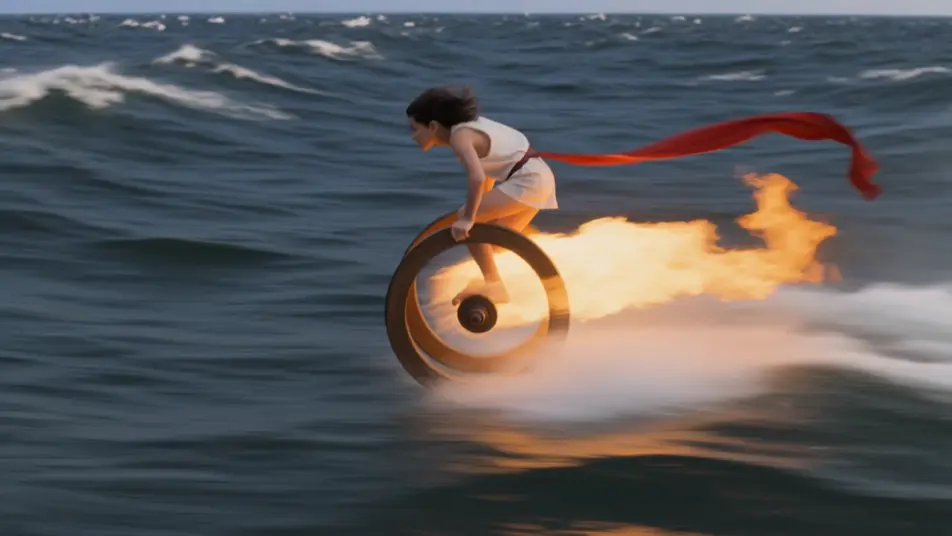
Nezha rides the Wind-Fire Wheels

The boy god skims low over a heaving sea on his burning wheels, red sash streaming behind him, spray kicking up in twin arcs and fire trailing his path. Fast side-tracking chase shot.

Prompt bearbeiten

The duel beneath the East Sea

Deep in the flooded dragon palace, Nezha and Ao Bing clash amid coral pillars, ring against spear, shockwaves rippling the water and knocking loose a storm of pearls. Slow underwater orbit shot.

Prompt bearbeiten

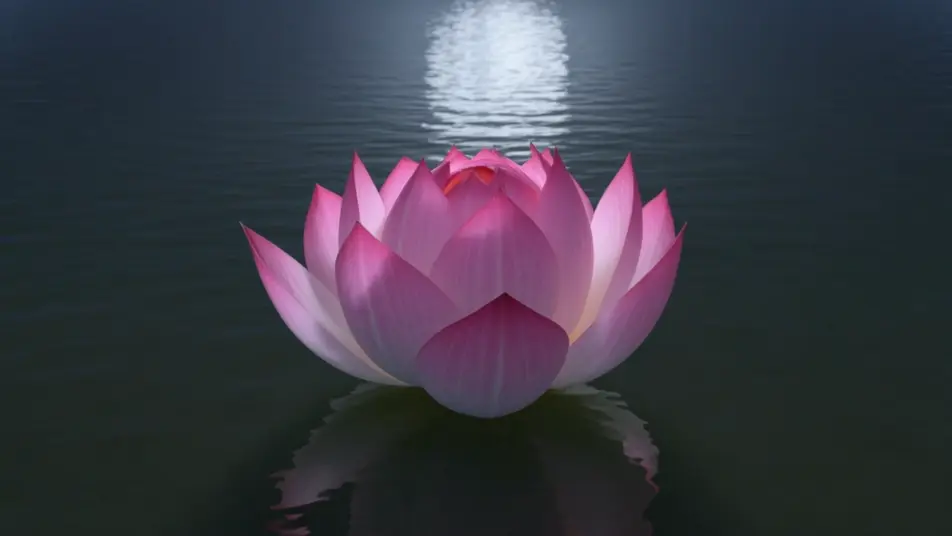
Rebirth from the lotus

Over a moonlit pond, a great lotus unfolds petal by petal and Nezha rises whole from its heart, soft pink light washing across the water. Slow vertical crane shot rising with him.

Prompt bearbeiten

The Dragon King floods the city

The old Dragon King rises in a towering wall of water above a lantern-lit town, his azure coils blotting out the sky as small Nezha stands his ground on a rooftop. Low-angle wide shot from below.

Prompt bearbeiten

Nezha-Videos in drei Schritten erstellen

  1. 01

    Beschreiben Sie Ihre Nezha-Szene

    Beschreiben Sie die Nezha-Szene, die Sie möchten, in einfachen Worten.

  2. 02

    Video generieren

    Morphic generiert in Sekunden einen filmreifen Clip auf Ihrer Canvas.

  3. 03

    Nezha-Video verfeinern

    Passen Sie den Prompt an, generieren Sie Varianten und laden Sie die Aufnahme herunter oder teilen Sie sie.

Verwandte Workflows

Das könnte Ihnen auch gefallen

Einfache Preise

Starten Sie noch heute kostenlos, mit der Option, jederzeit zu upgraden oder zu kündigen.

Basic

$0/ Monat
abgerechnet als $0 pro Jahr

900 monatliche Credits

1 Nutzer

Alle Modelle

Workflows

Standard

$0/ Monat
abgerechnet als $0 pro Jahr

3200 monatliche Credits

1 Nutzer

Alle Modelle

Workflows

Pro

$0/ Monat
abgerechnet als $0 pro Jahr

6200 gemeinsame monatliche Credits

1 Nutzer

+ bis zu 4 weitere gegen Aufpreis

Alle Modelle

Workflows

Pro Max

$0/ Monat
abgerechnet als $0 pro Jahr

24000 gemeinsame monatliche Credits

1 Nutzer

+ bis zu 9 weitere gegen Aufpreis

Alle Modelle

Workflows

Enterprise

Für höhere Limits

Individuell

Preis- und Abrechnungsbedingungen

Unbegrenzte Credits
Individuelle Platzlimits
Alle Modelle
Workflows
Pricing Gradient

Free

Zum Ausprobieren

$0

dauerhaft kostenlos

Bis zu 20 Credits
Nur 1 Nutzer
Eingeschränkte Modelle
Workflows

Häufig gestellte Fragen

Where can I make Nezha videos with AI?
You can create Nezha scenes directly in your browser on Morphic. Open the Text to Video tool, describe the moment from Nezha’s legend you want, and Morphic produces the clip. No installs and no specialist software needed.
What kinds of Nezha scenes work best with AI video?
Single-shot moments with strong composition tend to work best: Nezha riding the Wind-Fire Wheels, the duel with Ao Bing beneath the East Sea, his rebirth from the lotus, or the Dragon King flooding the city. Anchor each Nezha scene to a specific moment, location, time of day, and mood.
How do I keep Nezha consistent across scenes?
Use the Character Lineup workflow to lock in Nezha’s look, then reference that character card in every prompt. Morphic preserves the two topknots, the red sash, and the Wind-Fire Wheels so a Nezha series feels continuous from shot to shot.
How do I write a good prompt for a Nezha scene?
Name the form, the moment, the setting, the lighting, and the camera direction. For example: "Nezha on his Wind-Fire Wheels skimming over a stormy sea, Universe Ring blazing, red sash streaming, moonlight and spray, fast side-tracking shot." The more specific your imagery, the closer the output matches your imagination.
Can I add narration and music to my Nezha videos?
Yes. The Speech tool generates a voiceover from your script in the voice you choose, so you can give Nezha his fearless taunts, and the Music tool produces an original soundtrack of surging strings and drums to score the fight. Layer them onto your generated video to publish a complete Nezha episode.
What visual style works best for Nezha videos?
Three styles consistently land. Stylized 3D animation suits the fast Wind-Fire Wheels chases and the lotus rebirth. Ink-and-wash painting fits the quieter temple and master scenes. Cinematic photoreal lifts the undersea duel and the flooded-city sequences. Name the style directly in the prompt and Morphic will hold it across the series.