Slup legt sich in eine Dünung
Tiefe bugmontierte Aufnahme eines kleinen Segelboots, das sich hart in eine rollende Dünung legt, Gischt bricht über die Reling in die Linse, das Segel spannt, der graue Horizont kippt mit jeder Welle.
Prompt bearbeiten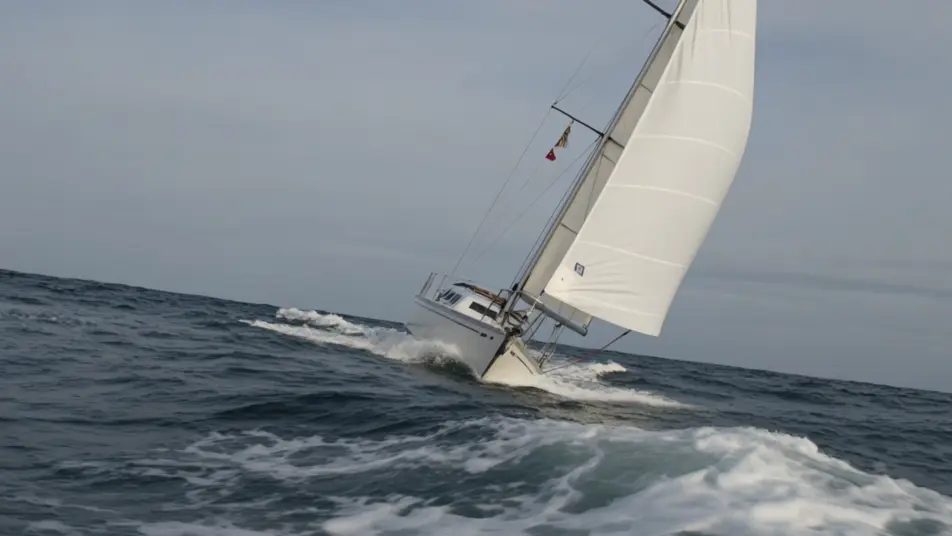
Segeln Sie Ihren eigenen Hochseefilm im Browser mit Morphics KI-Videogenerator für Ozean-Abenteuer. Generieren Sie eine Slup, die sich in eine Dünung legt, einen Taucher im blauen Licht über einem Wrack oder ein Forschungsschiff, das durch Nebel bricht. Erzählen Sie mit Speech, untermalen Sie mit Music, dann fügen Sie es im Canvas zusammen.
Tiefe bugmontierte Aufnahme eines kleinen Segelboots, das sich hart in eine rollende Dünung legt, Gischt bricht über die Reling in die Linse, das Segel spannt, der graue Horizont kippt mit jeder Welle.
Prompt bearbeitenWeite Unterwasseraufnahme eines Tauchers, der in einer Säule aus blauem Licht schwebt, das von der Oberfläche herabströmt, die Silhouette eines Wracks darunter, Partikel treiben durch den Strahl, langsam aufsteigende Blasen.
Prompt bearbeiten
Langsame Verfolgungsaufnahme eines Forschungsschiffs, das durch tiefen Morgennebel schiebt, die Bugwelle leuchtet in flachem goldenem Licht, Möwen kreisen darüber, die Horizontlinie verweicht im Dunst.
Prompt bearbeiten
Fixierte Aufnahme aus einer abgedunkelten Brücke durch die strömenden Fenster hinaus, während eine Welle über den Bug steigt, die Instrumente glühen, Regen hämmert gegen das Glas, der Horizont stampft wild.
Prompt bearbeiten
Beschreiben Sie die Ozean-Abenteuer-Szene, die Sie möchten, in einfachen Worten.
Morphic generiert in Sekunden einen filmreifen Clip auf Ihrer Canvas.
Passen Sie den Prompt an, generieren Sie Varianten und laden Sie die Aufnahme herunter oder teilen Sie sie.
Cinematic time-freeze short film for any scene

Dramatize any text conversation into a cinematic multi-shot video.
One image to a 9-scene cinematic video.
Drop in a photo of yourself. Get a 12-second cinematic movie with animation and a matched soundtrack.

Share a scene description with character references. Get a full storyboard with shot angles and mood.

Feed in a single image. Get 9 cinematic beats laid out as a 3x3 storyboard grid.
Dschungelabenteuer KI-Videos
Erstellen Sie kraftvolle KI-Dschungelabenteuer-Videos mit Morphic. Erzeugen Sie einzigartige, filmische Dschungelabenteuer-Szenen für jedes Projekt in Sekunden.
Schiffbruch-Überleben KI-Videos
Erstellen Sie eindrucksvolle KI-Schiffbruch-Überleben-Videos mit Morphic. Erzeugen Sie einzigartige, filmische Schiffbruch-Überleben-Szenen für jedes Projekt in Sekunden.
U-Boot-Film KI-Videos
Erstellen Sie kraftvolle KI-U-Boot-Film-Videos mit Morphic. Erzeugen Sie einzigartige, cinematische U-Boot-Film-Szenen für jedes Projekt in Sekunden.
Wildnis-Survival KI-Videos
Erstellen Sie eindrucksvolle KI-Wildnis-Survival-Videos mit Morphic. Erzeugen Sie einzigartige, cineastische Wildnis-Survival-Szenen für jedes Projekt in Sekunden.
Starten Sie noch heute kostenlos, mit der Option, jederzeit zu upgraden oder zu kündigen.
Basic
2400 monatliche Credits
1 Nutzer
Alle Modelle
Workflows
Standard
3625 monatliche Credits
1 Nutzer
Alle Modelle
Workflows
Pro
6350 gemeinsame monatliche Credits
1 Nutzer
Alle Modelle
Workflows
Max
24650 gemeinsame monatliche Credits
1 Nutzer
Alle Modelle
Workflows
Enterprise
Für höhere Limits
Individuell
Preis- und Abrechnungsbedingungen

Free
Zum Ausprobieren
$0
dauerhaft kostenlos