> For the complete documentation index, see [llms.txt](https://morphic.com/docs/llms.txt). Markdown versions of documentation pages are available by appending `.md` to page URLs; this page is available as [Markdown](https://morphic.com/docs/kr/getting-started/contextual-search.md).

# 문맥 검색

Morphic의 상황별 검색을 사용하면 키보드 단축키로 플랫폼의 모든 항목을 찾아 액세스할 수 있습니다. Mac에서는 'Cmd+K', Windows에서는 'Ctrl+K'로 열어 파일, 에셋, 워크플로 등 플랫폼 전반을 검색하세요.

Morphic에서 상황별 검색이 작동하는 방식은 다음과 같습니다:

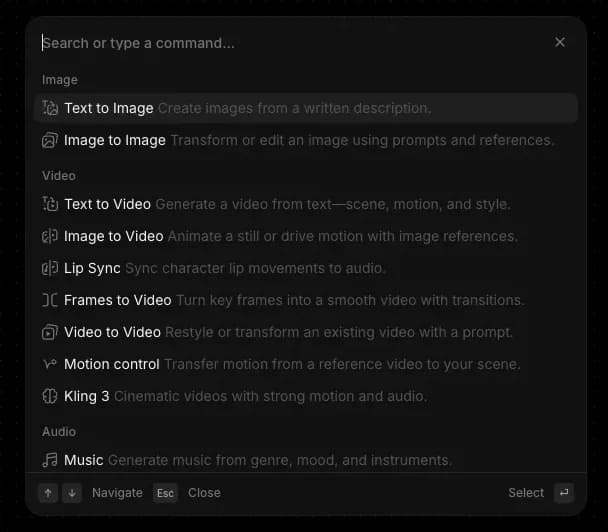
<figure><img src="/files/6eb49128f1e175969a49d8e587f9f9ebab4f982b" alt=""><figcaption><p>상황별 검색(cmd/ctrl + k)</p></figcaption></figure>

1. Mac에서는 'Cmd+K', Windows에서는 'Ctrl+K'로 Morphic 어디에서나 상황별 검색을 열 수 있습니다. 대시보드에서는 왼쪽 사이드바 상단의 '검색'을 클릭해도 같은 메뉴가 열립니다.
2. Morphic에 익숙해질 때는 이 기능을 활용하고, 속도가 필요할 때는 계속 의지하세요. 신규 사용자는 부담 없이 둘러보는 방법으로 여기고, 숙련 사용자는 키보드를 벗어나지 않고 흐름을 유지하는 데 사용합니다.
3. 메뉴는 Morphic에서 현재 있는 위치에 맞게 조정됩니다. 캔버스에서는 생성 및 편집 도구가 표시됩니다. 대시보드에서는 정리, 파일, 계정 옵션이 표시됩니다. 어떤 화면에서든 열어 그 순간에 가장 관련 있는 명령을 확인하세요.
4. 키워드를 입력해 모든 항목을 검색하세요. 결과에는 파일, 프로젝트, 워크플로, 에셋, 모델 및 일치하는 명령이 포함됩니다.
5. 키보드로 탐색하세요. 화살표 키로 결과를 이동하고, 'Enter'로 선택하며, 'Esc'로 이전으로 돌아가거나 메뉴를 닫습니다.

이것이 Morphic의 상황별 검색 기능을 사용하는 방법입니다. 하나의 단축키로 플랫폼의 모든 것과 연결되어, 흐름을 끊지 않고 찾고, 탐색하고, 작업할 수 있습니다.

***

문제가 있거나 궁금한 점이 있으시면 언제든지 연락해 주세요. 기꺼이 도와드리겠습니다. 다음 주소로 문의해 주세요: [**support@morphic.com**](mailto:support@morphic.com)**.**


---

# Agent Instructions
This documentation is published with GitBook. GitBook is the documentation platform designed so that both humans and AI agents can read, navigate, and reason over technical content effectively. Learn more at gitbook.com.

## Querying This Documentation
If you need additional information that is not directly available in this page, you can query the documentation dynamically by asking a question.

Perform an HTTP GET request on the current page URL with the `ask` query parameter, and the optional `goal` query parameter:

```
GET https://morphic.com/docs/kr/getting-started/contextual-search.md?ask=<question>&goal=<endgoal>
```

`ask` is the immediate question: it should be specific, self-contained, and written in natural language.
`goal` is optional and describes the broader end goal you are ultimately trying to accomplish on behalf of the user. GitBook uses it to tailor the answer towards what is most useful for that goal.

The response will contain a direct answer to the question and relevant excerpts and sources from the documentation.

Use this mechanism when the answer is not explicitly present in the current page, you need clarification or additional context, or you want to retrieve related documentation sections.