Birden Çok Görsel Referansı
Morphic'teki Çoklu görsel referansı, tek bir istemle benzersiz bir kompozisyon (görsel) oluşturmak için birden fazla görselden özneler, pozlar, stiller ve sahneler seçmenize olanak tanır.
İşte Morphic'te Çoklu Görsel Referansı nasıl kullanacağınıza dair kısa bir eğitim:
- Canvas'ta görseller yükleyin veya oluşturun
- Komut çubuğunda '+ References' seçeneğine tıklayın
- Referans görsellerinizi ekleyin. Panel, seçilen modelin kaç tane kabul ettiğini gösterir
- 'Canvas üzerinde Seç', 'Varlıklardan Seç' veya 'Kendi görsellerinizi içe aktarın' seçeneklerini kullanabilirsiniz.
- İstediğiniz çıktı için komutunuzu yazın.
- Birden fazla öğeye referans verebilirsiniz. Örnek komut: 1. görseldeki çocuk ve 2. görseldeki köpek, 3. görseldeki mavi uçan büyülü halıya binerek gülümsüyor ve şehri keşfediyor.
- Komut çubuğundaki mavi düğmeye tıklayın.
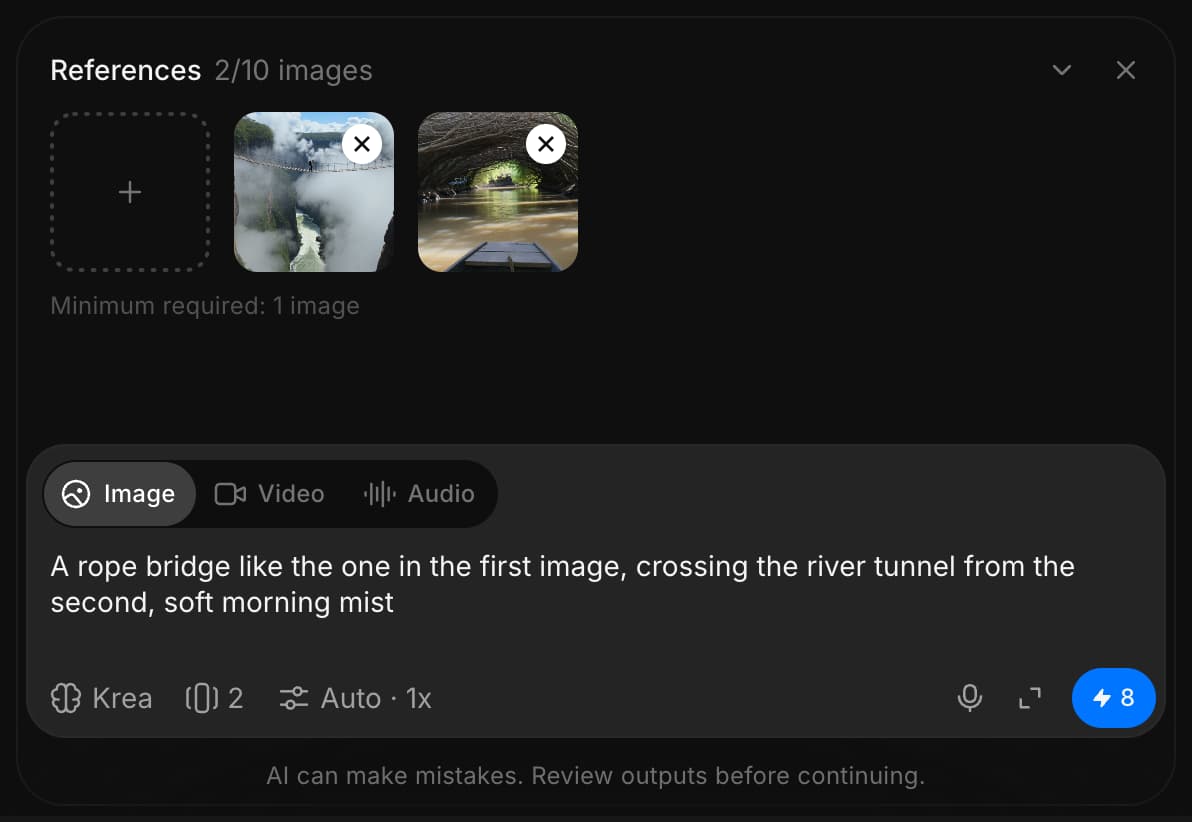
Morphıc'te Çoklu görsel referansını bu şekilde kullanırsınız. Tek bir komutla benzersiz bir kompozisyon (görsel) oluşturmak için birden fazla referanstaki öğeleri birleştirmenin hızlı ve yaratıcı bir yoludur.
Herhangi bir sorun yaşarsanız ya da sorularınız olursa, bizimle iletişime geçmekten çekinmeyin. Yardım etmeye memnuniyet duyarız. Bize şu adresten yazın: support@morphic.com.
Görüntüden Görüntüye
Morphic'teki Görselden Görsele özelliği, yalnızca bir istem kullanarak mevcut bir görseli ince ayarlamanıza, stilini değiştirmenize veya uyarlamanıza olanak tanır.
Video
Metin, görseller, kareler veya referanslardan video oluşturun ve dudak senkronu ile odak modunu kullanarak ince ayar yapın.