Un hôte qui s’installe pour la prise
Plan moyen fixe sur un hôte penché vers un micro neutre, casque sur les oreilles, lumière chaude de studio. La pièce reste douce et tamisée derrière lui, vêtements unis sans motif.
Modifier le prompt
Un podcast n’a pas besoin d’un studio loué pour avoir de l’allure. Morphic génère un hôte au micro, deux voix qui se répondent à table, ou un travelling dans une lumière chaude de cabine. Habillez l’ensemble avec Music, ajoutez une voix avec Speech, puis montez l’épisode sur Compose.
Plan moyen fixe sur un hôte penché vers un micro neutre, casque sur les oreilles, lumière chaude de studio. La pièce reste douce et tamisée derrière lui, vêtements unis sans motif.
Modifier le promptLent plan à deux sur des invités qui se répondent à table, micros neutres entre eux, mains animées et rire facile. Lumière chaude et intime, vêtements unis sans motif.
Modifier le prompt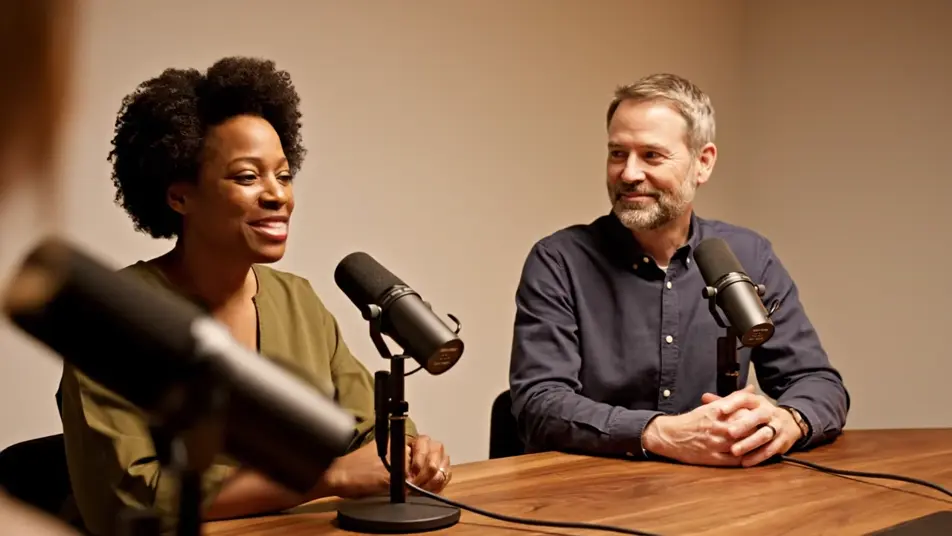
Cadre rapproché sur un invité qui éclate de rire au micro, tête renversée, dans un studio installé au cœur d’un mas provençal. Les mains se lèvent, la joie occupe l’écran, pierres apparentes en arrière-plan.
Modifier le prompt
Lent travelling avant à travers un studio installé dans un ancien atelier lyonnais, entre lampes chaudes et micros neutres. Les murs de pierre virent à l’ambre autour de deux hôtes en pleine conversation.
Modifier le prompt
Écrivez la scène vidéo de podcast que vous voulez, en mots simples.
Morphic génère votre clip cinématographique en quelques secondes.
Ajustez le prompt, régénérez des variantes, téléchargez ou partagez le plan.

Dramatiser toute conversation textuelle en une vidéo cinématographique multi-plans.
Court-métrage cinématographique avec effet de gel du temps pour toute scène

Générer une carte de titre de film professionnelle à partir de zéro, avec animation cinématographique optionnelle.
Photo of any real-estate becomes a cinematic renovation timelapse video with construction SFX and music.
Une image pour une vidéo cinématographique en 9 scènes.
Déposez une photo de vous. Obtenez un film cinématique de 12 secondes avec animation et une bande sonore assortie.
Vidéos IA de table ronde
Créez une vidéo de table ronde sans salle ni équipe. Générez des intervenants en pleine discussion, un animateur incisif, un public attentif. Lancez le débat.
Publicités vidéo LinkedIn IA
Créateur de publicité vidéo LinkedIn sans équipe ni tournage. Générez un expert convaincant ou une équipe au travail, montez pour le fil, publiez aujourd’hui.
Vidéos IA de l'histoire du fondateur
Vidéos de fondateur générées par IA. Les mains sur l'ouvrage dans un atelier des débuts, la personne derrière le produit.
Vidéos de pitch investisseur IA
Un pitch investisseur porté par le fondateur, pas par le deck. Générez la conviction, l'équipe et le produit, puis montez-le.
Commencez gratuitement dès aujourd'hui, avec la possibilité de mettre à niveau ou d'annuler à tout moment.
Basic
2400 mensuel crédits
1 utilisateur uniquement
Tous les modèles
Workflows
Standard
3625 mensuel crédits
1 utilisateur uniquement
Tous les modèles
Workflows
Pro
6350 partagé mensuel crédits
1 utilisateur
Tous les modèles
Workflows
Max
24650 partagé mensuel crédits
1 utilisateur
Tous les modèles
Workflows
Enterprise
Pour des limites plus élevées
Personnalisé
conditions de tarification et de facturation

Free
Pour expérimenter
$0
gratuit pour toujours