AI box braids

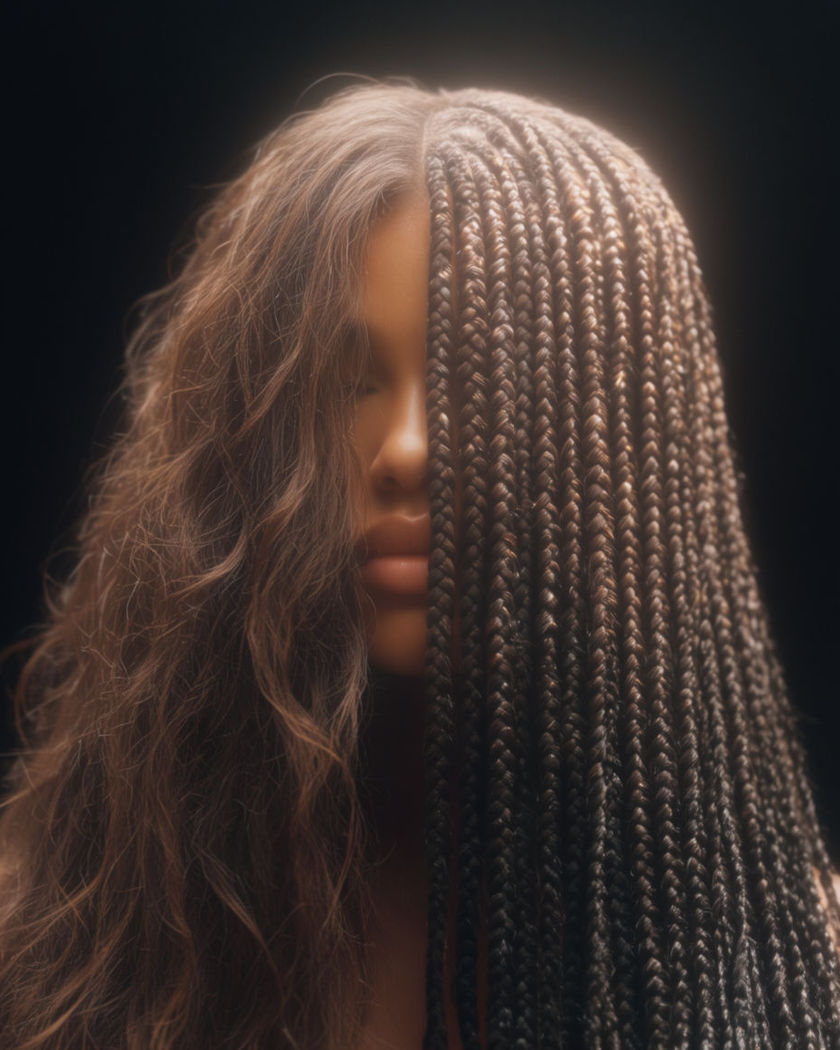
A portrait where loose hair resolves into long box braids in one continuous shot, the face held steady so only the hairstyle changes.

A portrait half loose hair and half long box braids parted in clean squares under soft studio light

Box braids examples

Studio transformation wide

이 프롬프트 사용

A wide shot holds a seated figure as loose hair becomes box braids. a wide studio shot of a person seated on a stool facing the camera, their loose hair resolving over the shot into long box braids parted in clean squares, the face and posture held steady, soft even light on a plain seamless backdrop, calm portrait mood

Braids in the breeze

이 프롬프트 사용

A wide shot shows long braids lifting and swaying in a light wind. a wide outdoor portrait of a person with long box braids as a light breeze lifts and sways the braids across the shoulders, the ends with small beads catching the sun, a soft green park blurred behind, warm natural light, relaxed easy motion

Turning head, braids swing

이 프롬프트 사용

The head turns side to side and the long braids swing and settle. a person with long box braids turning their head slowly from one side to the other so the braids swing out and settle against the shoulders, the beads at the ends clicking softly together, even studio light catching the length, plain backdrop, natural relaxed motion

Two looks, same face

이 프롬프트 사용

A split moment shows loose hair on one side and braids on the other. a front portrait where the hair reads as loose natural texture on the left half and finished long box braids on the right half of the same head, the face and expression identical across both, soft even studio light, plain grey backdrop, clean comparison framing

Loose hair into braids

이 프롬프트 사용

Loose hair resolves smoothly into long box braids while the face holds still. a close front portrait of a person with loose natural hair, the hair smoothly resolving over the shot into long neat box braids parted in clean square sections, the face, skin and calm expression staying exactly the same, soft even studio light, plain grey backdrop

Scalp parts close up

이 프롬프트 사용

A tight shot holds on the neat square parts across the scalp. an extreme close shot holding on the crown of a head with box braids, showing the neat square sections parted cleanly across the scalp and the braids starting tight at the root, soft raking light picking out the pattern, shallow depth of field, crisp detail

Two looks side by side

이 프롬프트 사용

A wide comparison holds loose hair and box braids on the same face. a wide clean comparison shot of the same person shown with loose natural hair and then with long box braids, the face, light and framing identical between the two so only the hairstyle changes, soft even studio light, plain grey backdrop

Braids swept back reveal

이 프롬프트 사용

A hand sweeps finished braids back off the face for a clean reveal. a person with finished long box braids sweeping them back off the face with one hand and looking up into the camera, the neat square parts along the scalp visible, a small confident smile, soft warm portrait light, plain backdrop, clean style reveal

Reveal turn to camera

이 프롬프트 사용

A figure with braids turns from profile to face the camera for the reveal. a wide shot of a person with finished long box braids standing in profile then turning smoothly to face the camera, sweeping the braids back off the shoulder, the clean square parts catching a soft key light, plain warm backdrop, confident style reveal

Gathering braids into a bun

이 프롬프트 사용

The braids are gathered up and twisted into a high bun. a person with long box braids gathering them up with both hands and twisting them into a high bun on top of the head, the square parts still visible at the front, a satisfied glance to the camera, soft warm light, plain backdrop, smooth natural movement

Generate your own box braids

시작점을 고르고 원하는 대로 수정한 뒤 Morphic에서 생성하세요.

생성하기

간단한 가격

오늘 무료로 시작하고 언제든지 업그레이드하거나 취소할 수 있습니다.

Basic

$19/ 월
청구 금액 $0 년

2400 월간 크레딧

1 명 전용

모든 모델

워크플로

Standard

$24/ 월
청구 금액 $0 년

3625 월간 크레딧

1 명 전용

모든 모델

워크플로

Pro

$45/ 월
청구 금액 $0 년

6350 공유 월간 크레딧

1 사용자

+ 최대 4 명 추가 비용으로 추가 가능

모든 모델

워크플로

Max

$170/ 월
청구 금액 $0 년

24650 공유 월간 크레딧

1 사용자

+ 최대 9 명 추가 비용으로 추가 가능

모든 모델

워크플로

Enterprise

더 높은 제한

사용자 정의

가격 및 청구 조건

대용량 크레딧
맞춤형 시트 제한
모든 모델
워크플로
Pricing Gradient

Free

가볍게 사용해보기

$0

영구 무료

최대 20 크레딧
1명 전용
일부 모델
워크플로

자주 묻는 질문

Where can I make box braids effect videos with AI?
You can create box braids videos directly in your browser on Morphic. Upload a portrait, describe the braids you want, and Morphic generates the change as one continuous shot, resolving loose hair into box braids while the face stays the same. No salon visit and no editing needed.
How do I keep my face the same in a box braids effect video?
Upload a clear front-facing photo and hold the face steady with reference sheets so Morphic changes only the hair. Saying in the prompt that the face, skin and expression stay exactly the same is what keeps you recognisable while the box braids resolve in.
What kinds of box braids shots work best with AI video?
A straight-on portrait where loose hair resolves into braids reads cleanest, and a slow head turn shows the braids swinging and settling. A side-by-side comparison of loose hair and box braids on the same face is a strong before-and-after for social.
How do I write a good prompt for a box braids effect video?
Name the starting hair, the finished braids, their length and parting, and say the face holds steady throughout. Add the light and a plain backdrop. The clearer the held face and the neat square parts, the more convincing the box braids Morphic returns.
Can I try different lengths or a bun?
Yes. Describe shoulder-length or waist-length braids, or ask for them gathered into a high bun, and generate each as its own clip. Trying several looks on the same photo is a quick way to compare before you commit to one.
Do I need video editing experience to make a box braids effect video?
No. Morphic runs in your browser and you direct it with plain-language prompts. If you can describe the braids you want, you can produce the video and export a vertical cut. The prompts on this page are written so anyone can paste and run them.