First flight over the treeline
A wide shot of a young reindeer character taking a first wobbly leap off a snowy ridge, the Northern Lights glowing above the treeline.
프롬프트 편집
Create animated Christmas stories for kids in Morphic: write an original story or start from a simple idea, add narration in a voice from Morphic's voice library, and turn it into a short video to watch together. Every story here is an invented original — no existing characters, just a few scenes you build yourself.
A wide shot of a young reindeer character taking a first wobbly leap off a snowy ridge, the Northern Lights glowing above the treeline.
프롬프트 편집A quiet village square at midnight, an original snowman character taking careful steps past dark shop windows under falling snow.
프롬프트 편집
A cozy interior shot from a windowsill, an original toy character watching the first snow of the season drift past warm lamplight.
프롬프트 편집
A warm closing shot of the glowing star character rolling back up a chair, a sofa and a side table to return to the top of the tree.
프롬프트 편집
원하는 Christmas story for kids 장면을 쉬운 말로 작성하세요.
Morphic이 캔버스 위에 영화 같은 클립을 몇 초 만에 생성합니다.
프롬프트를 조정해 다시 생성한 뒤, 원하는 장면을 저장하거나 공유하세요.

캐릭터 참조가 포함된 장면 설명을 공유하세요. 촬영 각도와 분위기가 포함된 전체 스토리보드를 받으세요.

단일 이미지를 입력하세요. 3x3 스토리보드 그리드로 구성된 9개의 시네마틱 비트를 얻으세요.
하나의 이미지에서 9장면의 시네마틱 영상으로.
사진을 올려주세요. 애니메이션과 어울리는 사운드트랙이 포함된 12초 분량의 영화를 만들어 드립니다.
프레임 전반에 걸쳐 완벽한 캐릭터 일관성으로 장면 시퀀스를 계속합니다.
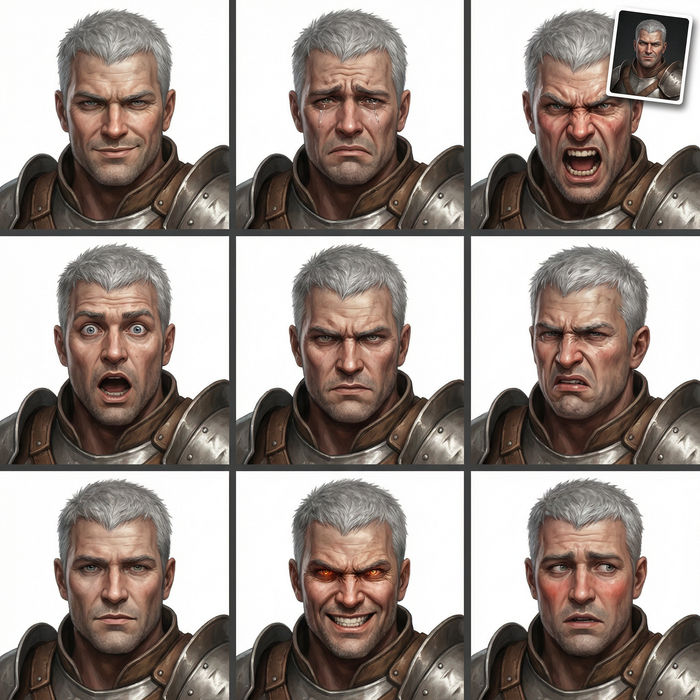
어떤 캐릭터 이미지든 가져와서 단일 참조 시트에 6가지의 뚜렷한 표정을 생성하세요.
크리스마스 캐럴 AI 영상
Morphic으로 크리스마스 캐럴 장면, 스크루지의 회계 사무실, 말리의 유령, 세 정령, 타이니 팀과의 크래칫 가족 만찬, 참회의 아침을 만드세요. 디킨스 영상을 하나의 프롬프트로 생성합니다.
Personalized Santa video message
Create a personalized Santa video message in Morphic. Write what Santa says, pick a voice and generate a festive video for your kids.
AI 비디오 생성기
텍스트로 놀라운 영상 생성. 모든 스타일의 전문 영상.
AI 시즌 인사 영상
고객과 직원을 위한 시즌 인사 영상입니다. 대표이사 신년사, 한 해 하이라이트, 따뜻한 마무리까지 Morphic으로 브랜드에 맞게 만드세요.
오늘 무료로 시작하고 언제든지 업그레이드하거나 취소할 수 있습니다.
Basic
2400 월간 크레딧
1 명 전용
모든 모델
워크플로
Standard
3625 월간 크레딧
1 명 전용
모든 모델
워크플로
Pro
6350 공유 월간 크레딧
1 사용자
모든 모델
워크플로
Max
24650 공유 월간 크레딧
1 사용자
모든 모델
워크플로
Enterprise
더 높은 제한
사용자 정의
가격 및 청구 조건

Free
가볍게 사용해보기
$0
영구 무료