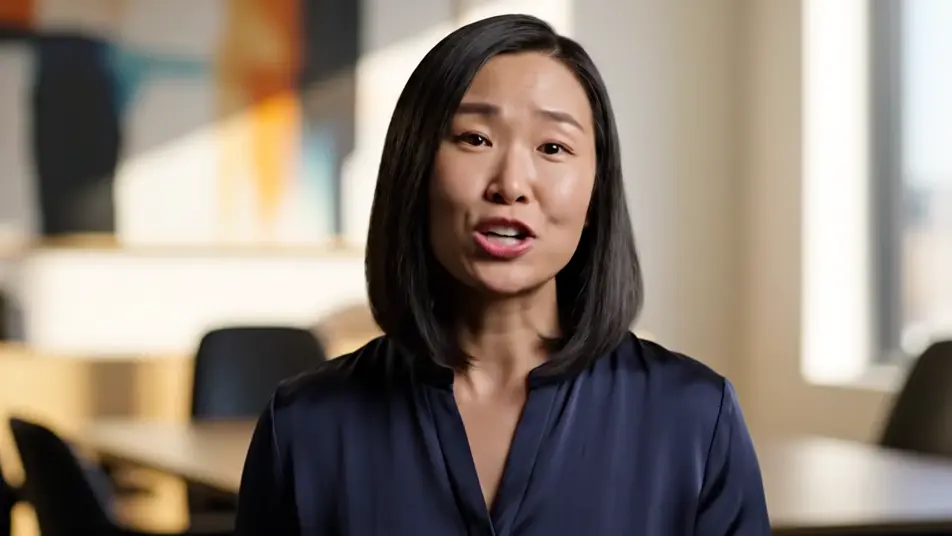
Direct a LinkedIn video ad in your browser with Morphic's LinkedIn video ad generator, no crew and no shoot day. Generate a confident expert to camera, a team at work in a modern office, or a craft close-up framed for the feed. Score it with Music, voice it with Speech, then assemble the final cut on Compose.

Ad openers you can direct

Ad sequences you can stage

A confident expert opener

A tight clean frame on a professional speaking straight to camera in a bright modern office, plain solid-color unprinted clothing, steady eye contact, soft depth behind.

프롬프트 편집

An office in easy motion

A smooth glide through a sleek workspace as colleagues collaborate around tables, screens as abstract color glow only, no interface, plain solid-color unprinted clothing, bright natural light.

프롬프트 편집

A craft close-up sequence

A macro pass over skilled hands working a plain unlabeled object with precision, soft directional light, shallow focus pulling from fingertips to finished detail.

프롬프트 편집

A walking pitch through the floor

A steady tracking shot following a founder through a bright open workspace as they talk to camera, the office alive behind them, plain solid-color unprinted clothing, confident pace.

프롬프트 편집

LinkedIn video ad 영상을 3단계로 만들기

  1. LinkedIn video ad 장면 설명하기

    원하는 LinkedIn video ad 장면을 쉬운 말로 작성하세요.

  2. 영상 생성하기

    Morphic이 캔버스 위에 영화 같은 클립을 몇 초 만에 생성합니다.

  3. LinkedIn video ad 영상 다듬기

    프롬프트를 조정해 다시 생성한 뒤, 원하는 장면을 저장하거나 공유하세요.

간단한 가격

오늘 무료로 시작하고 언제든지 업그레이드하거나 취소할 수 있습니다.

Basic

$9/
청구 금액 $0

900 월간 크레딧

1 명 전용

모든 모델

워크플로

Standard

$24/
청구 금액 $0

3200 월간 크레딧

1 명 전용

모든 모델

워크플로

Pro

$45/
청구 금액 $0

6200 공유 월간 크레딧

1 사용자

+ 최대 4 명 추가 비용으로 추가 가능

모든 모델

워크플로

Pro Max

$170/
청구 금액 $0

24000 공유 월간 크레딧

1 사용자

+ 최대 9 명 추가 비용으로 추가 가능

모든 모델

워크플로

Enterprise

더 높은 제한

사용자 정의

가격 및 청구 조건

대용량 크레딧
맞춤형 시트 제한
모든 모델
워크플로
Pricing Gradient

Free

가볍게 사용해보기

$0

영구 무료

최대 20 크레딧
1명 전용
일부 모델
워크플로

자주 묻는 질문

Where can I make a LinkedIn video ad with AI?
You can create a LinkedIn video ad directly in your browser on Morphic. Open the Text to Video tool, describe the hook shot and the supporting shots, and the model renders them. On Compose you cut them into a feed-ready ad without booking a crew or a shoot day.
Can the ad include the LinkedIn logo or interface?
No, and it should not. AI video invents fake logos and garbled interface elements, so keep every frame free of platform marks and UI. A clean cinematic ad reads as more premium in the feed anyway, and the platform supplies its own chrome around your ad.
How do I add captions to a LinkedIn video ad?
Generate the footage clean, without caption overlays, because AI-rendered text comes out garbled. Add real captions afterward in your editor or through the caption tools in the ads platform. That keeps every word crisp and editable while the generated footage stays reusable.
What length works best for a LinkedIn video ad?
Fifteen to thirty seconds performs best for feed placements. Land the hook in the first two seconds, prove the point with one craft or team shot, and close on the expert. Short confident cuts hold attention where long explainers get scrolled past.
Can I add voiceover and music to my LinkedIn video ad?
Yes. The Speech tool generates a clear professional voiceover in the voice you choose, and the Music tool adds an original bed underneath. Many feed viewers watch muted, so build the ad to work silently and let the audio reward the ones who turn it up.