Direct a podcast video in your browser with Morphic's podcast video generator and give your show a studio it never rented. Generate a host at a plain unbranded microphone, two voices trading a story across the table, or a slow push through warm booth light. Score it with Music, voice it with Speech, then cut the episode visuals on Compose.

Studio moments you can direct

Episode visuals you can stage

A host settling into the take

A steady medium shot of a host leaning into a plain unbranded microphone, headphones on, warm studio light, plain solid-color unprinted clothing, the room soft and dim behind.

프롬프트 편집

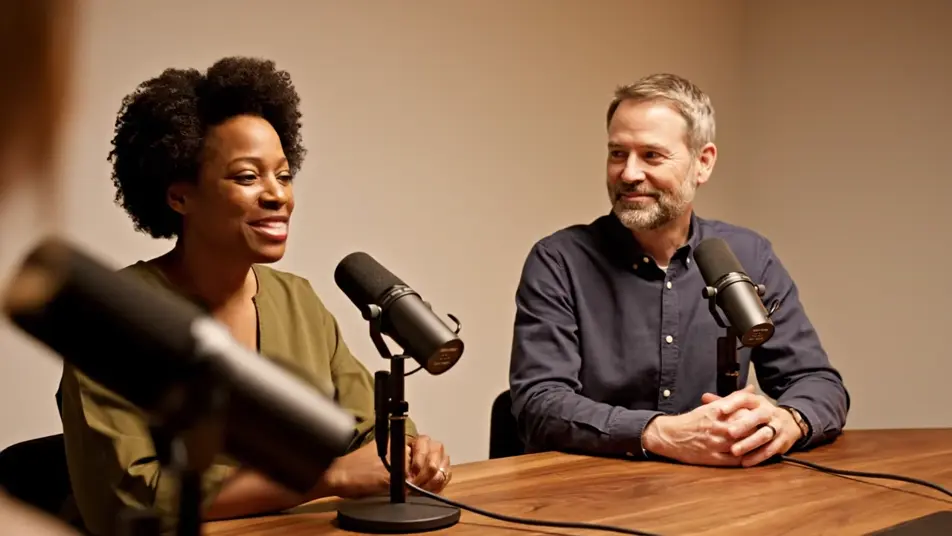
A conversation across the table

A slow two-shot of two people trading a story across a studio table, plain unbranded microphones between them, animated hands and easy laughter, warm intimate light, plain solid-color unprinted clothing.

프롬프트 편집

A laughing guest reaction

A close warm frame of a guest breaking into laughter at a plain unbranded microphone, head tipping back, hands rising, shallow focus on the joy, plain solid-color unprinted clothing.

프롬프트 편집

A slow push through the studio

A gentle push-in across a cozy booth, past warm lamps and plain unbranded microphones toward two hosts deep in conversation, dark walls glowing amber, unhurried mood.

프롬프트 편집

podcast video 영상을 3단계로 만들기

  1. podcast video 장면 설명하기

    원하는 podcast video 장면을 쉬운 말로 작성하세요.

  2. 영상 생성하기

    Morphic이 캔버스 위에 영화 같은 클립을 몇 초 만에 생성합니다.

  3. podcast video 영상 다듬기

    프롬프트를 조정해 다시 생성한 뒤, 원하는 장면을 저장하거나 공유하세요.

간단한 가격

오늘 무료로 시작하고 언제든지 업그레이드하거나 취소할 수 있습니다.

Basic

$9/
청구 금액 $0

900 월간 크레딧

1 명 전용

모든 모델

워크플로

Standard

$24/
청구 금액 $0

3200 월간 크레딧

1 명 전용

모든 모델

워크플로

Pro

$45/
청구 금액 $0

6200 공유 월간 크레딧

1 사용자

+ 최대 4 명 추가 비용으로 추가 가능

모든 모델

워크플로

Pro Max

$170/
청구 금액 $0

24000 공유 월간 크레딧

1 사용자

+ 최대 9 명 추가 비용으로 추가 가능

모든 모델

워크플로

Enterprise

더 높은 제한

사용자 정의

가격 및 청구 조건

대용량 크레딧
맞춤형 시트 제한
모든 모델
워크플로
Pricing Gradient

Free

가볍게 사용해보기

$0

영구 무료

최대 20 크레딧
1명 전용
일부 모델
워크플로

자주 묻는 질문

Where can I make a podcast video with AI?
You can create podcast videos directly in your browser on Morphic. Open the Text to Video tool, describe the studio shots your episode needs, and the model renders them. On Compose you cut the visuals against your episode audio without renting a studio.
How do I add episode titles and captions to a podcast video?
Keep the generated footage free of titles and waveform overlays, since AI-rendered text comes out garbled. Add real episode titles and captions in your editor after the cut. Clean footage also stays reusable, so one studio set can open every episode this season.
What visuals work best for a podcast video?
A host at the mic, a two-shot across the table, a laughing reaction, and a slow studio wide cover most episodes. Cut between them on the rhythm of the conversation. The reaction shot is the one to clip for social, since joy travels further than talk.
How do I keep the studio consistent across episodes?
Reuse the same prompt descriptors every time, the same chairs, plain unbranded microphones, lamp glow, and wall color. Consistent wording renders a consistent room. Save your studio prompt once and every episode opens in the same recognizable space.
Can I add music and voices to my podcast video?
Yes. The Speech tool generates voice tracks in the tones you choose, useful for trailers and intros. The Music tool adds an original theme underneath. Keep the bed low in the mix so the conversation stays the reason anyone pressed play.