What is Kling 4K?
Kling 4K refers to the native 4K video generation capability introduced with the Kling Video V3 model. Developed by Kuaishou Technology, one of China's largest short-video platforms, Kling has gone through several iterations before arriving at this version. The V3 model represents a significant architectural shift: instead of generating video at a lower resolution and then upscaling the output, Kling 4K renders every frame at full 3840x2160 resolution from the start.
This means the detail you see in the final video was generated at that resolution, not artificially added afterward. The distinction matters because upscaling always introduces trade-offs in quality, and Kling 4K sidesteps those entirely.
Kling 4K also includes native audio generation in multiple languages with regional accent support, allowing it to produce video with synchronized dialogue, sound effects, and ambience in a single rendering pass rather than requiring separate audio tools or post-production layering.
| Spec | Details |
|---|---|
| Architecture | Kling Video V3 (Native 4K) |
| Resolution | Native 4K (3840x2160), no post-processing upscale |
| Duration range | 3 to 15 seconds |
| Audio | Native audio generation in multiple languages and regional accents |
| Multi-shot | Up to 6 camera cuts in a single generation |
| Physics | Physics-aware motion (cloth, hair, fluid, collisions) |
| Aspect ratio | Inherited from the input image |
| Availability | Accessible on Morphic |
Why native 4K matters in AI video generation
Most AI video generators produce output at 720p or 1080p and then use upscaling algorithms to stretch the video to higher resolutions. This process works well enough for casual viewing, but it introduces specific problems that become visible in professional contexts.
Common issues with upscaled video include:
- Softer edges, especially around fine details like hair, text, or fabric textures
- Color gradients that appear banded rather than smooth
- Motion artifacts where the upscaler struggles to maintain consistency between frames
- Visible quality gaps when the video sits alongside natively captured footage on larger screens
Native 4K generation avoids these problems because the model calculates detail at the full resolution during the rendering process itself. The result is:
- Sharper textures with detail that holds up at full zoom
- Cleaner edges on fine elements like hair strands and text
- More natural color transitions throughout the frame
- Output that slots directly into a professional editing timeline without quality compromise
For anyone producing content that needs to hold up on a 4K display, a projector, or in a broadcast pipeline, this is a meaningful difference. There is no intermediate upscaling step, no artifacts introduced by that step, and no guesswork about whether the final output will look sharp enough for the intended use.
Key features of Kling 4K
Native 4K with zero upscaling
The headline capability. Kling 4K generates video at 3840x2160 resolution natively, which means the model produces full-resolution detail during generation rather than adding it afterward. This is the core technical differentiator, as the standard approach across the industry still relies on generating at a lower resolution and upscaling afterward.
Video duration from 3 to 15 seconds
Kling 4K supports generating clips between 3 and 15 seconds long. While 15 seconds may sound short, high-resolution output at native 4K typically comes with tighter duration limits elsewhere. For social media ads, product showcases, b-roll, and short-form content, this range covers the most common use cases.
Native audio generation
Rather than requiring a separate tool for voiceover or sound effects, Kling 4K generates dialogue, sound effects, and ambient audio as part of the same rendering process. It supports multiple languages and regional accents, with lip synchronization handled natively. Because the audio and visuals are created together in a single pass, the timing mismatches that come from layering audio in post-production are significantly reduced.
Multi-shot storyboarding
Kling 4K supports up to 6 camera cuts in a single generation. For each segment, you can define:
- Shot size (close-up, medium, wide, etc.)
- Perspective and camera angle
- Camera movement (pan, tilt, dolly, etc.)
Transitions and shot-reverse-shot patterns are handled automatically. This allows you to create structured, multi-beat narratives in one generation rather than producing isolated clips and stitching them together in post.
Physics-aware motion
Kling 4K simulates real-world physics during generation. The physics system handles:
- Cloth dynamics and fabric deformation
- Hair movement and strand-level interaction
- Fluid behavior and liquid physics
- Contact collisions between objects and characters
- Weight transfer (characters shift balance naturally, vehicles lean into turns)
This is a notable step beyond the static or floaty motion that has been a common limitation in AI-generated video, particularly in scenes with physical interaction between objects or characters.
Enhanced text rendering
On-screen text generated within Kling 4K videos is rendered with improved clarity and readability at native 4K resolution. For content that includes titles, captions, or branded text elements, this reduces the need for adding text overlays in post-production.
Kling 4K features at a glance
| Feature | What it means for you |
|---|---|
| Native 4K resolution | Professional-grade output without upscaling artifacts |
| 3 to 15 second duration | Covers social ads, product demos, b-roll, and short-form content |
| Native audio (multiple languages) | Dialogue, sound effects, and ambience without separate tools |
| Up to 6 camera cuts | Multi-shot storyboarding with automatic transitions |
| Physics-aware motion | Realistic cloth, hair, fluid, and collision simulation |
| Enhanced text rendering | Readable on-screen text at 4K without post-production overlays |
How to use Kling 4K on Morphic
Kling 4K is available directly through Morphic. You do not need a separate Kling account, API key, or any external setup. Here is how to generate your first native 4K video:
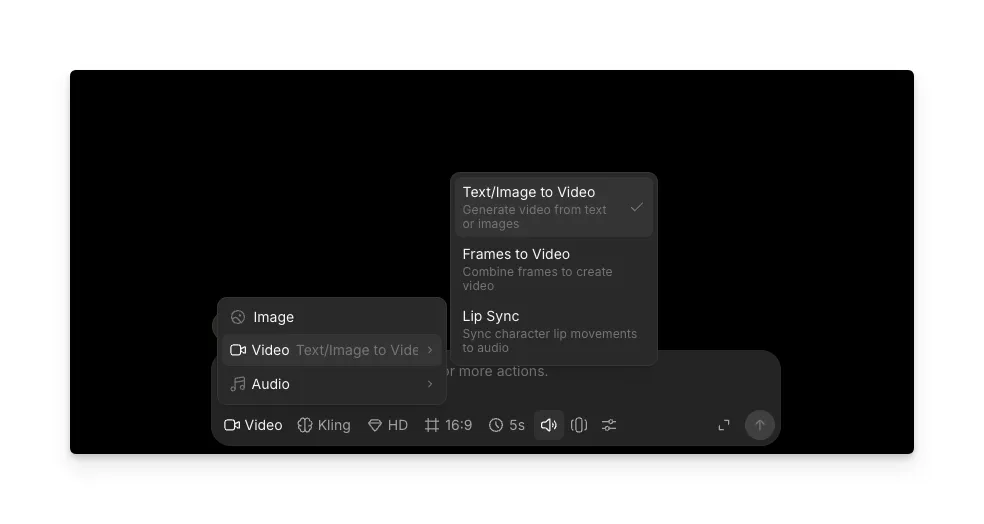
1. Switch to Video mode
From the prompt bar at the bottom of the screen, switch to Video mode. This puts the workspace into video generation, where you can configure the model, resolution, duration, and other generation settings.
2. Select Kling as the model
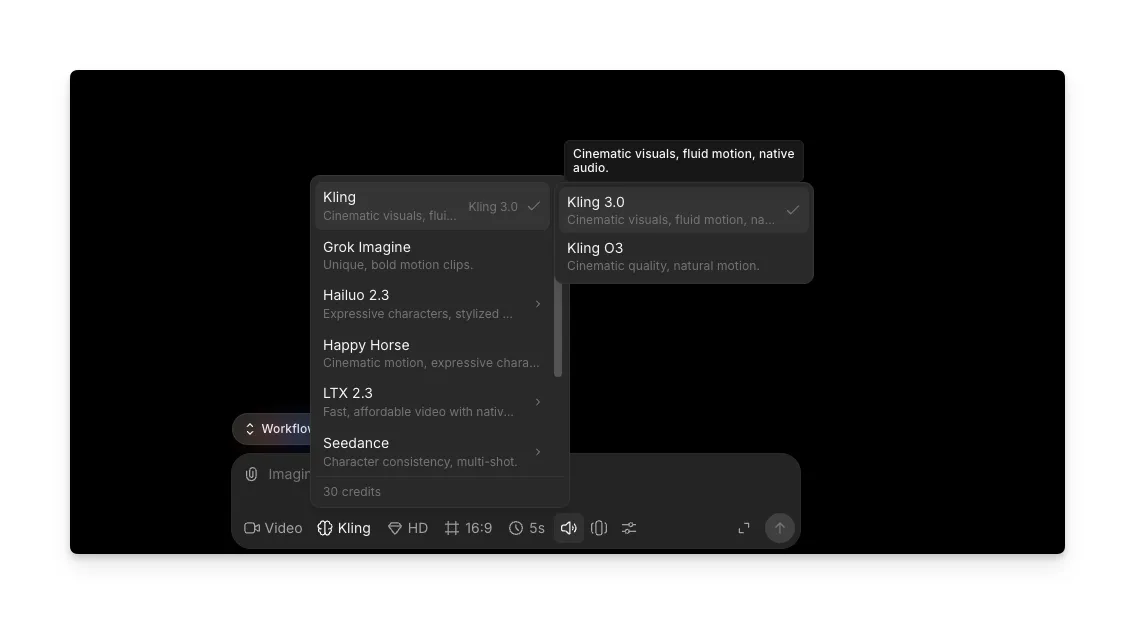
Open the model dropdown and select Kling. From there, choose either Kling 3.0 or Kling O3 depending on the version you want to use. Both options give you access to the Kling Video V3 generation pipeline.
3. Set the resolution to 4K
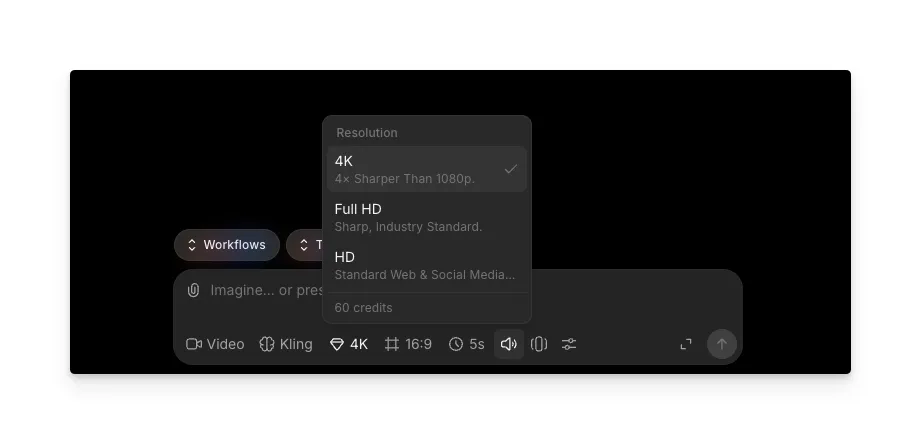
In the resolution settings, change the output to 4K. This activates native 4K generation, with every frame rendered at 3840x2160 from the start rather than upscaled afterward.
4. Add your prompt and generate
Type your prompt or upload a starting image, then hit generate. Kling 4K produces clips between 3 and 15 seconds in length, with native audio included when enabled. Review the output and iterate on your prompt as needed.
Combine Kling 4K with Morphic workflows
Morphic's workflows let you chain multiple creative steps into a single repeatable process. With Kling 4K as part of a workflow, you can generate an image, turn it into a 4K video, and add audio, all within one sequence. This is useful for teams producing content at scale or creators who want a consistent pipeline from concept to finished video.
Who is Kling 4K best for?
| Audience | Why Kling 4K fits | Key features they will use most |
|---|---|---|
| Indie filmmakers and video producers | Native 4K output that holds up in professional editing timelines and sits alongside traditionally shot footage | Multi-shot storyboarding, physics-aware motion |
| Social media and advertising creators | 3 to 15 second duration maps directly to the best-performing social formats, with built-in audio for complete ads in a single pass | Native audio, 4K resolution on mobile and desktop |
| E-commerce and product marketing teams | Fine details like fabric texture, product finish, and packaging are rendered with clarity that upscaled video loses | Physics-aware motion for product interactions, multi-format output |
| Creators and hobbyists | No API keys, no command line, no technical setup. Morphic's visual interface lets you go from an idea to a finished 4K video in one place | All features accessible through Morphic's interface |
FAQs
You can use Kling 4K directly on Morphic by signing up for a Morphic plan at morphic.com. Morphic integrates Kling 4K into its video generation tools, so you can access native 4K AI video alongside image, audio, and music generation without needing a separate account or setup.
Native 4K means the video is generated at 3840x2160 resolution from the start. Every frame is rendered at full resolution during the generation process. Upscaled 4K starts at a lower resolution (typically 720p or 1080p) and uses algorithms to stretch the image to 4K, which often introduces softer details, color banding, and motion artifacts. Native 4K avoids these issues entirely because the detail is real, not estimated.
Kling 4K generates videos between 3 and 15 seconds in length. This range covers the most common formats for social media content, product showcases, short ads, and b-roll footage. For longer content, you can generate multiple clips and edit them together in your preferred video editor or within Morphic's creative tools.
Yes, Kling 4K generates dialogue, sound effects, and ambient audio natively as part of the video rendering process. It supports multiple languages and regional accents, with lip synchronization built into the generation pass. The audio and visuals are created together rather than layered separately, which reduces timing mismatches and simplifies the production process.
No. Through Morphic, Kling 4K is accessible through a visual interface where you upload a starting image, write a prompt, and generate your video. There is no API configuration, no command-line setup, and no technical parameters to manage unless you want to. The platform is designed for creators of all skill levels.