Breites Skyline-Panorama
Ein breites Bild einer Stadtskyline unter tiefkobaltblauer Dämmerung, warme Fenster glühen über den Türmen, kühle Reflexionen auf einem Fluss darunter und dunkler Himmel oben für einen Titel reserviert.
Prompt bearbeiten
Erstellen Sie Blaue-Stunde-Fotografie-Bilder im Browser mit Morphics KI-Bildgenerator. Gestalten Sie eine Skyline mit warm glühenden Fenstern unter tiefkobaltblauem Himmel, eine laternenbeleuchtete Straße kurz nach Sonnenuntergang oder einen stillen Hafen im letzten Dämmerlicht. Halten Sie einen Dämmerungs-Look über das Set mit Style Transfer fest.
Ein breites Bild einer Stadtskyline unter tiefkobaltblauer Dämmerung, warme Fenster glühen über den Türmen, kühle Reflexionen auf einem Fluss darunter und dunkler Himmel oben für einen Titel reserviert.
Prompt bearbeitenEin Querformat eine nasse Straße bei Dämmerung entlang, warme Laternenpools gegen kühle blaue Luft, Führungslinien ziehen in die Ferne und ein schattierter Streifen bleibt frei für eine Bildunterschrift.
Prompt bearbeiten
Eine breite ruhige Wasseransicht eines Hafens zur blauen Stunde, Bootslichter verdoppelt auf der Oberfläche, indigo-bis-türkisfarbener Himmel und niedriger Horizont mit Platz oben für eine Schlagzeile.
Prompt bearbeiten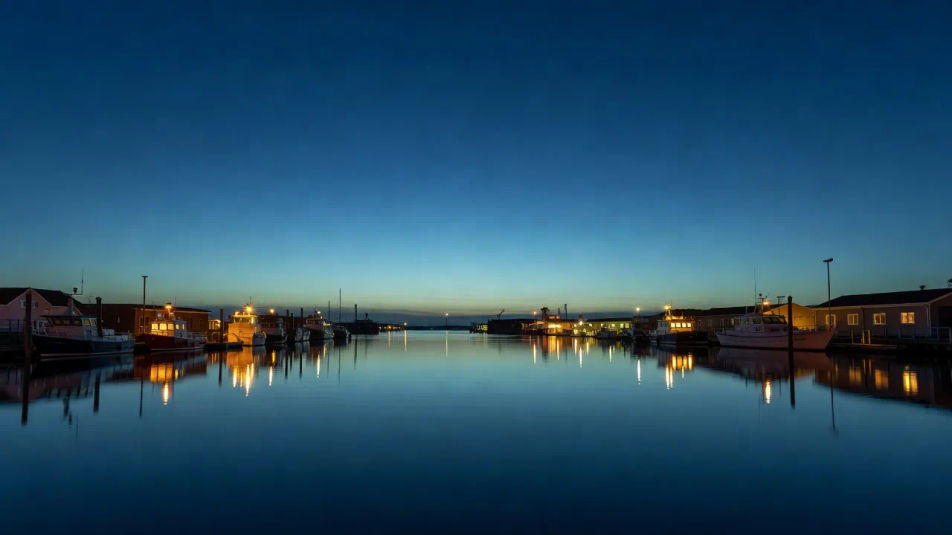
Eine Establishing-Ansicht geschichteter Bergkämme, die in Dämmerungsdunst verschwinden, kühle Blautöne stapeln sich zum Horizont und ein dünner warmer Nachglanz säumt die fernsten Gipfel.
Prompt bearbeiten
Beschreiben Sie das Blaue-Stunde-Fotografie, das Sie möchten, in einfachen Worten.
Morphic generiert in Sekunden ein sauberes, veröffentlichungsfertiges Bild auf Ihrer Canvas.
Passen Sie den Prompt an, generieren Sie Varianten und laden Sie das Bild herunter oder teilen Sie es.
Fix plastic-looking AI skin. Adds natural texture, pores, and imperfections for realism.
One selfie becomes a set of professional headshots. Studio-quality, multiple styles.
Convert any image to a new aspect ratio. Smart crop or extend the edges to fit.
Set the look with one reference image. Apply that exact grade to any scene or batch.
Choose your viewing angles and get precise perspective shifts of any image with full camera control.
Bring back any damaged, blurry, or low-res image. Get a sharp, detailed 4K version with natural clarity restored.
Golden-Hour-Fotografie-KI-Bilder
Erstellen Sie KI-Golden-Hour-Fotografie-Bilder mit Morphic. Generieren Sie authentische Golden-Hour-Fotografie-Werke, Szenen und Motive für jedes Projekt in Sekunden.
Nachthimmel-Fotografie-KI-Bilder
Erstellen Sie KI-Nachthimmel-Fotografie-Bilder mit Morphic. Generieren Sie authentische Nachthimmel-Fotografie-Kunst, Szenen und Motive für jedes Projekt in Sekunden.
Spiegelungsfotografie-KI-Bilder
Erstellen Sie KI-Spiegelungsfotografie-Bilder mit Morphic. Generieren Sie authentisches Spiegelungsfotografie-Artwork, Szenen und Motive für jedes Projekt in Sekunden.
Nebelfotografie-KI-Bilder
Erstellen Sie KI-Nebelfotografie-Bilder mit Morphic. Generieren Sie authentisches Nebelfotografie-Artwork, Szenen und Visuals für jedes Projekt in Sekunden.
Starten Sie noch heute kostenlos, mit der Option, jederzeit zu upgraden oder zu kündigen.
Basic
2400 monatliche Credits
1 Nutzer
Alle Modelle
Workflows
Standard
3625 monatliche Credits
1 Nutzer
Alle Modelle
Workflows
Pro
6350 gemeinsame monatliche Credits
1 Nutzer
Alle Modelle
Workflows
Max
24650 gemeinsame monatliche Credits
1 Nutzer
Alle Modelle
Workflows
Enterprise
Für höhere Limits
Individuell
Preis- und Abrechnungsbedingungen

Free
Zum Ausprobieren
$0
dauerhaft kostenlos