Action-Seitenlayout
Eine vollständige Comicseite mit dynamischen Action-Panels, kräftigen Tuschelinien, Bewegungsstreifen und Aufprallinien, flachen Comicfarben, mit freigehaltenem Platz für Sprechblasen.
Prompt bearbeiten
Gestalten Sie Comic-Panels im Browser mit dem KI-Bildgenerator von Morphic. Erzeugen Sie einen dynamischen Action-Moment mit kräftigen Bewegungslinien, eine randabfallende Helden-Splash-Page oder ein stimmungsvolles Noir-Panel in tiefem Schatten. Halten Sie einen Tuschestil mit Style Transfer fest und legen Sie die Kunst für Sprechblasen in die Canvas.
Eine vollständige Comicseite mit dynamischen Action-Panels, kräftigen Tuschelinien, Bewegungsstreifen und Aufprallinien, flachen Comicfarben, mit freigehaltenem Platz für Sprechblasen.
Prompt bearbeitenEine randabfallende Splash-Page mit einer einzelnen imposanten Helden-Enthüllung, dramatischem Streiflicht, kräftiger Tuschung und satter flacher Farbe, einem klaren Bereich oben für ein Logo.
Prompt bearbeiten
Eine stimmungsvolle Krimi-Seite in tiefem Schwarzschatten und hohem Kontrast, eine einsame Figur unter einem harten Lichtstreifen, begrenzte Palette, mit reserviertem Platz für Textboxen.
Prompt bearbeiten
Ein klassisches Sechs-Panel-Raster, das einen kurzen Moment erzählt, mit einheitlicher Tuschung und Palette über die Panels hinweg, Gutter dazwischen, Platz in jedem Panel für Sprechblasen und Bildunterschriften.
Prompt bearbeiten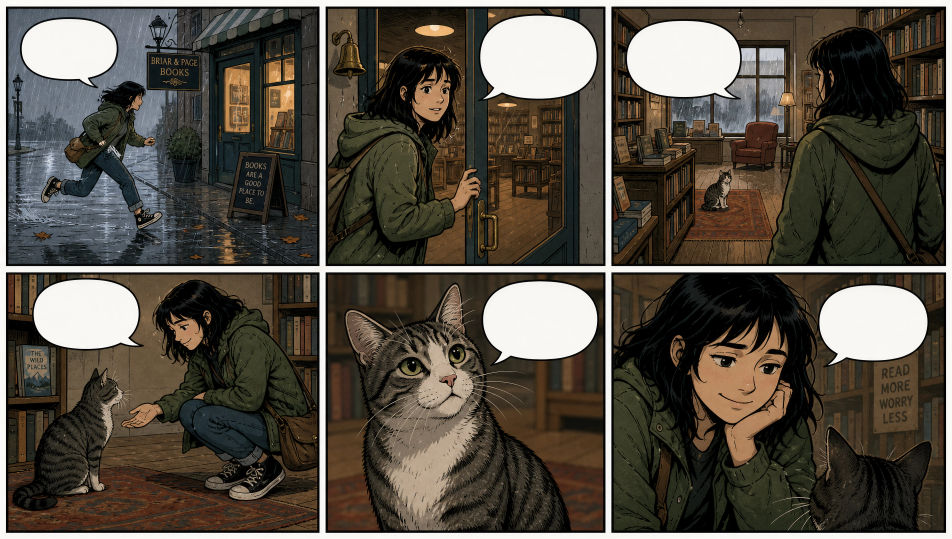
Beschreiben Sie das Comic-Panel, das Sie möchten, in einfachen Worten.
Morphic generiert in Sekunden ein sauberes, veröffentlichungsfertiges Bild auf Ihrer Canvas.
Passen Sie den Prompt an, generieren Sie Varianten und laden Sie das Bild herunter oder teilen Sie es.

Turn any sketch or drawing into a finished render.
Pick a reference image, apply its visual style to your own photo or artwork.
Convert any image to a new aspect ratio. Smart crop or extend the edges to fit.

Feed in a single image. Get 9 cinematic beats laid out as a 3x3 storyboard grid.

Take any character image and generate 6 distinct facial expressions on a single reference sheet.

All your characters on a single lineup image, side by side with height comparison.
Manga-Panel-KI-Bilder
Erstellen Sie KI-Manga-Panel-Bilder mit Morphic. Generieren Sie Manga-Panel-Artwork, -Layouts und redaktionelle Visuals für jedes Projekt in Sekunden.
Zeitungsillustration-KI-Bilder
Erstellen Sie KI-Zeitungsillustration-Bilder mit Morphic. Generieren Sie Zeitungsillustration-Artwork, Layouts und redaktionelle Visuals für jedes Projekt in Sekunden.
Konzeptkunst-KI-Bilder
Erstellen Sie KI-Konzeptkunst-Bilder mit Morphic. Generieren Sie Konzeptkunst-Charaktere, Umgebungen, Requisiten und Key-Art für jedes Projekt in Sekunden.
Buchcover-Design-KI-Bilder
Erstellen Sie KI-Buchcover-Design-Bilder mit Morphic. Generieren Sie Buchcover-Design-Kunstwerke, Layouts und redaktionelle Visuals für jedes Projekt in Sekunden.
Starten Sie noch heute kostenlos, mit der Option, jederzeit zu upgraden oder zu kündigen.
Basic
2400 monatliche Credits
1 Nutzer
Alle Modelle
Workflows
Standard
3625 monatliche Credits
1 Nutzer
Alle Modelle
Workflows
Pro
6350 gemeinsame monatliche Credits
1 Nutzer
Alle Modelle
Workflows
Max
24650 gemeinsame monatliche Credits
1 Nutzer
Alle Modelle
Workflows
Enterprise
Für höhere Limits
Individuell
Preis- und Abrechnungsbedingungen

Free
Zum Ausprobieren
$0
dauerhaft kostenlos