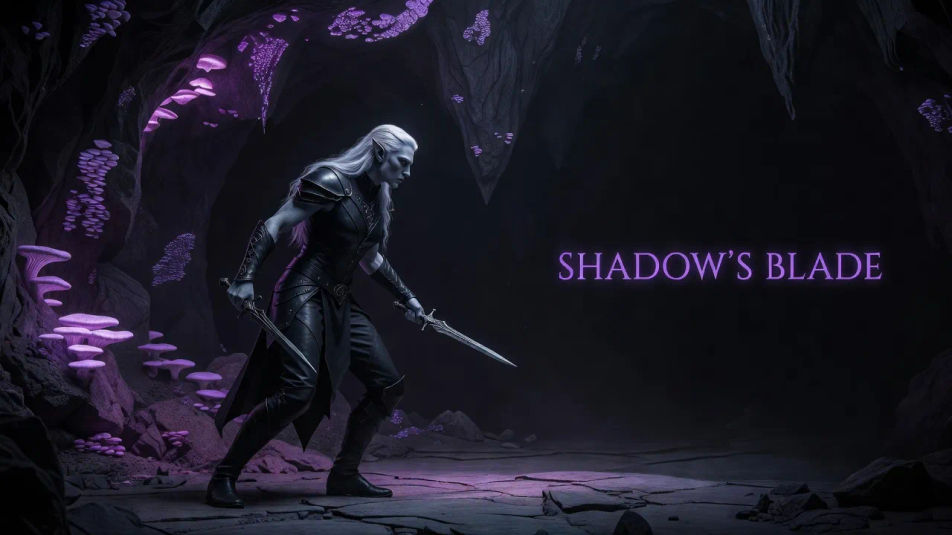
Create Dark elf images in your browser with Morphic's AI image generator. Design drow-style characters with ashen or violet skin, flowing white hair, and sculpted obsidian armor lit by a cool underground glow. Think a shadowed rogue mid-stalk, a spellblade wreathed in violet light, or a noble in a crystal cavern hall. Keep one dark elf looking the same across a lineup with the Character Lineup workflow.

Dark elf types you can create

Dark elf compositions you can produce

Wide rogue establishing

A landscape frame of a dark elf rogue mid-stalk with twin daggers drawn, ashen skin and white hair, obsidian leather in a faint violet cavern glow, with dark space to one side reserved for a title.

Prompt bearbeiten
Wide rogue establishing

Hero spellblade panel

A close landscape composition of a spellblade weaving violet energy along a black-etched sword, sculpted obsidian armor and white braids, cold underground light, with room to one side reserved for a caption.

Prompt bearbeiten
Hero spellblade panel

Cavern-hall spread

A wide composition of a dark elf noble in layered obsidian finery within a subterranean hall, violet skin and elaborate white hair, a cold crystalline glow throwing long shadows across the carved stone.

Prompt bearbeiten
Cavern-hall spread

Underground shrine establishing shot

An establishing landscape frame of a robed dark elf before a carved shrine, web-motif armor and cascading white hair, a violet gem casting cold glow over the scene and eerie fungi shimmer in the deep background.

Prompt bearbeiten
Underground shrine establishing shot

Dark elf in drei Schritten erstellen

  1. 01

    Beschreiben Sie Ihr Dark elf

    Beschreiben Sie das Dark elf, das Sie möchten, in einfachen Worten.

  2. 02

    Bild generieren

    Morphic generiert in Sekunden ein sauberes, veröffentlichungsfertiges Bild auf Ihrer Canvas.

  3. 03

    Dark elf verfeinern

    Passen Sie den Prompt an, generieren Sie Varianten und laden Sie das Bild herunter oder teilen Sie es.

Verwandte Workflows

Das könnte Ihnen auch gefallen

Einfache Preise

Starten Sie noch heute kostenlos, mit der Option, jederzeit zu upgraden oder zu kündigen.

Basic

$0/ Monat
abgerechnet als $0 pro Jahr

900 monatliche Credits

1 Nutzer

Alle Modelle

Workflows

Standard

$0/ Monat
abgerechnet als $0 pro Jahr

3200 monatliche Credits

1 Nutzer

Alle Modelle

Workflows

Pro

$0/ Monat
abgerechnet als $0 pro Jahr

6200 gemeinsame monatliche Credits

1 Nutzer

+ bis zu 4 weitere gegen Aufpreis

Alle Modelle

Workflows

Pro Max

$0/ Monat
abgerechnet als $0 pro Jahr

24000 gemeinsame monatliche Credits

1 Nutzer

+ bis zu 9 weitere gegen Aufpreis

Alle Modelle

Workflows

Enterprise

Für höhere Limits

Individuell

Preis- und Abrechnungsbedingungen

Unbegrenzte Credits
Individuelle Platzlimits
Alle Modelle
Workflows
Pricing Gradient

Free

Zum Ausprobieren

$0

dauerhaft kostenlos

Bis zu 20 Credits
Nur 1 Nutzer
Eingeschränkte Modelle
Workflows

Häufig gestellte Fragen

What is a dark elf?
A dark elf is a drow-style fantasy archetype with ashen or violet skin, flowing white hair, and sculpted obsidian armor, usually lit by a cool underground glow. The look pairs cold subterranean lighting with dark-silver detailing and an elegant, dangerous mood.
How do I create a dark elf with AI?
You design a dark elf with AI on Morphic, right in your browser. Open the Image tool, describe the skin tone, the white hair, the obsidian armor, and the violet cavern glow, and Morphic renders the character. No drawing skill or software needed.
How do I get the drow-style underground glow?
Ask for it directly: "ashen violet skin, long white hair, matte obsidian armor, cool violet cavern glow." Naming the cold underground light and the ashen skin is what gives a dark elf its drow register, rather than a standard woodland elf.
How do I keep the same dark elf across a set of images?
Use the Character Lineup workflow to lock the skin tone, hair, and armor from your first frame, then carry that character across the set. Each image can show a different pose or cavern scene while the dark elf stays recognizably the same.
Can I add a title or banner to a dark elf image?
Yes. Generate the frame with open dark space reserved, then open the Canvas to place a title or banner as a layer. Keeping the type separate lets you adjust the wording without regenerating the dark elf underneath.
Do I need art skills to make a dark elf?
No. Morphic runs in your browser and works from plain-language prompts, so you do not need drawing skill, a tablet, or software. Describing the skin, the hair, the armor, and the glow is enough to produce a finished dark elf image.