Digital Painting AI Images

Paint Digital Painting images in your browser with Morphic's Digital Painting AI image generator. Create a mountain-monastery matte painting or a thick-brushed armoured scout, hold the brushwork with Style Transfer, then animate any still with Image to Video.

Digital painting subjects you can paint

Digital painting scenes you can compose

Painterly matte painting of a mountain monastery

A mountain monastery clinging to a sheer cliff in dawn cloud, painterly atmospheric perspective, visible brushwork in the rock face, soft warm light catching the top of the stupa.

Prompt bearbeiten
Painterly matte painting of a mountain monastery

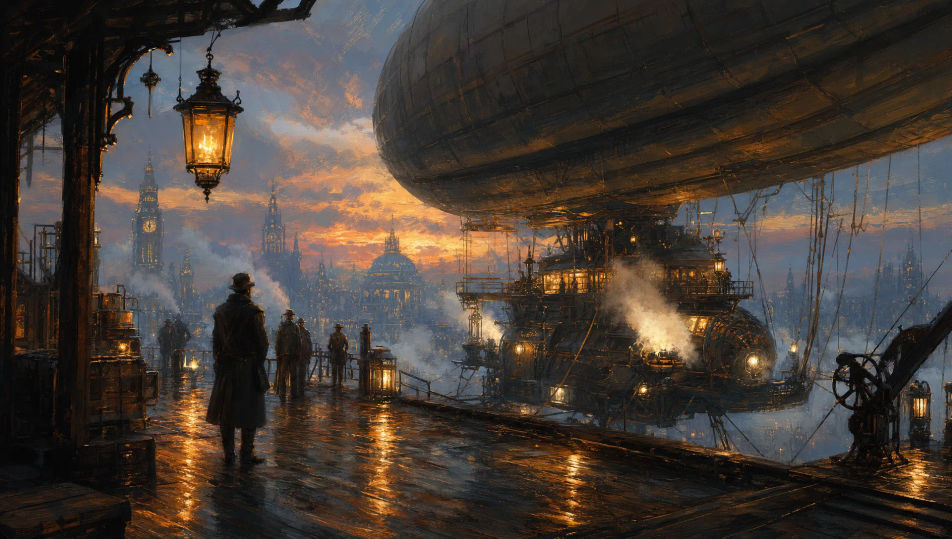
Airship dock at dusk

An airship dock platform at dusk, painterly steam rising from the engines, thick-brushed lantern light pooling on the wet boards, distant clockwork city skyline in soft painterly haze.

Prompt bearbeiten
Airship dock at dusk

Throne room concept piece

A vast painterly throne room seen from the back of the hall, painterly columns receding into deep umber shadow, single shaft of god-ray hitting the empty throne, banners loose in the stroke.

Prompt bearbeiten
Throne room concept piece

Painterly storm at sea from the deck

A painterly storm at sea seen from the foredeck of a frigate, thick-brushed waves cresting beside the bow, electric flashes painted into the painterly clouds, single lantern on the mast above.

Prompt bearbeiten
Painterly storm at sea from the deck

Digital painting in drei Schritten erstellen

  1. 01

    Beschreiben Sie Ihr Digital painting

    Beschreiben Sie das Digital painting, das Sie möchten, in einfachen Worten.

  2. 02

    Bild generieren

    Morphic generiert in Sekunden ein sauberes, veröffentlichungsfertiges Bild auf Ihrer Canvas.

  3. 03

    Digital painting verfeinern

    Passen Sie den Prompt an, generieren Sie Varianten und laden Sie das Bild herunter oder teilen Sie es.

Verwandte Workflows

Das könnte Ihnen auch gefallen

Einfache Preise

Starten Sie noch heute kostenlos, mit der Option, jederzeit zu upgraden oder zu kündigen.

Basic

$0/ Monat
abgerechnet als $0 pro Jahr

900 monatliche Credits

1 Nutzer

Alle Modelle

Workflows

Standard

$0/ Monat
abgerechnet als $0 pro Jahr

3200 monatliche Credits

1 Nutzer

Alle Modelle

Workflows

Pro

$0/ Monat
abgerechnet als $0 pro Jahr

6200 gemeinsame monatliche Credits

1 Nutzer

+ bis zu 4 weitere gegen Aufpreis

Alle Modelle

Workflows

Pro Max

$0/ Monat
abgerechnet als $0 pro Jahr

24000 gemeinsame monatliche Credits

1 Nutzer

+ bis zu 9 weitere gegen Aufpreis

Alle Modelle

Workflows

Enterprise

Für höhere Limits

Individuell

Preis- und Abrechnungsbedingungen

Unbegrenzte Credits
Individuelle Platzlimits
Alle Modelle
Workflows
Pricing Gradient

Free

Zum Ausprobieren

$0

dauerhaft kostenlos

Bis zu 20 Credits
Nur 1 Nutzer
Eingeschränkte Modelle
Workflows

Häufig gestellte Fragen

Where can I make Digital Painting images with AI?
You can create Digital Painting images directly in your browser on Morphic. Open the Image tool, describe the subject and setting with the brushwork and lighting spelled out, and Morphic produces the artwork. No installs and no specialist software needed.
What Digital Painting styles can I generate?
Painterly concept art for characters and environments, matte paintings with strong atmospheric perspective, loose colour studies, and thick-brushed character portraits. This page targets the painterly tradition rather than photoreal CG or vector illustration — name the look upfront so Morphic stays in that lane.
How is this different from a generic AI image page?
Digital painting here means the painterly technique — visible brushwork, layered colour, painterly edges — that concept artists and matte painters use. If you want a photoreal render, a 3D look, or a vector illustration, those live on different pages. Naming the brushwork keeps the result on-style.
How do I keep Digital Painting characters consistent across multiple pieces?
Use the Character Lineup workflow to lock in each figure's face, costume, and signature props before generating, then reference those character cards in every prompt. Morphic preserves the design across cliff, throne room, and airship scenes so a series reads as one body of work.
How do I prompt for visible brushwork instead of a photoreal finish?
Name the brushwork directly. Use phrases like "painterly stroke direction visible", "thick-brushed highlights on the metal", "painterly atmospheric perspective", or "loose colour study". The named brushwork tells Morphic to stay on the painterly side of the dial.
Can I turn my Digital Painting into a video?
Yes. Open the Image to Video tool, upload the still, and describe the motion you want (clouds drifting past the monastery, lanterns swaying on the airship dock, a god-ray sweeping across the throne). Morphic animates from the source so the video preserves the painterly brushwork.