Weiter Wärmebild-Frame
Eine weite Komposition einer Figur, die heiß gelb-weiß vor einem kalten blauen Raum glüht, sanfte Temperaturgradienten, ein technischer Instrumenten-Look und kühler Raum, reserviert für einen Titel.
Prompt bearbeiten
Erstellen Sie Thermografie-Bilder direkt im Browser mit dem KI-Bildgenerator von Morphic. Generieren Sie Wärmebild-Frames wie eine gelb-weiß glühende Figur in einem kühlen Raum, warme orange strahlende Hände oder einen glühenden Automotor auf kalter Straße. Halten Sie eine thermografische Palette mit Style Transfer.
Eine weite Komposition einer Figur, die heiß gelb-weiß vor einem kalten blauen Raum glüht, sanfte Temperaturgradienten, ein technischer Instrumenten-Look und kühler Raum, reserviert für einen Titel.
Prompt bearbeitenEin Querformat-Frame eines heißen Objekts, das orange in einem kühlen Umfeld strahlt, die aufsteigende Hitze als Fahne nachgezeichnet, die Wärmebild-Farbpalette hält einen sauberen Gradienten von Weiß zu Tiefblau.
Prompt bearbeiten
Eine weite Aufnahme eines lodernd heißen Motors auf einer dunklen kalten Straße, mit Hitze, die sich weiß-gelb um den Block staut und zu Blau ausblasst, mit einem klaren Beschriftungsbereich, gehalten im kalten Negativraum.
Prompt bearbeiten
Ein Etablier-Frame warmer heller Wärmesignaturen, verstreut über eine kalte blau-schwarze Szene, glühende Formen isoliert in der Dunkelheit und eine technische thermografische Stimmung.
Prompt bearbeiten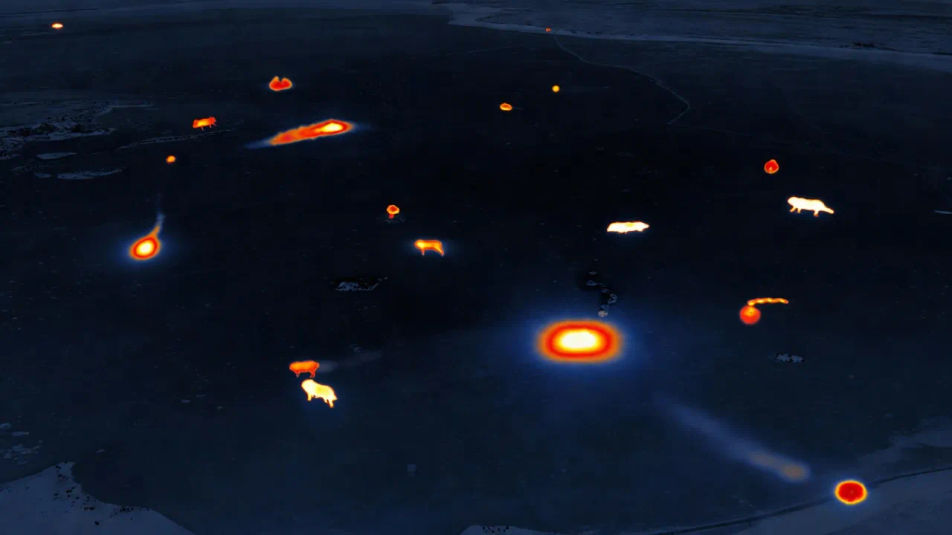
Beschreiben Sie das Thermografie, das Sie möchten, in einfachen Worten.
Morphic generiert in Sekunden ein sauberes, veröffentlichungsfertiges Bild auf Ihrer Canvas.
Passen Sie den Prompt an, generieren Sie Varianten und laden Sie das Bild herunter oder teilen Sie es.
Fix plastic-looking AI skin. Adds natural texture, pores, and imperfections for realism.
One selfie becomes a set of professional headshots. Studio-quality, multiple styles.
Convert any image to a new aspect ratio. Smart crop or extend the edges to fit.
Set the look with one reference image. Apply that exact grade to any scene or batch.
Choose your viewing angles and get precise perspective shifts of any image with full camera control.
Bring back any damaged, blurry, or low-res image. Get a sharp, detailed 4K version with natural clarity restored.
Infrarotfotografie-KI-Bilder
Erstellen Sie KI-Infrarotfotografie-Bilder mit Morphic. Generieren Sie in Sekunden authentische Infrarotfotografie-Kunstwerke, -Szenen und -Motive für jedes Projekt.
Abstrakte-Fotografie-KI-Bilder
Erstellen Sie KI-Bilder abstrakter Fotografie mit Morphic. Generieren Sie authentische Kunstwerke, Szenen und Visuals abstrakter Fotografie für jedes Projekt in Sekunden.
Satellitenfotografie-KI-Bilder
Erstellen Sie KI-Satellitenfotografie-Bilder mit Morphic. Generieren Sie authentische Satellitenfotografie-Kunstwerke, -Szenen und -Motive für jedes Projekt in Sekunden.
Mikroskopiefotografie-KI-Bilder
Erstellen Sie KI-Mikroskopiefotografie-Bilder mit Morphic. Generieren Sie authentische Mikroskopiefotografie-Motive, Szenen und Visuals für jedes Projekt in Sekunden.
Starten Sie noch heute kostenlos, mit der Option, jederzeit zu upgraden oder zu kündigen.
Basic
2400 monatliche Credits
1 Nutzer
Alle Modelle
Workflows
Standard
3625 monatliche Credits
1 Nutzer
Alle Modelle
Workflows
Pro
6350 gemeinsame monatliche Credits
1 Nutzer
Alle Modelle
Workflows
Max
24650 gemeinsame monatliche Credits
1 Nutzer
Alle Modelle
Workflows
Enterprise
Für höhere Limits
Individuell
Preis- und Abrechnungsbedingungen

Free
Zum Ausprobieren
$0
dauerhaft kostenlos