Stadtsilhouette vom Meeresgrund aus gesehen
Ein weiter Blick über ein Unterwasserkönigreich vom dunklen Meeresgrund, Korallentürme und beleuchtete Fenster ragen ins Blau, Lichtstrahlen fallen über die ganze Stadt.
Prompt bearbeiten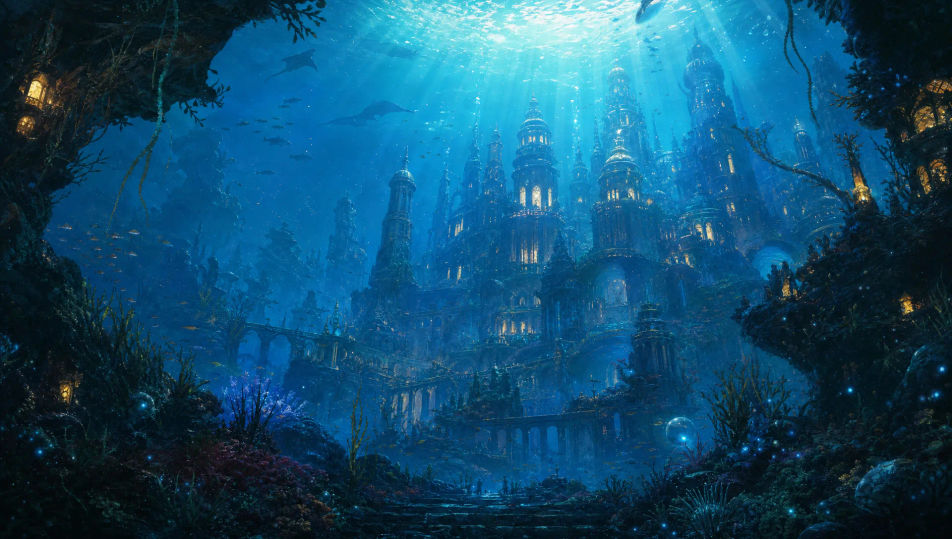
Bauen Sie versunkene Unterwasserkönigreiche direkt im Browser mit Morphics KI-Bildgenerator. Generieren Sie einen von Lichtstrahlen erhellten Korallenpalast, eine versunkene Marmorstadt umschlungen von Seetang oder eine biolumineszente Tiefsee-Zitadelle. Halten Sie eine Palette mit Style Transfer, dann animieren Sie mit Image to Video.
Ein weiter Blick über ein Unterwasserkönigreich vom dunklen Meeresgrund, Korallentürme und beleuchtete Fenster ragen ins Blau, Lichtstrahlen fallen über die ganze Stadt.
Prompt bearbeitenEin aufragendes Bogentor in eine Unterwasserstadt, flankiert von riesigen gehauenen Seeschlangenstatuen, Seetang wogt um die Säulen, Licht sickert von weit oben herab.
Prompt bearbeiten
Das Innere einer Korallen-Thronhalle, Lichtschächte strömen durch hohe Öffnungen auf einen Perlthron, kleine Fische treiben durch das helle Wasser.
Prompt bearbeiten
Ein eingestürztes Viertel einer Unterwasserstadt, überwuchert von Korallen und Anemonen, zerbrochene Bögen halb im Sand vergraben, weiches blaues Licht und treibender Schlamm überall.
Prompt bearbeiten
Beschreiben Sie das Unterwasserkönigreich, das Sie möchten, in einfachen Worten.
Morphic generiert in Sekunden ein sauberes, veröffentlichungsfertiges Bild auf Ihrer Canvas.
Passen Sie den Prompt an, generieren Sie Varianten und laden Sie das Bild herunter oder teilen Sie es.
Choose your viewing angles and get precise perspective shifts of any image with full camera control.

Professional 7-panel location reference sheet from a single photo.
Set the look with one reference image. Apply that exact grade to any scene or batch.
Restyle any video in a completely new visual style. Every frame transforms, all motion stays intact.

Take any character image and generate 6 distinct facial expressions on a single reference sheet.
Photo of any real-estate becomes a cinematic renovation timelapse video with construction SFX and music.
Meerjungfrau-KI-Bilder
Erstellen Sie KI-Meerjungfrau-Bilder auf Morphic. Schillernde Flossen, sonnenbeschienene Korallenriffe, Tiefseesirenen und Ozeanszenen aus Prompts, konsistent über ein ganzes Set.
Kraken-KI-Bilder
Erstellen Sie KI-Kraken-Bilder auf Morphic. Schiffszermalmende Seeungeheuer, biolumineszente Tiefsee-Varianten und Sturmozean-Szenen aus Prompts, durchgängig über ein ganzes Set.
Schwebende-Inseln-KI-Bilder
Erstellen Sie KI-Bilder schwebender Inseln mit Morphic. Generieren Sie in Sekunden Szenen, Landschaften und Umgebungen mit schwebenden Inseln für jedes Projekt.
Tropischer-Strand-KI-Bilder
Erstellen Sie KI-Bilder von tropischen Stränden mit Morphic. Generieren Sie Strandszenen, Landschaften und Umgebungen für jedes Projekt in Sekunden.
Starten Sie noch heute kostenlos, mit der Option, jederzeit zu upgraden oder zu kündigen.
Basic
2400 monatliche Credits
1 Nutzer
Alle Modelle
Workflows
Standard
3625 monatliche Credits
1 Nutzer
Alle Modelle
Workflows
Pro
6350 gemeinsame monatliche Credits
1 Nutzer
Alle Modelle
Workflows
Max
24650 gemeinsame monatliche Credits
1 Nutzer
Alle Modelle
Workflows
Enterprise
Für höhere Limits
Individuell
Preis- und Abrechnungsbedingungen

Free
Zum Ausprobieren
$0
dauerhaft kostenlos