AI spiders from mouth video

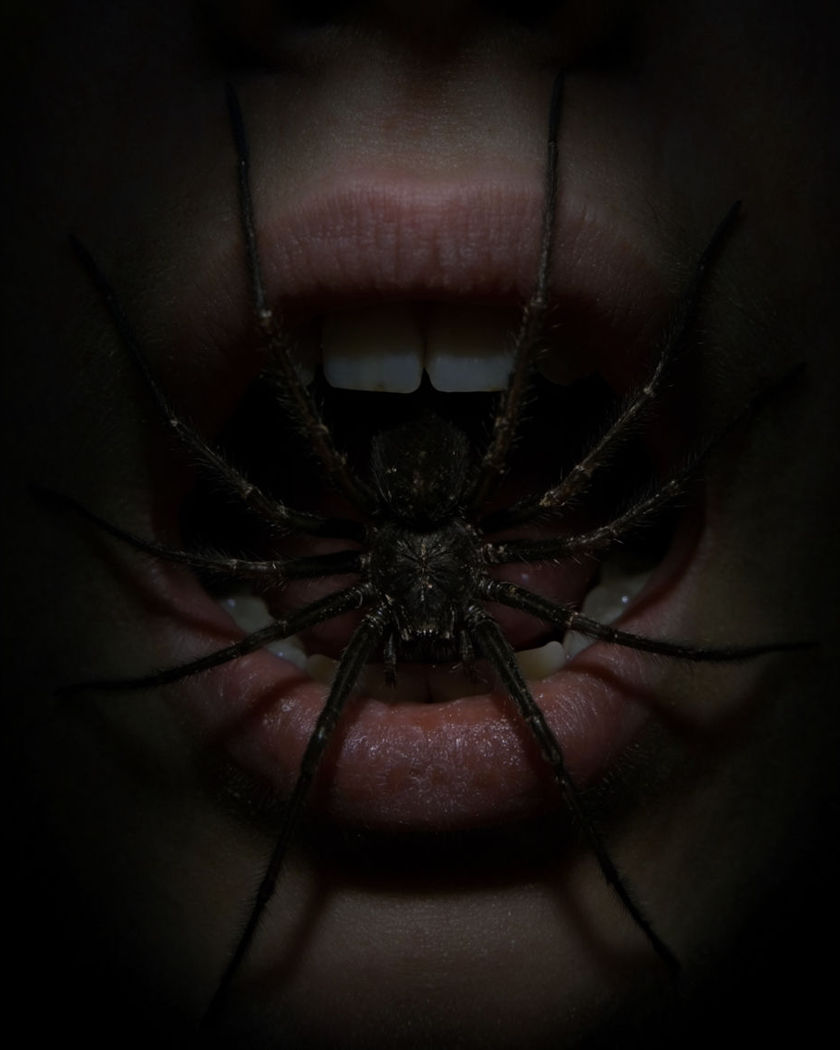
Spiders from mouth shots generated in one move: dark spiders emerging one by one from a still, calm face, legs catching the light as they crawl free.

A dark spider emerging from a calm, still mouth in dim, dramatic horror lighting

Spiders from mouth examples

Dim room wide reveal

A wide shot in a dim room shows the full moment as spiders emerge. a wide shot of a person sitting motionless in a dim, sparsely furnished room, several dark spiders emerging from their mouth and dropping to the floor around them, a single hard light source casting long shadows, unsettling and still

Corridor silhouette wide

A wide silhouette shot down a dim corridor shows the emergence at a distance. a wide shot down a dim, narrow corridor, a person standing still at the far end in silhouette as a spider emerges from their mouth and drops to the floor, a single flickering light overhead, tense and cinematic distance

Extreme close on legs

A macro-style close-up frames one spider's legs emerging from the lips. an extreme close-up on a person's slightly parted lips, a single spider's legs emerging one at a time in sharp macro detail before the full body follows, dim directional light picking out fine leg hairs, tense and deliberate pacing

Eyes reacting, calm mouth

The eyes widen slightly while the mouth stays still as a spider emerges. a close portrait of a person, their eyes widening slightly with tension while the mouth stays perfectly still as a dark spider slowly emerges from the lips, dim single-source light on the face, restrained and tense mood

Single spider, slow crawl

One spider emerges slowly and crawls down the chin into shadow. a close portrait of a person with a calm, still expression, a single dark spider slowly emerging from the corner of the mouth and crawling down the chin into shadow, dim single-source horror lighting, the face otherwise motionless, unsettling and quiet

Silhouette emergence

A backlit silhouette shows spiders emerging as dark shapes against light. a backlit silhouette portrait of a person, several small dark spider shapes emerging from the mouth and dropping away into the light behind, the face reduced to pure outline, minimal and eerie, slow motion feel

Window backlight wide

A wide shot backlit by a dim window shows a slow, isolated emergence. a wide shot of a person sitting beside a dim window at night, backlit so their face falls into shadow, a single spider slowly emerging from the mouth visible only in outline against the faint window light, minimal and eerie

Multiple spiders scattering

Several spiders emerge together and scatter outward across the frame. a close portrait of a person, several dark spiders emerging together from the mouth and scattering outward in different directions across the frame, legs catching a thin rim of light, the face expressionless and still, dim moody light

Table close, low light

A low-lit table scene frames the face close as spiders scatter across it. a wide low-angle shot across a bare wooden table, a person seated at the far end, several spiders emerging from their mouth and scattering across the tabletop toward the camera, a single dim lamp overhead, quiet dread

Web thread trailing

A spider emerges trailing a fine silk thread that catches the light. a close portrait of a person, a single spider emerging from the mouth and dropping on a fine silk thread that catches a thin beam of light as it swings gently, the face calm and unmoving, dim atmospheric background

Generate your own spiders from mouth video

Wählen Sie einen Ausgangspunkt, passen Sie ihn beliebig an und erzeugen Sie ihn in Morphic.

Erzeugen

Einfache Preise

Starten Sie noch heute kostenlos, mit der Option, jederzeit zu upgraden oder zu kündigen.

Basic

$19/ Monat
abgerechnet als $0 pro Jahr

2400 monatliche Credits

1 Nutzer

Alle Modelle

Workflows

Standard

$24/ Monat
abgerechnet als $0 pro Jahr

3625 monatliche Credits

1 Nutzer

Alle Modelle

Workflows

Pro

$45/ Monat
abgerechnet als $0 pro Jahr

6350 gemeinsame monatliche Credits

1 Nutzer

+ bis zu 4 weitere gegen Aufpreis

Alle Modelle

Workflows

Max

$170/ Monat
abgerechnet als $0 pro Jahr

24650 gemeinsame monatliche Credits

1 Nutzer

+ bis zu 9 weitere gegen Aufpreis

Alle Modelle

Workflows

Enterprise

Für höhere Limits

Individuell

Preis- und Abrechnungsbedingungen

High-Volume-Credits
Individuelle Platzlimits
Alle Modelle
Workflows
Pricing Gradient

Free

Zum Ausprobieren

$0

dauerhaft kostenlos

Bis zu 20 Credits
Nur 1 Nutzer
Eingeschränkte Modelle
Workflows

Häufig gestellte Fragen

Where can I make spiders from mouth videos with AI?
You can create spiders from mouth videos directly in your browser on Morphic. Open the Image to Video tool, start from a still portrait, describe how the spiders emerge, and Morphic generates the clip with the motion built in. No overlay footage or manual compositing needed.
What kinds of spiders from mouth shots work best with AI video?
A close, still portrait with simple, dim lighting gives the strongest result. One clear light source and a calm, motionless expression let the crawling motion stand out clearly against the face.
How do I write a good prompt for a spiders from mouth video?
Name how many spiders appear, how they move, and the light on the face. Describing a still, calm expression against the movement is what keeps the effect feeling deliberate and unsettling rather than exaggerated.
Can I use my own photo for a spiders from mouth video?
Yes. Start from a close portrait photo, describe how the spiders should emerge and move, and Morphic animates the effect from that starting image while keeping the face consistent.
Do I need video editing experience to make a spiders from mouth video?
No. Morphic runs in your browser and you direct it with plain-language prompts. If you can describe how the spiders emerge, you can produce the video. The prompts on this page are written so anyone can paste and run them.
What can I use a spiders from mouth video for?
They work well as horror-style social edits, Halloween content, and stylised jump-scare clips. Generate the shot, lay unsettling sound design under it on the Compose timeline, and export the size each channel needs.