Direct translucent ghost overlays in your browser with Morphic's ghost overlay AI video generator. Generate apparition clips like a semi-transparent figure drifting through a dim hallway, or a faint spectral face fading up behind a mirror, and pair them with the Music tool to time a swell to the reveal. Stitch the hauntings into one continuous sequence on the Canvas.

Ghost overlay variations you can direct

Ghost overlay sequences you can stage

An apparition in a Victorian hallway

A translucent figure drifts down a long, dim hallway lined with old portraits, the wallpaper showing faintly through it. Cold blue moonlight from a far window, a slow static frame that lets it pass.

Prompt bearbeiten

A face fading up in a mirror

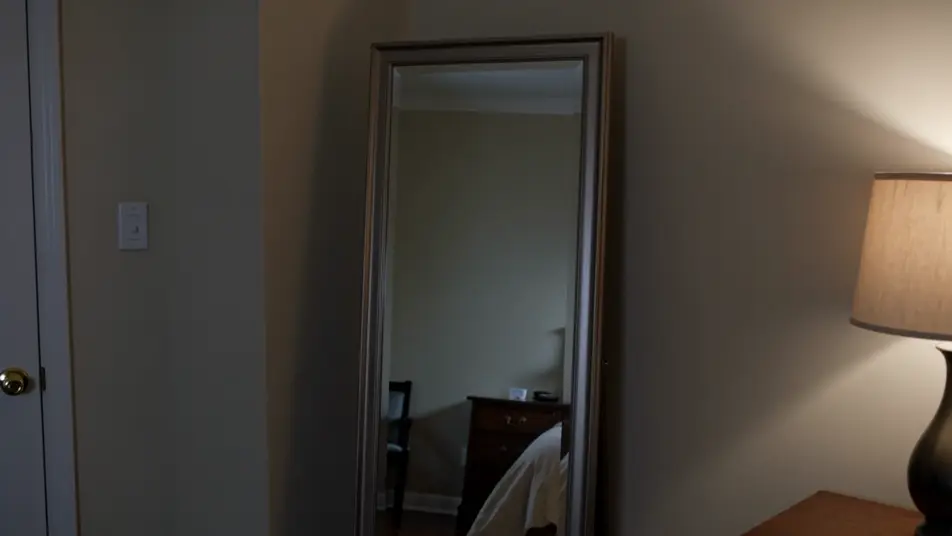
A dim bedroom where a faint spectral face slowly resolves in a standing mirror while the room reflected around it stays empty. Low warm lamplight, a slow push-in on the glass.

Prompt bearbeiten

A wisp forming in an attic

Dust-filled attic light where a curl of luminous mist gathers into a vague human shape before scattering apart. Hard shafts through a small window, a locked wide shot holding the still air.

Prompt bearbeiten

A wraith solidifying in a stairwell

A translucent figure climbs a shadowed stone stairwell, growing more opaque with each step until it nearly blocks the light behind it. Cold top light, a slow tilt that follows it up.

Prompt bearbeiten

ghost overlay-Videos in drei Schritten erstellen

  1. 01

    Beschreiben Sie Ihre ghost overlay-Szene

    Beschreiben Sie die ghost overlay-Szene, die Sie möchten, in einfachen Worten.

  2. 02

    Video generieren

    Morphic generiert in Sekunden einen filmreifen Clip auf Ihrer Canvas.

  3. 03

    ghost overlay-Video verfeinern

    Passen Sie den Prompt an, generieren Sie Varianten und laden Sie die Aufnahme herunter oder teilen Sie sie.

Verwandte Workflows

Das könnte Ihnen auch gefallen

Einfache Preise

Starten Sie noch heute kostenlos, mit der Option, jederzeit zu upgraden oder zu kündigen.

Basic

$9/ Monat
abgerechnet als $0 pro Jahr

900 monatliche Credits

1 Nutzer

Alle Modelle

Workflows

Standard

$24/ Monat
abgerechnet als $0 pro Jahr

3200 monatliche Credits

1 Nutzer

Alle Modelle

Workflows

Pro

$45/ Monat
abgerechnet als $0 pro Jahr

6200 gemeinsame monatliche Credits

1 Nutzer

+ bis zu 4 weitere gegen Aufpreis

Alle Modelle

Workflows

Pro Max

$170/ Monat
abgerechnet als $0 pro Jahr

24000 gemeinsame monatliche Credits

1 Nutzer

+ bis zu 9 weitere gegen Aufpreis

Alle Modelle

Workflows

Enterprise

Für höhere Limits

Individuell

Preis- und Abrechnungsbedingungen

Unbegrenzte Credits
Individuelle Platzlimits
Alle Modelle
Workflows
Pricing Gradient

Free

Zum Ausprobieren

$0

dauerhaft kostenlos

Bis zu 20 Credits
Nur 1 Nutzer
Eingeschränkte Modelle
Workflows

Häufig gestellte Fragen

Where can I make ghost overlay videos with AI?
You can create ghost overlay videos directly in your browser on Morphic. Open the Text to Video tool, describe the apparition, its transparency, and how it moves through the space, and Morphic produces the clip. No stock plates or blending modes needed.
What kinds of ghost overlay shots work best with AI video?
Slow translucent drifts, fade-up manifestations, and mirror apparitions all read cleanly. The strongest overlays let the background show clearly through the figure and keep the camera calm, so the transparency and the slow motion carry the haunting.
How do I write a good prompt for a ghost overlay video?
Name the apparition, how see-through it is, its motion, and what surface sits behind it. Add the light and camera. The clearer the transparency and the background, the more convincing the overlay Morphic returns.
How do I keep the ghost overlay smooth between scenes?
Keep the transparency level, drift speed, and light direction consistent across clips, and describe them the same way in each prompt. On the Canvas you can place apparition shots side by side and refine each until the hauntings match into one continuous sequence.
Can I add music and narration to my ghost overlay videos?
Yes. The Music tool produces an original soundtrack, and a haunting lands hardest when a swell times to the apparition reveal. The Speech tool generates narration in the voice you choose, layered onto the clip so a ghost scene can carry a voiceover.
Do I need video editing experience to make a ghost overlay video?
No. Morphic runs in your browser and you direct it with plain-language prompts. If you can describe the apparition and how it drifts, you can produce a ghost overlay clip. The prompts on this page are written so anyone can paste and run.