AI Lofi Study Stream videos

Direct cozy study-companion loops in your browser with Morphic's lofi study stream AI video generator. Generate lofi study stream clips like a rain-streaked window over a lamplit desk or a slow room pan across a shelf of books and a sleeping cat, and pair them with the Music tool for a mellow beat and the Speech tool for soft study prompts. Stitch the calm loops into one continuous study stream on the Canvas.

Lofi study moods you can direct

Lofi study loops you can stage

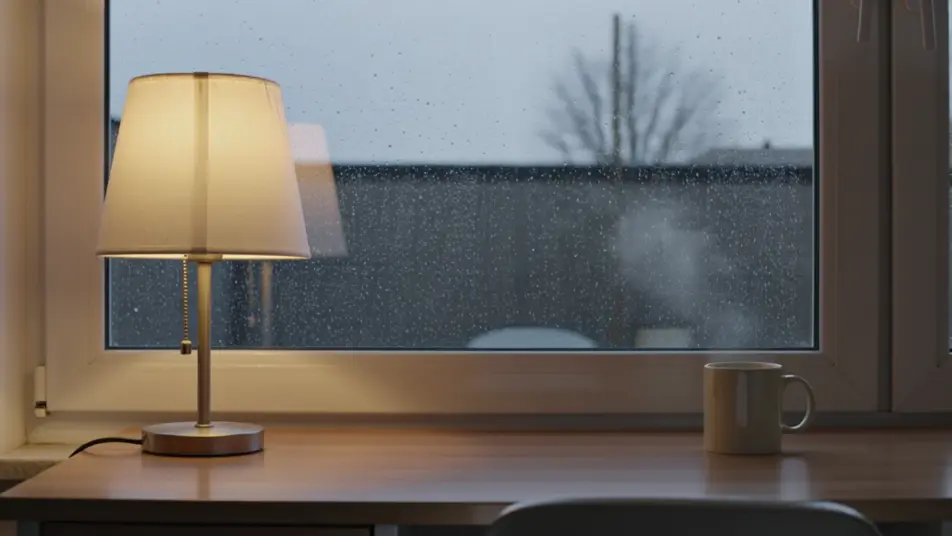
Rain on the study window

A locked medium shot of a desk beside a rain-beaded window, the lamp warm against the grey light outside, steam rising steadily from a mug as droplets race down the glass in one seamless loop.

Prompt bearbeiten

Slow pan across a cozy room

A very slow lateral pan across a study room, drifting past a shelf of books, a sleeping cat, and a glowing lamp before easing back, soft even light, the motion gentle enough to fade in and out.

Prompt bearbeiten

Desk at 2 a.m.

A tight overhead-adjacent angle on open notebooks under a single lamp, the rest of the frame in deep blue night, a pencil and a half-drunk tea holding still while the light flickers almost imperceptibly.

Prompt bearbeiten

Snowy window study loop

A wide static shot of a window-seat nook with snow drifting past the glass, fairy lights twinkling along the shelf, warm interior light holding steady as the snowfall carries the loop forward.

Prompt bearbeiten

lofi study stream-Videos in drei Schritten erstellen

  1. 01

    Beschreiben Sie Ihre lofi study stream-Szene

    Beschreiben Sie die lofi study stream-Szene, die Sie möchten, in einfachen Worten.

  2. 02

    Video generieren

    Morphic generiert in Sekunden einen filmreifen Clip auf Ihrer Canvas.

  3. 03

    lofi study stream-Video verfeinern

    Passen Sie den Prompt an, generieren Sie Varianten und laden Sie die Aufnahme herunter oder teilen Sie sie.

Verwandte Workflows

Das könnte Ihnen auch gefallen

Einfache Preise

Starten Sie noch heute kostenlos, mit der Option, jederzeit zu upgraden oder zu kündigen.

Basic

$9/ Monat
abgerechnet als $0 pro Jahr

900 monatliche Credits

1 Nutzer

Alle Modelle

Workflows

Standard

$24/ Monat
abgerechnet als $0 pro Jahr

3200 monatliche Credits

1 Nutzer

Alle Modelle

Workflows

Pro

$45/ Monat
abgerechnet als $0 pro Jahr

6200 gemeinsame monatliche Credits

1 Nutzer

+ bis zu 4 weitere gegen Aufpreis

Alle Modelle

Workflows

Pro Max

$170/ Monat
abgerechnet als $0 pro Jahr

24000 gemeinsame monatliche Credits

1 Nutzer

+ bis zu 9 weitere gegen Aufpreis

Alle Modelle

Workflows

Enterprise

Für höhere Limits

Individuell

Preis- und Abrechnungsbedingungen

Unbegrenzte Credits
Individuelle Platzlimits
Alle Modelle
Workflows
Pricing Gradient

Free

Zum Ausprobieren

$0

dauerhaft kostenlos

Bis zu 20 Credits
Nur 1 Nutzer
Eingeschränkte Modelle
Workflows

Häufig gestellte Fragen

Where can I make lofi study stream videos with AI?
You can create lofi study stream videos directly in your browser on Morphic. Open the Text to Video tool, describe the study space, the light, and the one slow detail that keeps moving, and Morphic produces the looping clip. No installs and no editing software needed.
What kinds of lofi study scenes work best with AI video?
Cozy, low-motion scenes read best: a rainy window over a lamplit desk, a slow pan across a bookshelf, a sleeping cat, snow drifting past the glass. The strongest study loops keep the camera still and let a single element (rain, steam, snowfall) carry the motion so the clip stays calm and repeatable.
How do I write a good prompt for a lofi study stream video?
Name three things: the setting, the light source, and one small ongoing motion. Add a mood word like cozy, late-night, or golden-hour. The clearer the light and the single moving detail, the more the scene reads as a loop you can study alongside rather than a busy shot.
How do I keep the mood consistent across scenes?
Hold the light temperature and the framing steady from clip to clip, warm amber against cool shadow, camera locked or barely drifting. On the Canvas you can line the study loops up in sequence and tune each one until the color and pace match into one continuous stream.
Can I add music and narration to my lofi study stream videos?
Yes. The Music tool produces a mellow lofi beat to sit under the loop, and a study stream lives or dies on that soundtrack. The Speech tool generates soft-spoken narration in the voice you choose, so you can layer gentle study prompts or a welcome message over the scene.
Do I need video editing experience to make a lofi study stream video?
No. Morphic runs in your browser and you direct it with plain-language prompts. If you can picture a cozy desk and describe what keeps it alive, you can produce a study loop. The prompts on this page are written so anyone can paste and run.