AI Text to Video Generation videos

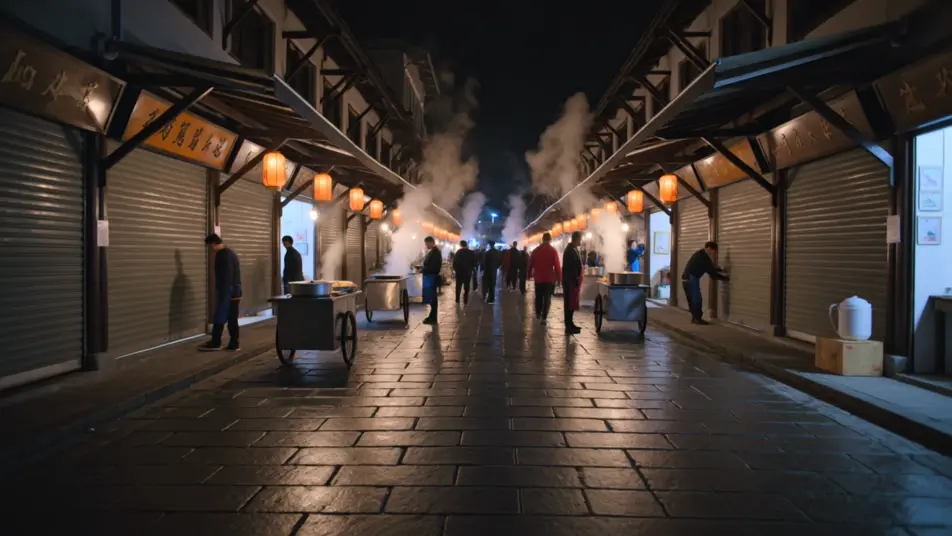
Direct a clip from a typed sentence in your browser with Morphic's text to video generation AI video generator. Generate example clips like a lantern-lit market waking at dawn or a lone runner crossing a rain-slick bridge, and pair them with the Music tool to score the moment. Stitch the results into one continuous sequence on the Canvas, then add narration with the Speech tool.

Text to video prompt styles you can direct

Text to video sequences you can stage

A market waking at dawn

A wide street of lantern-lit stalls comes to life as vendors raise shutters and steam rises from food carts, warm amber light spreading across wet stone, a slow dolly forward drawing the viewer into the crowd.

Prompt bearbeiten

A runner crossing a rain-slick bridge

A lone figure crosses a long steel bridge in steady rain, city lights smeared in the puddles below, a low tracking shot moving alongside the runner as breath fogs in the cold blue air.

Prompt bearbeiten

A studio interview setup

A single presenter seated against a soft gradient backdrop, keyed with a gentle three-point setup, the camera holding a locked medium shot so the delivery stays clean and the words carry.

Prompt bearbeiten

A product on a turning pedestal

A sleek object rotates slowly on a lit pedestal against seamless white, a shallow depth of field softening the edges, the camera arcing a quarter turn to catch the highlight sliding across the surface.

Prompt bearbeiten

text to video generation-Videos in drei Schritten erstellen

  1. 01

    Beschreiben Sie Ihre text to video generation-Szene

    Beschreiben Sie die text to video generation-Szene, die Sie möchten, in einfachen Worten.

  2. 02

    Video generieren

    Morphic generiert in Sekunden einen filmreifen Clip auf Ihrer Canvas.

  3. 03

    text to video generation-Video verfeinern

    Passen Sie den Prompt an, generieren Sie Varianten und laden Sie die Aufnahme herunter oder teilen Sie sie.

Verwandte Workflows

Das könnte Ihnen auch gefallen

Einfache Preise

Starten Sie noch heute kostenlos, mit der Option, jederzeit zu upgraden oder zu kündigen.

Basic

$9/ Monat
abgerechnet als $0 pro Jahr

900 monatliche Credits

1 Nutzer

Alle Modelle

Workflows

Standard

$24/ Monat
abgerechnet als $0 pro Jahr

3200 monatliche Credits

1 Nutzer

Alle Modelle

Workflows

Pro

$45/ Monat
abgerechnet als $0 pro Jahr

6200 gemeinsame monatliche Credits

1 Nutzer

+ bis zu 4 weitere gegen Aufpreis

Alle Modelle

Workflows

Pro Max

$170/ Monat
abgerechnet als $0 pro Jahr

24000 gemeinsame monatliche Credits

1 Nutzer

+ bis zu 9 weitere gegen Aufpreis

Alle Modelle

Workflows

Enterprise

Für höhere Limits

Individuell

Preis- und Abrechnungsbedingungen

Unbegrenzte Credits
Individuelle Platzlimits
Alle Modelle
Workflows
Pricing Gradient

Free

Zum Ausprobieren

$0

dauerhaft kostenlos

Bis zu 20 Credits
Nur 1 Nutzer
Eingeschränkte Modelle
Workflows

Häufig gestellte Fragen

Where can I make text to video clips with AI?
You can generate text to video clips directly in your browser on Morphic. Open the Text to Video tool, type a sentence describing the subject, action, light, and camera move, and Morphic produces the clip. No installs and no editing timeline required.
What kinds of shots work best with text to video?
Single-subject clips, establishing wide shots, and motion-led action shots all read cleanly from a prompt. The strongest results name one clear action and one clear camera move rather than trying to pack a whole scene into a single clip, which keeps the frame legible.
How do I write a good prompt for a text to video clip?
Lead with the subject, then the action, then the light, then the camera move. Swap vague words like beautiful or dynamic for concrete detail, warm amber light, slow dolly forward. Naming the camera path is what separates a directed clip from a static description.
How do I keep the look consistent between scenes?
Reuse the same light and color language across prompts and keep one visual anchor steady, a color palette, a time of day, a lens feel. On the Canvas you can line up clips and adjust each until the sequence reads as one continuous world.
Can I add music and narration to my text to video clips?
Yes. The Music tool scores an original soundtrack that matches the pace of your clip, and the Speech tool generates narration in the voice you choose. Layer both onto a clip so an establishing shot or interview carries sound as well as picture.
Do I need video editing experience to make these clips?
No. Morphic runs in your browser and you direct it with plain-language prompts. If you can describe a shot in a sentence, you can generate it. The prompts on this page are written so you can paste and run them straight away.