Inpainting
Mit Inpainting in Morphic können Sie gezielte Bearbeitungen an bestimmten Bereichen eines Bildes mithilfe eines Prompts vornehmen – ideal zum Verfeinern, Ersetzen oder Verbessern von Teilen, ohne das Ganze zu beeinflussen.
Hier ist eine kurze Anleitung, wie du Inpainting in Morphic verwendest:
- Laden Sie Ihr Bild auf der Leinwand hoch oder generieren Sie es dort
- Wähle das Bild aus und klicke in der Symbolleiste darüber auf „Bereichsauswahl“ oder in der rechten Seitenleiste unter „Details“ > „Tools“
- Ziehe einen Rahmen über den Bereich, den du ändern möchtest. Für eine unregelmäßige Form klicke in derselben Symbolleiste auf „Geführte Auswahl“ und zeichne freihändig um sie herum
- Schreibe einen Prompt, der die Änderung beschreibt, die du in diesem bestimmten Bereich sehen möchtest
- Klicken Sie auf den blauen Button in der Eingabeleiste
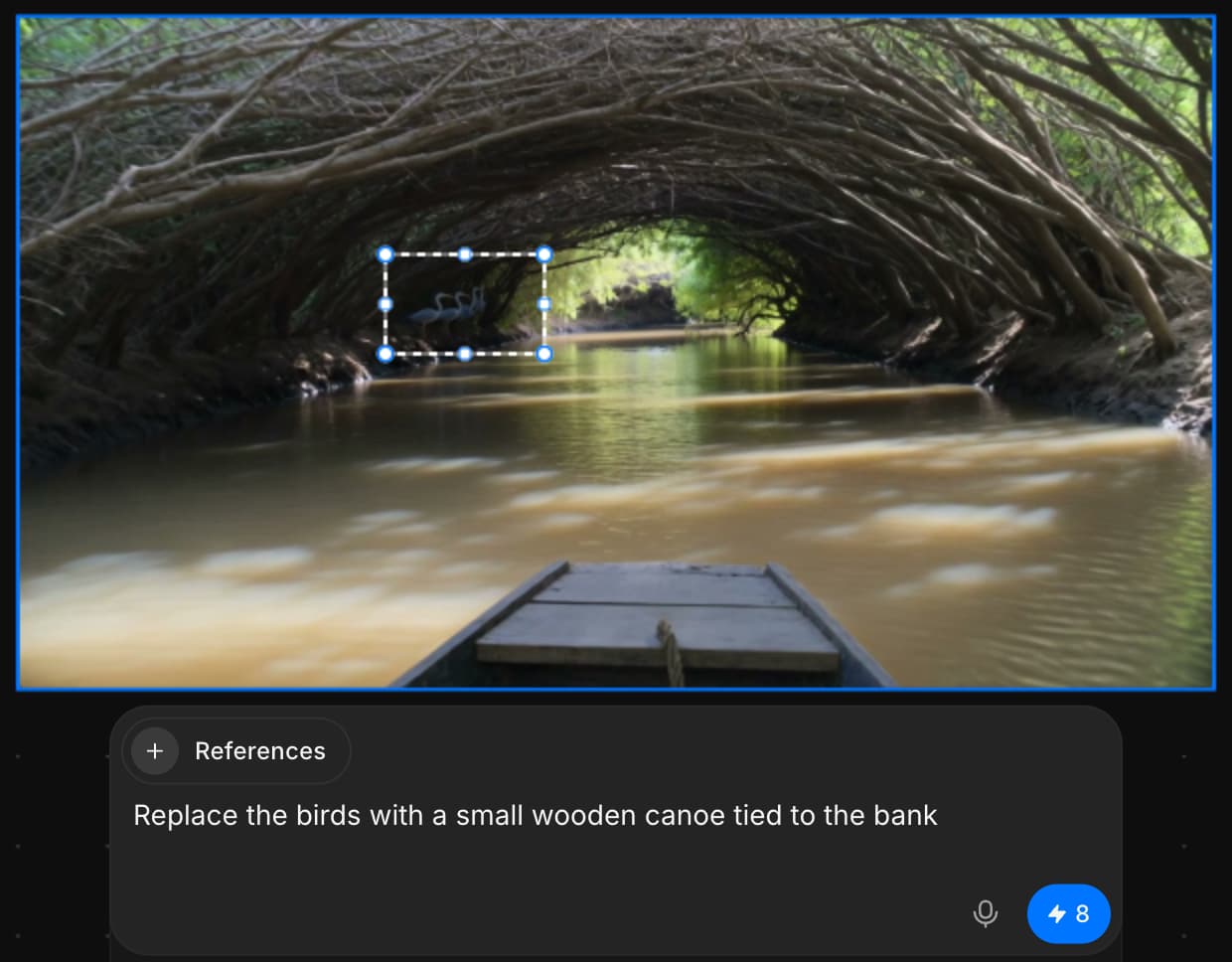
So verwendest du Inpainting, um gezielte Bearbeitungen an jedem Teil deines Bildes nur mit einem Prompt vorzunehmen. Nutze Inpainting, um Elemente in deinem Bild nahtlos zu entfernen, zu ersetzen oder hinzuzufügen. Bearbeitungen werden als neue Ebenen hinzugefügt, sodass dein ursprüngliches Bild unverändert und vollständig bearbeitbar bleibt.
Wenn Sie Probleme haben oder Fragen haben, können Sie sich gerne an uns wenden. Wir helfen Ihnen gerne. Schreiben Sie uns an support@morphic.com.
Inpainting und Outpainting
Der Unterschied zwischen dem Bearbeiten innerhalb eines Bildes und dem Erweitern über seine Ränder hinaus und wann sich was eignet.
Bild-Outpainting
Mit Outpainting in Morphic können Sie ein Bild mithilfe eines Prompts über seinen ursprünglichen Rahmen hinaus erweitern und nahtlose Ergänzungen erzeugen, die die bestehende Szene fortsetzen.