Einen Workflow bearbeiten
Wie Sie einen von Ihnen erstellten Workflow ändern, entweder aus dem Chat, in dem Sie ihn erstellt haben, oder aus dem Workflow-Editor heraus.
Haben Sie einen Workflow erstellt und möchten ihn anpassen? Sie können jeden von Ihnen erstellten Workflow jederzeit aktualisieren. Fügen Sie neue Schritte hinzu, passen Sie Einstellungen an oder verfeinern Sie die Funktionsweise – alles in einem Gespräch mit Copilot.
So können Sie einen Workflow bearbeiten:
- Über den Chat: Wenn Sie gerade einen Workflow erstellt haben, teilen Sie Copilot direkt im Chat mit, was geändert werden soll. Beschreiben Sie die gewünschten Bearbeitungen, und Copilot aktualisiert den Workflow für Sie.
- Über das Dashboard: Gehen Sie in der Seitenleiste zum Tab „Workflows“, klicken Sie bei einem von Ihnen erstellten Workflow auf das Drei-Punkte-Menü (···) und wählen Sie „Bearbeiten“. Dadurch öffnet sich der Workflow-Editor mit allen Details links und Copilot rechts, der Sie bei den Änderungen begleitet.
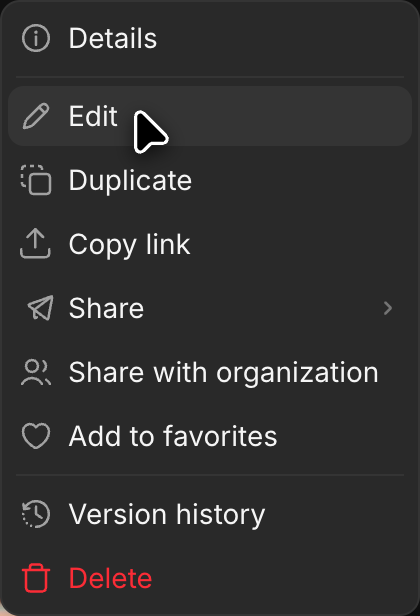
Jede Änderungsrunde wird als Version gespeichert, sodass Sie nachvollziehen können, wie der Workflow früher aussah, und eine frühere Version veröffentlichen können, falls eine Änderung nicht funktioniert hat. Siehe Versionsverlauf.
Wenn Sie einen Workflow, den Ihr Team ausführt, lieber nicht ändern möchten, duplizieren Sie ihn über das Menü „···“ und bearbeiten Sie stattdessen die Kopie.
So bearbeiten Sie einen Workflow in Morphic. Möchten Sie ihn mit Ihrem Team oder extern teilen? Erfahren Sie, wie Sie einen Workflow teilen.
Wenn Sie Probleme haben oder Fragen haben, können Sie sich gerne an uns wenden. Wir helfen Ihnen gerne. Schreiben Sie uns an support@morphic.com.
Einen Workflow erstellen
Die zwei Möglichkeiten, einen Workflow zu erstellen: von Grund auf mit Copilot oder aus einer Aufgabe, die Sie im Chat bereits abgeschlossen haben.
Versionsverlauf
Sehen Sie jede Version eines Workflows an, öffnen Sie eine frühere und schalten Sie sie live, um sie wieder zu verwenden. Nichts wird überschrieben, sodass eine nicht gelungene Bearbeitung jederzeit rückgängig gemacht werden kann.