Einen Workflow teilen
Wie Sie einen Workflow an Ihr Team weitergeben und wie Sie ihn für Personen außerhalb Ihrer Organisation verfügbar machen.
Einen Workflow erstellt, der sich zu teilen lohnt? Du kannst jeden Workflow mit deinem Team teilen, um alles konsistent zu halten oder ihn für Personen außerhalb deiner Organisation verfügbar zu machen. Geteilte Workflows bedeuten, dass alle die gleichen Schritte befolgen, dieselben Einstellungen verwenden und jedes Mal die gleiche Ausgabequalität erhalten.
So kannst du einen Workflow teilen:
- Innerhalb deiner Organisation: Klicke im Dashboard bei einem beliebigen Workflow auf das Drei-Punkte-Menü (···) und wähle „Link kopieren“. Jede Person in deiner Organisation kann diesen Link verwenden, um den Workflow anzusehen und auszuführen.
- Extern: Klicke bei einem von dir erstellten Workflow auf das Drei-Punkte-Menü (···) und fahre mit der Maus über „Teilen“. Aktiviere „Externes Teilen“ und klicke dann auf „Externen Link kopieren“, um ihn zu kopieren, oder auf „Über System teilen...“, um ihn direkt an eine andere App weiterzugeben. Jede Person mit diesem Link kann den Workflow ansehen und ausführen, auch außerhalb deiner Organisation.
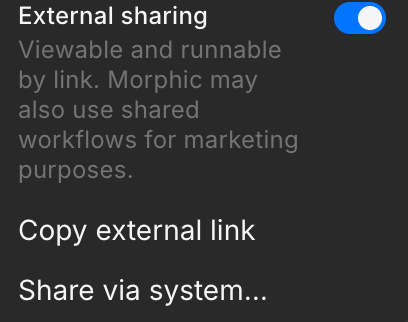
Im Bereich „Teilen“ wird darauf hingewiesen, dass Morphic freigegebene Workflows möglicherweise auch für Marketingzwecke verwendet. Das solltest du wissen, bevor du das externe Teilen für Kundenaufträge aktivierst.
So teilst du einen Workflow auf Morphic. Ob mit deinem Team oder mit der ganzen Welt: Durch das Teilen können andere deinen Workflow mit nur einem Klick ausführen.
Wenn Sie Probleme haben oder Fragen haben, können Sie sich gerne an uns wenden. Wir helfen Ihnen gerne. Schreiben Sie uns an support@morphic.com.