Contextual search
The keyboard shortcut that searches files, assets, and workflows from anywhere in Morphic.
Contextual Search on Morphic lets you find and access anything in the platform using a keyboard shortcut. Open it with 'Cmd+K' on Mac or 'Ctrl+K' on Windows to search files, assets, workflows, among other things, across the platform.
Here's how Contextual search works on Morphic:
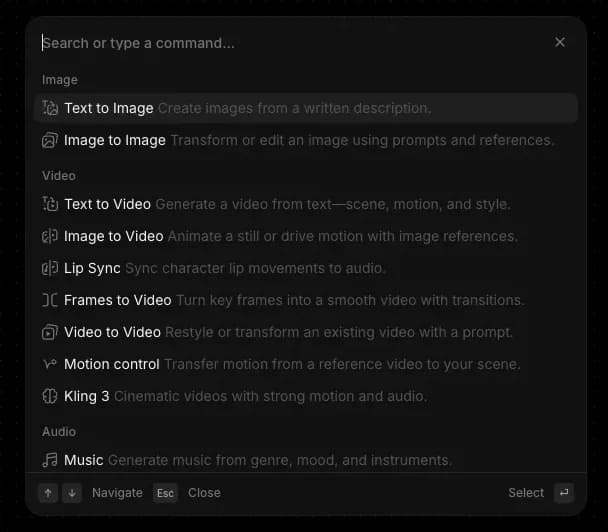
- Open Contextual search anywhere in Morphic with 'Cmd+K' on Mac or 'Ctrl+K' on Windows. On the Dashboard you can also click 'Search' at the top of the left sidebar, which opens the same menu.
- Reach for it when you're getting oriented with Morphic, and rely on it when you want speed. New users find it a low-friction way to explore, while power users use it to stay in flow without leaving the keyboard.
- The menu adapts to where you are in Morphic. Canvas surfaces creation and editing tools. The dashboard surfaces organization, files, and account options. Open it in any view to see the most relevant commands for that moment.
- Search across everything by typing a keyword. Results include files, projects, workflows, assets, references, and matching commands.
- Navigate with the keyboard. Arrow keys move through results, 'Enter' selects, and 'Esc' goes back or closes the menu.
That's how you use the Contextual Search feature on Morphic. One shortcut connects you to everything in the platform, so you can find, navigate, and act without breaking flow.
If you have any trouble or have any questions, feel free to reach out. We're happy to help. Write to us at support@morphic.com.