Choose a model
How to pick which model runs a Copilot chat, what each one is suited to, and where to set the one new chats start with.
Copilot runs on a language model, and you can pick which one. It is the model that reads your request, plans the work, and talks back to you. Which image or video model makes the media is a separate setting, under 'Model preferences' in the prompt bar.
The models
| Model | Suited to |
|---|---|
| Auto | Picks the best model for each task. The default |
| Sonnet 4.6 | Balanced intelligence and speed for most tasks |
| Sonnet 5.5 | Balanced intelligence and speed for most tasks |
| Haiku 5.5 | Fast and affordable for quick, focused tasks |
| Grok 4.6 | Fast, direct responses for everyday tasks |
| Grok 4.7 | Fast like Grok 4.6, and stronger on long, multi-step tasks |
| GPT 6 Sol | Deep reasoning for complex, multi-step tasks |
| GPT 6.1 Sol | Capable, efficient reasoning for complex, multi-step projects |
| GPT 5.6 Terra | Balanced intelligence and cost for demanding everyday work |
| Fable 5.1 | Creative, polished responses for storytelling and ideation |
| Opus 5.5 | Strong reasoning and creative judgment for demanding projects |
Leave it on 'Auto' unless you have a reason not to. GPT 6 Sol, GPT 5.6 Terra, Fable 5.1 and Opus 5.5 need a paid plan. Some models are listed but dimmed; those cannot be picked yet.
Credits
Each reply uses credits, and the model sets the rate. Auto uses the fewest. A model you pick is always charged, which the dropdown notes under the list: 'Switching from Auto to any specific model will cost you the relevant credits'. Auto can be charged too, depending on your account.
Changing the model partway through a chat asks you to confirm first: the new model reads the whole chat before it answers, so its first reply costs more. Pick the model when you start a chat to avoid it.
Typical credits per reply for every model are under Copilot reply costs.
Pick one for a chat
- Open Copilot
- Click the button at the bottom right of the prompt bar. It reads mode first and model second, so 'Auto · Sonnet 4.6' is automatic generation running on Sonnet 4.6
- Under 'Model', open the dropdown and pick one. A checkmark marks the active model
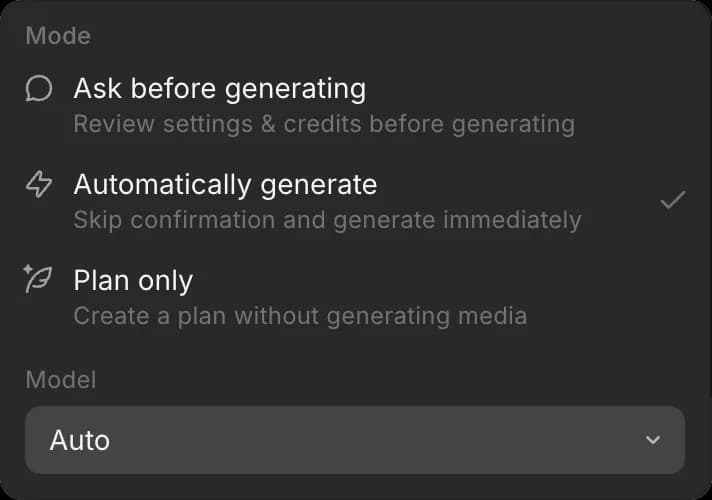
The choice belongs to the chat, so chats can run on different models at once, and it holds until you change it.
Set the default for new chats
- Open 'Preferences'
- Beside 'Default chat mode', open the dropdown
- Pick the model under 'Model', and the mode under 'Mode' while you are there
New chats start on that model. Changing one chat's model does not change the default.
That's how you choose a model on Morphic. Most work is fine on 'Auto'; pick one yourself when a chat calls for speed or for more reasoning.
If you have any trouble or have any questions, feel free to reach out. We're happy to help. Write to us at support@morphic.com.