Continue in a new chat
How to fork a Copilot chat at any message, what carries over to the new chat, and when forking helps most.
'Continue in new chat' on Morphic lets you carry a conversation on in a separate chat, picking up from any message you choose. The new chat continues from that point with the history behind it, and the chat you started from stays exactly as it was.
You may know this as chat forking, or branching a conversation. They mean the same thing, and this page uses both. In Morphic the control is called 'Continue in new chat', because that is what the new chat does: it continues the original rather than starting from nothing.
The most valuable thing in a long chat is rarely the images, which are already in your library. It is everything Copilot worked out along the way: the references and what each is for, the wording that finally landed, the corrections, the settings, the attempts that failed. Forking keeps all of it and points it somewhere new.
So the best moment to fork is the moment something is finally right. It costs nothing, it is instant, and it never changes the chat you forked from.
Fork a conversation
Here's a quick tutorial on how to fork a conversation on Morphic:
- Open Copilot and find the message you want to branch from
- Click the branch icon in the row of actions under the message. It is labelled 'Continue in new chat'
- Copilot creates the new chat and opens it for you
Under Copilot's replies the actions sit there ready, so the branch icon takes one click. Under your own messages they appear when you hover. Hovering also shows the time the message was sent.
The forked chat appears at the top of your chats list, named after the original with a number added, like 'Pear and Mug (1)'. At the end of the copied history you'll see 'Continued from', with a link back to the source, so you can always trace a branch to where it came from.
You can fork from Copilot's messages and from your own, and each does something different.
From one of Copilot's messages, the new chat includes everything through that reply, so you carry on from that point.
From one of your own messages, the new chat includes everything up to but not including that message, and your message is dropped into the prompt bar ready to edit. It carries over in full, so the text, any @mentions, and anything you attached, including documents, are all still there. You change the part you want to change and send it, rather than building the message again.
By asking Copilot, say 'continue this conversation in a new chat', or name it up front with 'continue this in a new chat called Night version'. Copilot forks it and replies with a 'Forked chat' card you can click to open. Asked this way you stay where you are, which is useful when you want to spin off a branch and come back to it later.
How the context branches
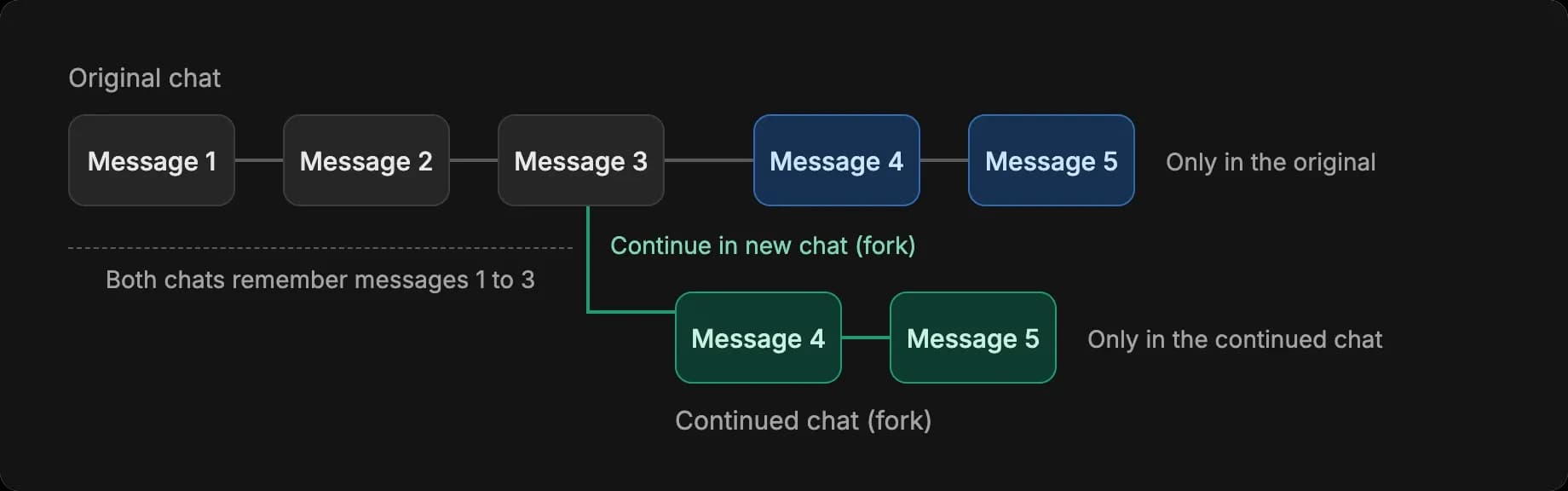
The new chat starts with everything up to the message you pick: the messages, attachments, documents Copilot wrote, and the chat's model and mode. From there the two chats grow separately. Copilot in each remembers the shared messages and only its own messages after them, so a change in one chat never reaches the other.
| New chat | Continue in new chat (fork) | |
|---|---|---|
| Starts with | No history | Everything up to the message you pick |
| Reply cost | Lowest | The same as the original, since it reads the same history |
| Use it for | New work | A second direction from a point you want to keep |
When it helps most
Turn an approved result into a starting point
This is what forking is best at. You spend a dozen messages and a good number of credits getting one thing right: the hero frame, the character, the grade. Then the job needs six things from it.
Fork from that message once per deliverable. Every branch starts with Copilot already understanding the look, so the vertical cut, the alternate scene, and the video version all come from the same agreed base.
- Find the message where the result was approved
- Fork from it once for each direction you need
- Rename each branch for what it is, like '9x16' or 'Scene 2'
- Work in each one independently
This is also how you keep a character consistent. Get the character settled once, then fork per scene or outfit, so each starts from the same description and the same references.
Ask again without losing the first answer
The quickest win, and the one most people miss. When Copilot's reply is close but not quite there, fork from your own message. The new chat holds everything before you asked, with your message waiting in the prompt bar, attachments and all. Change a few words, send it, and you get a second attempt from an identical starting point while the first stays put. Fork a few times and you have alternatives to compare side by side.
Keep a chat focused on one direction
Copilot reads the whole conversation as context, so a chat that follows a single direction gives it the clearest picture of what you are after.
When a chat has covered a few different ideas, fork from the message where the one you want to continue was going well, and carry on there. It is also worth forking before you try something experimental: if the idea does not lead anywhere, close the branch and the original is untouched.
Good to know
- Forking itself costs no credits. For work that does not need the history, start a new chat.
- Forked chats stay in the same workspace as the original.
- It is worth forking before something experimental, and before handing work to a teammate, so they open a chat holding the decisions and not the exploration.
Name a branch for what you are trying in it, like 'Warm grade' or 'Night version'. Right-click the chat in the sidebar and choose 'Rename'. It saves a lot of hunting later when several branches come from the same conversation.
That's how chat forking works in Copilot. When a conversation reaches a point you would hate to lose, continue it in a new chat and build from there.
If you have any trouble or have any questions, feel free to reach out. We're happy to help. Write to us at support@morphic.com.