Videoyu uzatın
Bir çekimi tek üretimin izin verdiğinden uzun yapmanın yolu: klibi Seedance 2.5 ile uzatın ya da karelerinden birinden devam edin.
Morphic'teki her video modelinin bir azami klip uzunluğu vardır. Daha uzun bir çekim yapmak ya da bir sahneyi sürdürmek için elinizdeki klibi Seedance 2.5 ile uzatın veya karelerinden birinden yeni bir klip başlatıp klipleri Compose'da birleştirin.
Seedance 2.5 ile uzatma
Seedance 2.5, karakteri, hareketi ve stili koruyarak klibi son karesinin ötesine taşır. İlk kareden önceki anı da üretebilir.
- Canvas'ta prompt çubuğunun sol altındaki mod seçicisine tıklayın, 'Video'nun üzerine gelin, ardından 'Reference to Video'ya tıklayın
- Model seçicisine tıklayın, 'Seedance'in üzerine gelin ve 'Seedance 2.5'i seçin
- 'References' kutusuna tıklayın ve uzatmak istediğiniz klibi ekleyin. Bir referansın nereden gelebileceği için Reference to Video sayfasına bakın
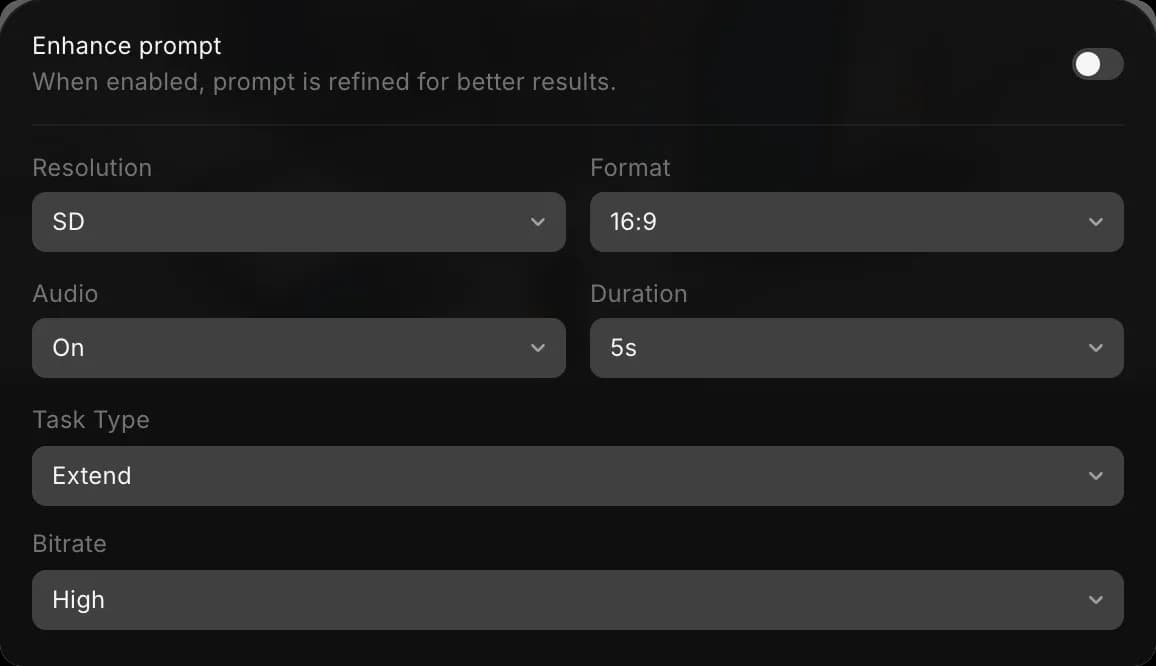
- 'SD · 16:9 · On · 5s · Auto · High' gibi görünen ayarlar düğmesine tıklayın. 'Task Type'ı 'Extend' olarak ayarlayın ve 'Duration'ı bitmiş klibin uzunluğuna, yani orijinal artı yeni görüntüye ayarlayın. 5 saniyelik bir klibe 5 saniye eklemek için 10s seçin
- Prompt'u uzat ya da devam et diyerek yazın ve klibi @ ile belirtin, örneğin
@Video 1'i ileri doğru uzat: binici tepeyi aşar ve kasaba görününce yavaşlar - Prompt çubuğundaki mavi düğmeye tıklayın. Düğme, klibin maliyetini gösterir
Sonuç, orijinal ve yeni görüntüyü içeren tek bir kliptir ve eklediğiniz klibin en boy oranını korur. Bunun yerine klibin önüne görüntü eklemek için bunu belirtin: @Video 1'den önceki 5 saniyeyi devam ettir.
Bir kareden devam etme
Bu yöntem her video modeliyle çalışır; böylece kesme noktasında model ya da yön değiştirebilirsiniz.
- Canvas'taki klibe sağ tıklayın ve 'Extract last frame to Canvas'ı seçin. Daha önceki bir andan devam etmek için klibi seçin, oynatma başlığını istediğiniz kareye sürükleyin, ardından sağ tıklayıp 'Extract frame to Canvas'ı seçin
- Çıkarılan kareyi seçin ve onu başlangıç karesi olarak kullanarak Image to Video çalıştırın. Sonra ne olacağını anlatın, örneğin
aynı hızda yürümeye devam eder ve pencereye doğru döner - Sahne ihtiyacınız olan uzunluğa gelene kadar her yeni klibin sonundan bu adımları tekrarlayın
Morphic'te bir videodan kare çıkarmayı gösteren kısa bir eğitim:
Klipleri birleştirme
Karelerden oluşturulan klipler ayrı videolardır. Onları Compose'da birleştirin:
- Compose'u açın
- Klipleri 'Assets' sekmesinden zaman çizelgesine sırayla sürükleyin
- Sağ üstteki 'Export'a tıklayın. Bkz. Video dışa aktarma
İpuçları
- Çekimin görünür bir geçiş olmadan akması gerektiğinde Extend'i kullanın. Sonraki her klibi kendiniz yönlendirmek istediğinizde bir kareden devam edin.
- Karakter ve görünüm aynı kalsın diye tüm kliplerde aynı modeli, en boy oranını ve referansları kullanın.
- Copilot'ta bunu gündelik bir dille isteyin, örneğin "bu klibi 5 saniye uzat".
Morphic'te video böyle uzatılır. Bir çekimin ya da sahnenin tek bir üretimden daha uzun sürmesi gerektiğinde kullanın.
Herhangi bir sorun yaşarsanız ya da sorularınız olursa, bizimle iletişime geçmekten çekinmeyin. Yardım etmeye memnuniyet duyarız. Bize şu adresten yazın: support@morphic.com.
Birden fazla karakter etiketi
Artık Morphic'te birden fazla karakter içeren bir sahne oluşturabilirsiniz. Bu, karakterler arasında tutarlılığı korurken diyalog, etkileşim veya koordineli eylem gerektiren sahneler için kullanışlıdır.
Storyboard oluşturma
Nihai kareleri oluşturmadan önce Morphic'te sahneleri, çekimleri ve görsel akışı nasıl planlayacağınız.