> For the complete documentation index, see [llms.txt](https://morphic.com/docs/llms.txt). Markdown versions of documentation pages are available by appending `.md` to page URLs; this page is available as [Markdown](https://morphic.com/docs/tr/how-tos/storyboarding/storyboarding-using-a-script.md).

# Bir senaryo kullanarak storyboard oluşturma

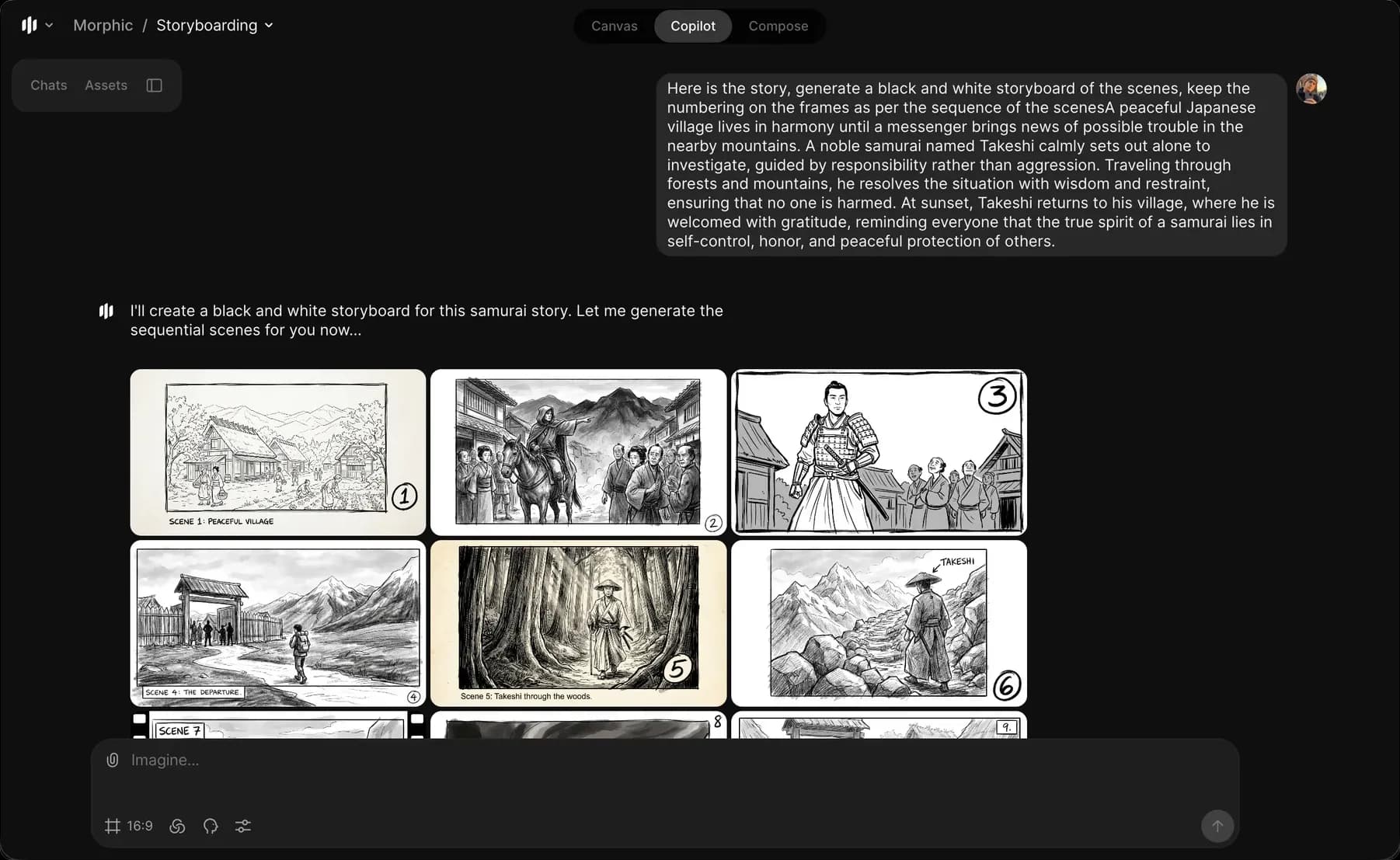
Bu yöntem, Copilot’un bir hikâye oluşturmasını istediğinizde veya zaten bir senaryonuz varsa ve bunu storyboard kareleri olarak görselleştirmek istediğinizde kullanışlıdır.

Morphic’te script kullanarak storyboard’ların nasıl oluşturulacağına dair kısa bir eğitim burada:

1. Şuraya gidin [Copilot](https://studio.morphic.com/chat) Morphic üzerinde
2. “Bu sahnelerin siyah-beyaz bir storyboard’unu oluşturun….” gibi bir istem yazın
3. İsteğe bağlı olarak karakter hareketlerini, kamera açılarını, ruh halini veya ortamı ekleyin
4. Storyboard’unuzu oluşturmak için istem çubuğundaki mavi düğmeye tıklayın
<figure><img src="https://991311795-files.gitbook.io/~/files/v0/b/gitbook-x-prod.appspot.com/o/spaces%2FoPhHCbNZdzW70rakoLhf%2Fuploads%2F6JFTMEybO1TAvQ6zFbSz%2FCleanShot%202026-01-12%20at%2019.45.50%402x.png?alt=media&amp;token=83683d2a-c7d8-4ba2-91ec-de5b9391f491" alt=""><figcaption></figcaption></figure>

Copilot, oluşturulan hikâyeyi veya scripti net görsel sahnelere bölerek storyboard kareleri oluşturur. Morphic’te bir script kullanarak storyboard’ları bu şekilde oluşturabilirsiniz. Bu, yazılı scriptleri net görsel sahnelere dönüştürmeye yardımcı olur.

***

Herhangi bir sorun yaşarsanız veya sorularınız varsa, bizimle iletişime geçmekten çekinmeyin. Yardım etmekten memnuniyet duyarız. Bize şu adresten yazın [**support@morphic.com**](mailto:support@morphic.com)**.**


---

# Agent Instructions
This documentation is published with GitBook. GitBook is the documentation platform designed so that both humans and AI agents can read, navigate, and reason over technical content effectively. Learn more at gitbook.com.

## Querying This Documentation
If you need additional information that is not directly available in this page, you can query the documentation dynamically by asking a question.

Perform an HTTP GET request on the current page URL with the `ask` query parameter, and the optional `goal` query parameter:

```
GET https://morphic.com/docs/tr/how-tos/storyboarding/storyboarding-using-a-script.md?ask=<question>&goal=<endgoal>
```

`ask` is the immediate question: it should be specific, self-contained, and written in natural language.
`goal` is optional and describes the broader end goal you are ultimately trying to accomplish on behalf of the user. GitBook uses it to tailor the answer towards what is most useful for that goal.

The response will contain a direct answer to the question and relevant excerpts and sources from the documentation.

Use this mechanism when the answer is not explicitly present in the current page, you need clarification or additional context, or you want to retrieve related documentation sections.
