Out of Frame Effect

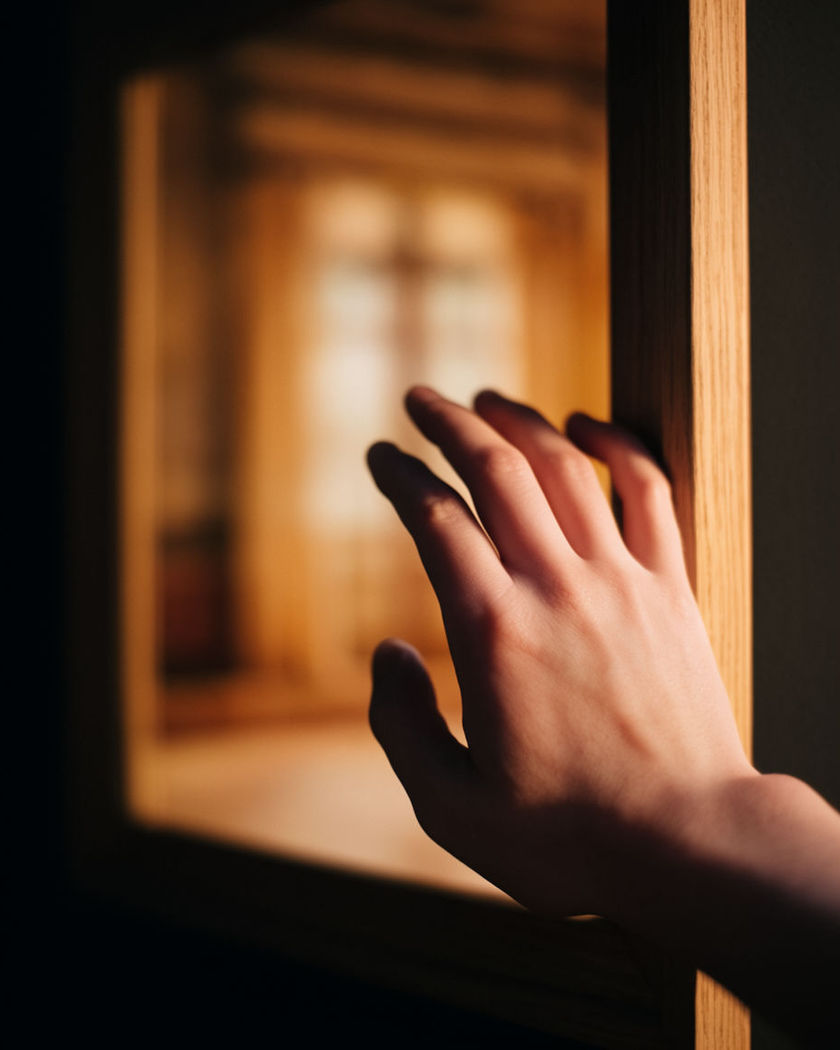
A portrait comes to life inside its own picture frame and a hand, then a shoulder, then a whole figure pushes past the wooden edge into the room.

A hand reaching out past the wooden edge of a hanging picture frame into the room beyond it

Out of frame effect examples

Gallery wall reveal

Utiliser ce prompt

A wide gallery wall shot as one portrait's subject steps fully into the room. a wide shot of a gallery wall lined with framed portraits, the centre portrait's subject slowly stepping fully out of its frame and standing in the gallery among visitors, dramatic track lighting, other frames staying still and flat

Study wall breakthrough

Utiliser ce prompt

In a quiet study, a hand punches through the canvas into the lamp-lit room. a wide shot of a wood-panelled study at night, a single framed portrait on the wall, a hand breaking through the canvas surface and reaching into the room as the desk lamp flickers, warm low light, slow suspenseful push in

Full step out of the frame

Utiliser ce prompt

The figure steps entirely out of the frame and stands in front of it. a full-length portrait in a tall gilt frame in a dim hallway, the figure taking one full step forward out of the frame and standing in the hallway in front of the now-empty painted background, single warm sconce light, slow reveal

Frame flexes as pressure builds

Utiliser ce prompt

The canvas visibly bulges outward before the figure finally breaks through. a portrait in a canvas frame in a quiet study, the canvas surface visibly bulging outward under pressure from within before the figure's hand finally breaks through the surface into the room, low warm desk lamp light, slow building tension

Hand breaks the frame edge

Utiliser ce prompt

A painted hand slowly pushes past the wooden edge of the frame into the room. a close portrait hanging in an ornate wooden frame on a gallery wall, the figure inside slowly reaching one hand forward until the fingers push past the physical edge of the frame into the room, dramatic gallery spotlight, the frame's shadow staying fixed on the wall

Fingers gripping the frame edge

Utiliser ce prompt

Fingers curl around the outer wooden edge as if pulling the body forward. a close portrait in a thick wooden frame, both hands appearing at the outer edges of the frame and gripping the wood as if pulling the body forward out of the picture, museum track lighting, tense and deliberate motion

Museum bench reveal

Utiliser ce prompt

A visitor on a bench looks up as a portrait's subject steps down beside them. a wide museum room with a visitor seated on a bench facing a large framed portrait, the portrait's subject slowly stepping down out of the frame and standing beside the bench, soft gallery daylight, quiet awe in the composition

Shoulder leans out

Utiliser ce prompt

A shoulder and half a face lean forward past the flat plane of the canvas. a portrait in a plain black frame, the figure slowly turning and leaning one shoulder forward past the flat plane of the canvas into three dimensions while the rest of the frame stays a flat painted surface, soft studio light, subtle and eerie

Hallway of frames

Utiliser ce prompt

Along a hallway of frames, one figure leans out further than the rest. a wide hallway lined with hanging portraits under sconce light, most frames perfectly still while one figure in the centre frame leans its shoulder and head out past the frame's edge, subtle unsettling motion, slow tracking shot down the hall

Foot crosses the frame line

Utiliser ce prompt

A single foot steps down past the bottom edge of the frame onto the floor. a three-quarter portrait in a simple frame propped against a wall, one foot slowly stepping down past the bottom edge of the frame onto the real floor below while the upper body remains inside the picture, warm afternoon light

Generate your own out of frame effect

Choisissez un point de départ, modifiez ce que vous voulez, puis générez dans Morphic.

Générer

Tarifs simples

Commencez gratuitement dès aujourd'hui, avec la possibilité de mettre à niveau ou d'annuler à tout moment.

Basic

$19/ mois
facturé comme $0 par an

2400 mensuel crédits

1 utilisateur uniquement

Tous les modèles

Workflows

Standard

$24/ mois
facturé comme $0 par an

3625 mensuel crédits

1 utilisateur uniquement

Tous les modèles

Workflows

Pro

$45/ mois
facturé comme $0 par an

6350 partagé mensuel crédits

1 utilisateur

+ jusqu'à 4 plus à un coût supplémentaire

Tous les modèles

Workflows

Max

$170/ mois
facturé comme $0 par an

24650 partagé mensuel crédits

1 utilisateur

+ jusqu'à 9 plus à un coût supplémentaire

Tous les modèles

Workflows

Enterprise

Pour des limites plus élevées

Personnalisé

conditions de tarification et de facturation

Crédits à haut volume
Limites de sièges personnalisées
Tous les modèles
Workflows
Pricing Gradient

Free

Pour expérimenter

$0

gratuit pour toujours

Jusqu'à 20 crédits
1 utilisateur uniquement
Modèles limités
Workflows

Questions fréquentes

Where can I make AI Out of Frame Effect videos with AI?
You can create AI Out of Frame Effect videos directly in your browser on Morphic. Open the Image to Video tool, describe how far the figure breaks out of the frame, pick the model that suits the look, and Morphic generates the clip. No compositing software needed.
What kinds of shots work best for an out of frame effect video?
A clear frame or canvas edge against a plain wall works best, since the contrast between the flat picture and the real room is what sells the illusion. A single deliberate motion, a reach, a step, a breakthrough, reads more convincingly than several actions at once.
How do I write a good prompt for an out of frame effect video?
Name the type of frame, exactly what breaks past its edge, and how the rest of the frame stays fixed and flat. Add the light and setting. The clearer the contrast between picture and room, the more convincing the illusion Morphic returns.
Can I use my own photo for this effect?
Yes. Upload a portrait, describe how it should hang in a frame and break out of it, and Morphic generates the clip from your image. You can then finish the edit with music or sound design on the timeline before you export.
Do I need video editing experience to make this video?
No. Morphic runs in your browser and you direct it with plain-language prompts. If you can describe the frame and the motion, you can produce the video. The prompts on this page are written so anyone can paste and run them.
What can I use an AI Out of Frame Effect video for?
They work well as eye-catching art and gallery-style social content. Generate the shot, finish the edit with music or a voiceover on the timeline, then export the size each platform needs, all from one workspace.