Tintype Wet Plate AI Images

Shoot tintype wet plate images in your browser with Morphic's tintype wet plate AI image generator. Generate tintype wet plate portraits like a stern studio sitter in high collar, a weathered tradesperson with tools, or a draped figure against a painted backdrop, and pair every frame with the Style Transfer workflow to lock the collodion silver tones and swirling bokeh across the set. Use the Upscale tool to push any selected plate to print resolution.

Tintype wet plate portraits you can shoot

Tintype wet plate scenes you can compose

Wet-plate studio with backdrop

A period wet-plate studio with a hand-painted backdrop and a heavy posing chair, soft north-window light, collodion silver tones, shallow focus, swirling bokeh, faint plate streaks framing the set.

Edit prompt
Wet-plate studio with backdrop

Collodion plate detail surface

A macro view of a collodion plate surface, metallic silver sheen catching raking light, fine emulsion swirls and edge pour-marks, shallow focus, antique tarnish and texture filling the frame.

Edit prompt
Collodion plate detail surface

Outdoor field portrait setup

An outdoor wet-plate setup in a dim field, a draped figure before foliage, metallic silver-grey rendering, very shallow focus, heavy swirling bokeh, soft uneven plate edges, brooding collodion atmosphere.

Edit prompt
Outdoor field portrait setup

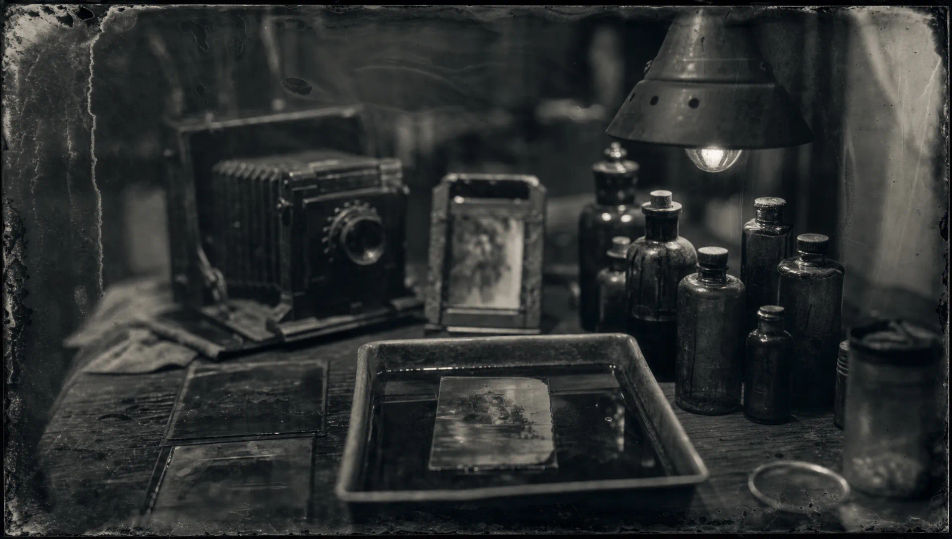
Antique darkroom workbench

An antique darkroom workbench with glass plates, amber chemical bottles, and a developing tray under dim safelight, collodion silver tones, shallow focus, soft vignette, weathered period texture.

Edit prompt
Antique darkroom workbench

Make Tintype wet plate in three steps

  1. 01

    Describe your Tintype wet plate

    Describe the Tintype wet plate you want, including the subject, setting, and lighting.

  2. 02

    Generate the image

    Morphic generates a clean, ready-to-publish image on your canvas in seconds, no editing software required.

  3. 03

    Refine your Tintype wet plate

    Tweak the prompt, regenerate variations, then download or share the moment the frame lands.

Related workflows

こちらもおすすめ

FAQs

Where can I make tintype wet plate images with AI?
You can shoot tintype wet plate images directly in your browser on Morphic. Open the Image tool, describe the sitter, the period costume, the setting, and the plate look, and Morphic renders the portrait. No collodion chemistry or large-format camera needed.
What defines a tintype wet plate image at the prompt level?
Metallic silver-grey collodion tones, very shallow depth of field, swirling background bokeh, soft plate halation, and edge streaks from the hand-poured emulsion. Name the silver tones, the shallow focus, and the swirling bokeh in every prompt so the frame reads as a genuine wet-plate exposure.
How do I get the collodion plate look right in a tintype portrait?
Specify it directly: name the tones ("collodion silver-grey", "luminous silver highlights"), the focus ("shallow focus with swirling bokeh"), and the texture ("faint plate streaks", "soft uneven edges"). Reuse those cues across every plate so the antique look stays matched through the set.
How do I keep a tintype wet plate series feeling like one sitting?
Use the Style Transfer workflow to lock the silver tones, the shallow focus, and the plate texture, then reference that style card in every prompt. The full series then reads as one consistent wet-plate session across every portrait and setting.
Do I need collodion chemistry or a plate camera to shoot tintype wet plate images?
No. Morphic runs in your browser and you direct it with plain-language prompts. Anyone who can describe a sitter, a period setting, and a plate look can produce wet-plate portraits. Collodion chemicals, silver plates, and a large-format camera are not required.