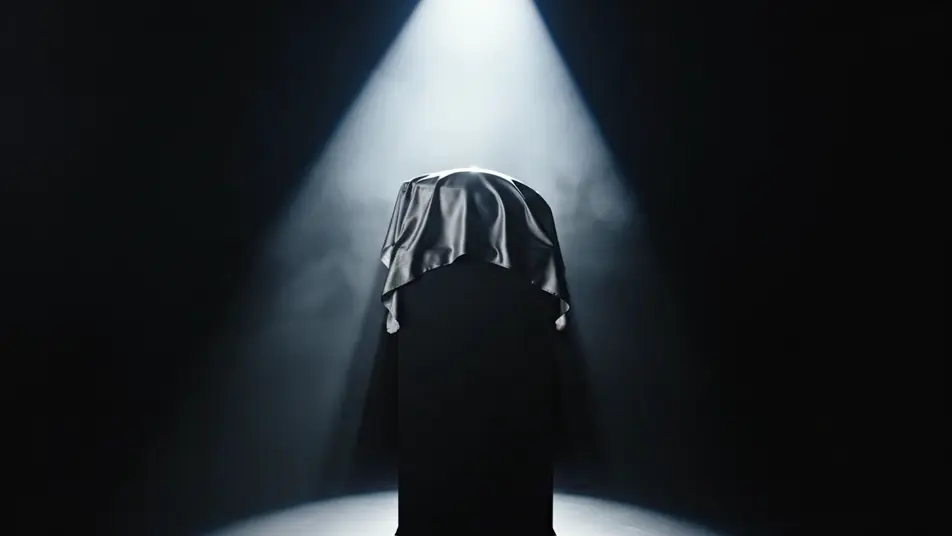
新商品発表動画をAIで演出
新商品発表動画は、ブラウザ上でMorphicの動画生成AIを使って演出できます。幕が落ちる瞬間やスポットライトが灯るヒーローショット、紙吹雪に沸く客席まで、プロンプトひとつで再現可能です。Musicで音楽を重ね、Composeで一本の発表シーンに仕上げます。
発表を彩る演出カット
発表シーンの構成



新商品発表動画の動画を3ステップで作成
- 一
シーンを記述
作りたい新商品発表動画のシーンを、わかりやすい言葉で記述します。
- 二
動画を生成
Morphicがキャンバス上に映画のようなクリップを数秒で生成します。
- 三
仕上げて共有
プロンプトを調整して再生成し、気に入ったショットを保存・共有します。

シネマティックシーンへのメッセージ
あらゆるテキスト会話を映画のようなマルチショットビデオにドラマ化します。
このワークフローを試す
タイムフリーズ効果
あらゆるシーンに使える、シネマティックなタイムフリーズ短編動画
このワークフローを試す

タイトルシーケンス
オプションでシネマティックアニメーションを追加できる、プロフェッショナルな映画タイトルカードをゼロから生成します。
このワークフローを試す
リノベーションのタイムラプス
不動産の写真は、建設SFXと音楽を使った映画のようなリノベーションのタイムラプスビデオになります。
このワークフローを試す
Cinematic scene
1枚の画像から9シーンのシネマティックビデオを作成します。
このワークフローを試す
映画の世界に入り込んでみよう
あなたの写真をドロップしてください。アニメーションとマッチしたサウンドトラックを備えた12秒の映画のようなムービーを入手してください。
このワークフローを試す
こちらもおすすめ
AI商品デモ動画
ターンテーブル回転や手元のクローズアップ、マクロ撮影まで一つのプロンプトから生成。無地の商品でデモ映像を今すぐ作れます。
展示会ループ動画をAIで生成
展示会ブース向けのループ動画をAIで生成。回転する商品や光の演出を数分で用意できます。Composeで途切れなく繰り返す一本に仕上げましょう。
TikTok広告動画をAIで生成
TikTok広告動画をAIで生成。商品をつかむ手、ビフォーアフター、驚きの表情を縦型で作れます。SNS運用にも広告出稿にもそのまま使えます。今すぐフックを作りましょう。
AI季節キャンペーン動画
季節キャンペーン動画をAIで生成。雪、紅葉狩り、桜、夏の光を数分で再現し、撮影日もロケ地も不要です。今すぐ季節を選べます。
シンプルな料金体系
今すぐ無料で始めて、いつでもアップグレードまたはキャンセルできます。
Basic
$19/ 月
請求額は $0 年2400 月 クレジット
1 ユーザーのみ
すべてのモデル
ワークフロー
Standard
$24/ 月
請求額は $0 年3625 月 クレジット
1 ユーザーのみ
すべてのモデル
ワークフロー
Pro
$45/ 月
請求額は $0 年6350 共有 月 クレジット
1 ユーザー
+ 最大 4 名まで追加費用
すべてのモデル
ワークフロー
Max
$170/ 月
請求額は $0 年24650 共有 月 クレジット
1 ユーザー
+ 最大 9 名まで追加費用
すべてのモデル
ワークフロー
Enterprise
より高い制限のために
カスタム
料金と請求条件
大容量クレジット
カスタムシート制限
すべてのモデル
ワークフロー

Free
気軽に試したい方に
$0
ずっと無料
最大20クレジット
1ユーザーのみ
一部のモデル
ワークフロー
よくある質問
AIで新商品発表動画を作るには?
MorphicならブラウザだけでOKです。Text to Videoで幕開けや予告、観客の反応など各カットを言葉で指定すると、Morphicが映像を生成します。Canvasで各カットのテイクを並べて見比べ、仕上げはComposeで、暗闇から祝祭へと盛り上がる一本にまとめましょう。
発表動画を盛り上げる演出の型は?
期待・開示・反応の三拍子が基本です。正体を隠す予告、一つの光源で見せる開示、拍手や紙吹雪で締める反応があります。新商品は無地・無印で統一すると、AIが余計な模様を描かず演出に集中できます。
発表シーンのプロンプトはどう書けばいい?
光とタイミングを具体的に指定します。暗い空間、一つの光源、布が外れる瞬間や光が灯る瞬間を明記しましょう。新商品は無地・無印と書き添え、カメラは一つのゆっくりした動きに絞ると構図が崩れません。
発表動画は商用利用できますか?
はい、Morphicで生成した動画は商用利用に対応しています。テープカットや紅白幕といった自社イベントの演出も、そのまま広告や告知に使えます。著作権は制作者に帰属します。
発表動画にBGMは付けられますか?
はい、発表動画では音楽が印象を大きく左右します。Musicで盛り上がりから頂点へと導くオリジナル曲を作り、Composeで開示の瞬間に一番大きな音が重なるよう編集しましょう。