AI comic to real effect

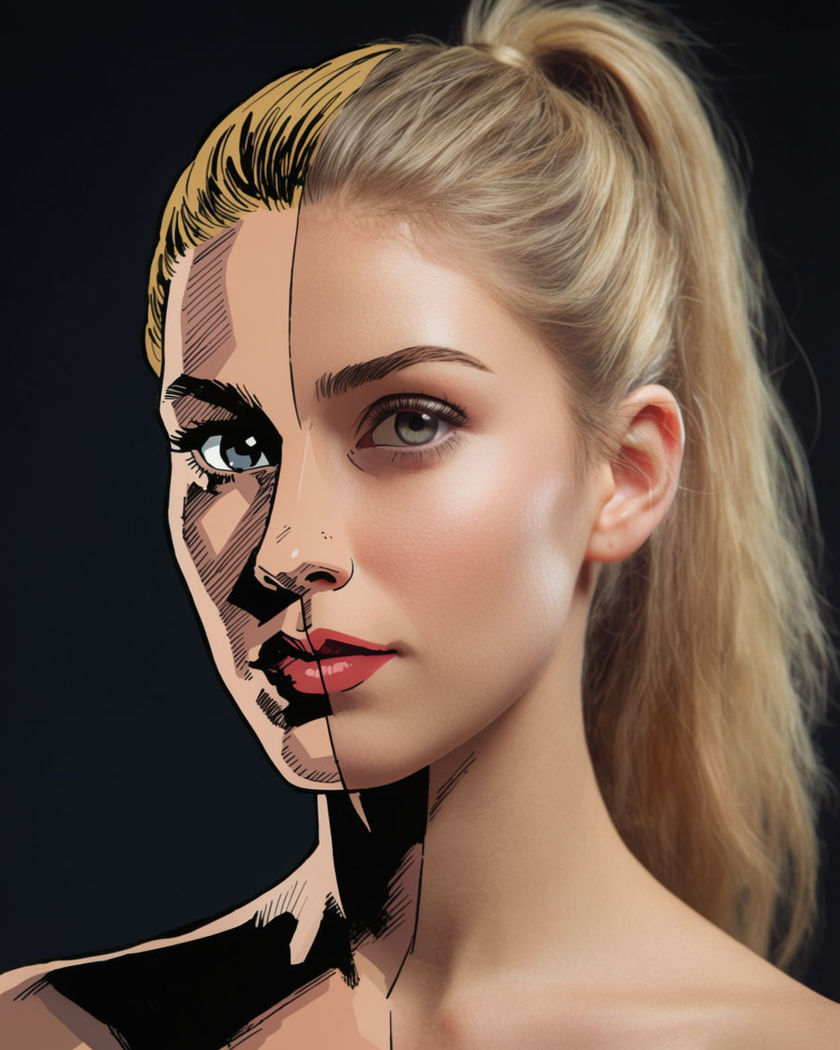
Comic to real shots generated with the whole transformation in one move: flat inked lines gaining skin texture, depth, and light until the panel becomes a living shot.

Half of a face still flat inked comic art, the other half resolved into photoreal skin and light

Comic to real examples

Full page panel to street scene

이 프롬프트 사용

A whole comic page panel resolves into a real street with the same pose. a wide shot of a full comic-book page panel showing a figure standing on a drawn city street, the ink lines and flat colour of the entire scene gradually gaining photoreal texture, depth, and natural light until it becomes a live street scene with the same pose held

Two-panel sequence morph

이 프롬프트 사용

A wide shot holds two comic panels side by side as both resolve to real. a wide shot of two comic panels side by side on a page, each showing a different pose of the same figure, both panels dissolving their bold ink and flat colour into photoreal texture and light at the same time until they read as two real photographic frames

Halftone dots dissolving

이 프롬프트 사용

Comic halftone dots scatter and dissolve into natural photographic skin. a close vertical portrait of a comic-style face made of visible halftone dot shading, the dots scattering outward and dissolving into smooth natural photographic skin tone, eyes gaining real catchlight, soft studio background, transformation reads gradual

Speech bubble pop

이 프롬프트 사용

A drawn speech bubble pops away as the mouth beneath becomes real. a vertical shot of a comic panel with a small speech bubble near a drawn mouth, the bubble popping and dissolving into the air as the mouth and face beneath gain real photographic texture and a natural expression, warm even light settling in

Ink to skin, straight on

이 프롬프트 사용

A flat inked face gains texture and depth in a straight-on portrait. a vertical portrait beginning as a flat black-and-white comic-book drawing of a person, bold ink lines and halftone shading, that smoothly gains photoreal skin texture, depth, and studio light until it resolves into a living portrait, calm and gradual, clean background

Speed lines to motion blur

이 프롬프트 사용

Drawn speed lines behind a running figure become real motion blur. a vertical shot of a comic-drawn figure running with bold black speed lines streaking behind them, the lines gradually turning into real photographic motion blur as the figure itself gains texture and weight, dynamic action energy, gritty urban background forming behind

Colour cover to portrait

이 프롬프트 사용

A stylised comic cover illustration eases into a lit photographic portrait. a wide shot of a stylised comic-book cover illustration of a figure in a bold pose against a flat colour background, the illustration gradually gaining photographic skin texture, real hair movement, and studio light until it reads as a live portrait shot

Panel border dissolve

이 프롬프트 사용

A drawn panel border melts away as the art beneath becomes photoreal. a vertical shot of a comic panel with a bold black border and a drawn superhero-style figure inside it, the border melting away at the edges as the art itself gains real texture, lighting, and depth, dramatic colour ink giving way to natural light

Action splash page resolve

이 프롬프트 사용

A dynamic splash-page composition gains real light, dust, and texture. a wide shot of a dynamic comic splash page with bold diagonal composition and speed lines around a leaping figure, the drawing gaining real photographic texture, dust, and dramatic natural light until the whole splash page becomes one live cinematic shot

Colour flat to lit

이 프롬프트 사용

Flat comic colour blocks gain gradient light and shadow across a pose. a vertical portrait of a comic-style figure rendered in flat solid colour blocks with no shading, the colours slowly gaining gradient light and cast shadow until the figure reads as a fully lit photoreal subject, dramatic hero pose, clean studio backdrop

Generate your own comic to real effect

시작점을 고르고 원하는 대로 수정한 뒤 Morphic에서 생성하세요.

생성하기

간단한 가격

오늘 무료로 시작하고 언제든지 업그레이드하거나 취소할 수 있습니다.

Basic

$19/ 월
청구 금액 $0 년

2400 월간 크레딧

1 명 전용

모든 모델

워크플로

Standard

$24/ 월
청구 금액 $0 년

3625 월간 크레딧

1 명 전용

모든 모델

워크플로

Pro

$45/ 월
청구 금액 $0 년

6350 공유 월간 크레딧

1 사용자

+ 최대 4 명 추가 비용으로 추가 가능

모든 모델

워크플로

Max

$170/ 월
청구 금액 $0 년

24650 공유 월간 크레딧

1 사용자

+ 최대 9 명 추가 비용으로 추가 가능

모든 모델

워크플로

Enterprise

더 높은 제한

사용자 정의

가격 및 청구 조건

대용량 크레딧
맞춤형 시트 제한
모든 모델
워크플로
Pricing Gradient

Free

가볍게 사용해보기

$0

영구 무료

최대 20 크레딧
1명 전용
일부 모델
워크플로

자주 묻는 질문

Where can I make comic to real videos with AI?
You can create comic to real videos directly in your browser on Morphic. Start from a still or a prompt describing the comic art, and Morphic generates the shot with the panel resolving into a photoreal scene. No frame-by-frame animation or manual compositing needed.
What kinds of comic to real shots work best with AI video?
A clear single figure or panel with a simple background reads most cleanly, since the transformation has an obvious subject to resolve. Bold ink lines, halftone shading, or flat colour blocks all give Morphic clear starting detail to work from.
How do I write a good prompt for a comic to real video?
Name the comic style you are starting from and exactly what should resolve into real detail, skin, light, motion blur, or the panel border itself. Add the pose and setting. The clearer the starting art style, the more convincing the transformation Morphic returns.
Can I use my own photo for a comic to real video?
Yes. Bring a still, either a real photo styled as a comic or a comic-style image, describe the transformation, and Morphic generates the clip from it. You can then add music and a voiceover on the timeline before you export.
Do I need video editing experience to make a comic to real video?
No. Morphic runs in your browser and you direct it with plain-language prompts. If you can describe the transformation you want, you can produce the video. The prompts on this page are written so anyone can paste and run them.
What can I use a comic to real video for?
Trend-style reveal clips, character concept teasers, and eye-catching social posts all use this kind of shot. Generate the transformation, cut it together with sound on the timeline, then export the size each platform needs from the same workspace.