Crowds and action
Stage a whole cast at once in a 3D scene: dance numbers, fights, foot chases and car chases with up to 60 performers.
A whole-cast sequence adds a new group of performers who already move together, so a dance, a fight or a chase takes one step instead of dozens of paths.
Stage a sequence
- Move the playhead to where the sequence should start. Frame 0 is the start of the shot
- Click the 'Scene' tab and go to 'Whole-cast sequence'
- Pick a 'Sequence': Dance number, Fight, Foot chase or Car chase
- Pick a 'Sequence style', or leave it on 'Mixed styles'
- Type a 'Cast size', from 2 to 60
- Type how many 'Frames' it runs
- Set 'Origin' for where it happens, and 'Heading' for which way it faces
- Click 'Stage sequence'
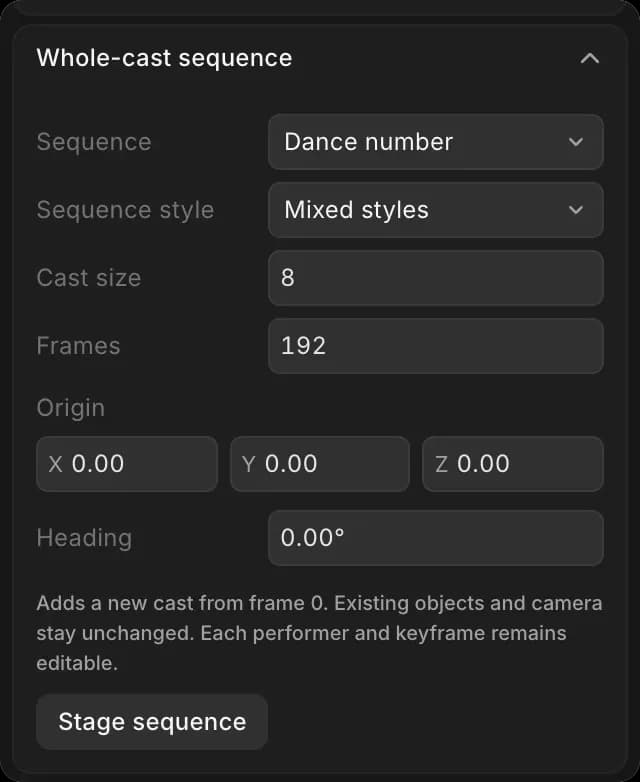
The cast appears in 'Layers' as a group named after the sequence, such as 'Dance number' with 'Dancer 1' to 'Dancer 8'. The objects and camera already in the scene stay as they were.
Edit the cast
Every performer is an ordinary character with ordinary keyframes. Open the group in 'Layers', click a performer, and change their color, label, pose or path in the 'Selection' tab, or click 'Delete'.
Tips
- Stage the sequence before you place the camera, then frame the busiest moment
- Run the continuity checks after a chase. Fast movement is the usual cause of speed warnings
That's how to stage crowds and action in a 3D scene on Morphic. Use it when a shot needs many performers moving together.
If you have any trouble or have any questions, feel free to reach out. We're happy to help. Write to us at support@morphic.com.