> For the complete documentation index, see [llms.txt](https://morphic.com/docs/llms.txt). Markdown versions of documentation pages are available by appending `.md` to page URLs; this page is available as [Markdown](https://morphic.com/docs/ar/getting-started/contextual-search.md).

# البحث السياقي

اختصار لوحة المفاتيح الذي يبحث في الملفات والأصول وسير العمل من أي مكان في Morphic.

يتيح لك البحث السياقي في Morphic العثور على أي شيء في المنصة والوصول إليه باستخدام اختصار لوحة المفاتيح. افتحه باستخدام 'Cmd+K' على Mac أو 'Ctrl+K' على Windows للبحث في الملفات والأصول وسير العمل، وغيرها، عبر المنصة.

إليك كيفية عمل البحث السياقي في Morphic:
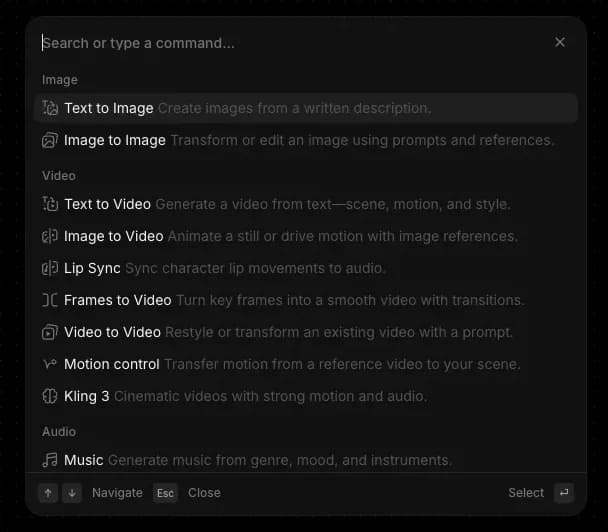
<figure><img src="https://468387403-files.gitbook.io/~/files/v0/b/gitbook-x-prod.appspot.com/o/spaces%2FoPhHCbNZdzW70rakoLhf%2Fuploads%2F0CABByf1N0YIId6JhKnT%2FCleanShot%202026-04-21%20at%2009.42.54.png?alt=media&amp;token=be8abf15-efce-4ed8-b90a-ae360fecdfd2" alt=""><figcaption><p>البحث السياقي (cmd/ctrl + k)</p></figcaption></figure>

1. افتح البحث السياقي في أي مكان في Morphic باستخدام 'Cmd+K' على Mac أو 'Ctrl+K' على Windows. في لوحة التحكم يمكنك أيضًا النقر على 'بحث' في أعلى الشريط الجانبي الأيسر، والذي يفتح القائمة نفسها.
2. اعتمد عليه عندما تبدأ بالتعرّف على Morphic، وارجع إليه عندما تريد السرعة. يجد المستخدمون الجدد فيه طريقة سهلة الاستكشاف قليلة العوائق، بينما يستخدمه المستخدمون المتقدمون للبقاء في حالة تدفّق دون مغادرة لوحة المفاتيح.
3. تتكيف القائمة مع المكان الذي توجد فيه داخل Morphic. تعرض Canvas أدوات الإنشاء والتحرير. وتعرض لوحة التحكم خيارات التنظيم والملفات والحساب. افتحها في أي عرض لترى الأوامر الأكثر صلة بتلك اللحظة.
4. ابحث في كل شيء بكتابة كلمة مفتاحية. تتضمن النتائج الملفات والمشاريع وسير العمل والأصول والنماذج والأوامر المطابقة.
5. تنقّل باستخدام لوحة المفاتيح. تنتقل مفاتيح الأسهم بين النتائج، و'Enter' يختار، و'Esc' يعود أو يغلق القائمة.

هذه هي طريقة استخدام ميزة البحث السياقي في Morphic. اختصار واحد يوصلك بكل شيء في المنصة، بحيث يمكنك العثور والتنقل والقيام بالإجراءات دون قطع حالة التدفق.

***

إذا واجهت أي مشكلة أو كانت لديك أي أسئلة، فلا تتردد في التواصل معنا. يسعدنا مساعدتك. راسلنا على [**support@morphic.com**](mailto:support@morphic.com)**.**


---

# Agent Instructions
This documentation is published with GitBook. GitBook is the documentation platform designed so that both humans and AI agents can read, navigate, and reason over technical content effectively. Learn more at gitbook.com.

## Querying This Documentation
If you need additional information that is not directly available in this page, you can query the documentation dynamically by asking a question.

Perform an HTTP GET request on the current page URL with the `ask` query parameter, and the optional `goal` query parameter:

```
GET https://morphic.com/docs/ar/getting-started/contextual-search.md?ask=<question>&goal=<endgoal>
```

`ask` is the immediate question: it should be specific, self-contained, and written in natural language.
`goal` is optional and describes the broader end goal you are ultimately trying to accomplish on behalf of the user. GitBook uses it to tailor the answer towards what is most useful for that goal.

The response will contain a direct answer to the question and relevant excerpts and sources from the documentation.

Use this mechanism when the answer is not explicitly present in the current page, you need clarification or additional context, or you want to retrieve related documentation sections.
